Superb quality and spec AB-Com PULSe 4K SE. Crazy offer! Only £129! FREE UK DELIVERY! 4K UHD, Enigma 2, Multiboot 4 images & more!...
Superb quality and spec AB-Com PULSe 4K Rev II Twin Satellite tuner only £179! FREE UK DELIVERY! 4K UHD, Enigma 2, SATA HDD facility, Multiboot 4 images & more!...

[VU+ Ultimo4K] Additional dual T2 terrestrial tuner causing issues on Vu+ Ultimo4K

ccs

ViX Beta Tester
Joined
Sep 6, 2014
Messages
5,836
Reaction score
5
Points
0
I've recently purchased a third dual T2 terrestrial tuner from WoS for the Vu+ Ultimo4K.

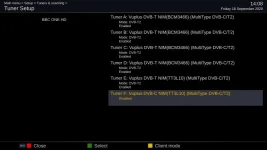
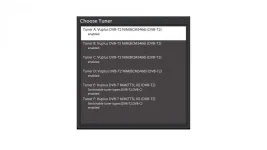
The first attachment shows the tuner config before adding the additional BCM3466 tuner. Everything works ok.

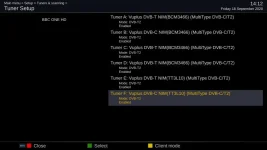
The second attachment shows a working config. Tuner F has to be disabled.

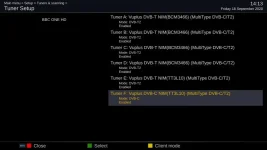
The third attachment shows what happens when tuner F is enabled. Tuner B becomes DVB-C, (as does tuner F) but the modes remain DVB-T2. Tuner B no longer works.

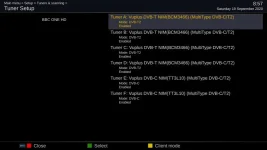
The fourth attachment shows what happens when tuner F is configured as DVB-C, mode: DVB-C. Tuner B starts working again.

There's also a debug log (ABM "start scan" is an easy way to get tuner B to fail) and a dmesg.

I'm sure there must be some telnet commands to provide the nitty gritty details.

Maybe I should also add that the BCM3466 tuner started life as DVB-T2 only, and was only turned into dual at a later date.

https://www.world-of-satellite.com/...K-and-Ultimo4K&p=498582&viewfull=1#post498582
 

Attachments
  • VU_1.webp
    VU_1.webp
    19.5 KB · Views: 20
  • works.webp
    works.webp
    25.3 KB · Views: 33
  • not_work_tunerB.webp
    not_work_tunerB.webp
    25.7 KB · Views: 19
  • F_as_typeC.webp
    F_as_typeC.webp
    25.7 KB · Views: 16
Last edited by a moderator:
This problem is in VU+ drivers 2019-04-24. With earlier drivers you could use BCM3466 tuner only as T2 not C.
With those earlier drivers all six T2 tuners were ok.
 
Last edited:
.... deleted.

Just seen your reference to ALL 6 T2 TUNERS WORKING.
 
If I configure tuner B as DVB-C, and tuner F as DVB-T2 (as it should be), reboot, I get the spinner during the boot.....

Attachment shows what it comes back with (had to delete timers+autotimers to get it back), tuner B now DVB-T, tuners E and F now DVB-C. :confused:

Getting back tuner B to DVB-T2 doesn't work unless I save it explicitly as DVB-C and then save it as DVB-T2.
 

Attachments

  • reboot.webp
    reboot.webp
    25.7 KB · Views: 12
Last edited by a moderator:
You can't set tuners to be both dvb-t and dvb-c at the same time.

Tuner A & B is 1 dual tuner

Tuner C & D is 1 dual tuner

Tuner E & F is 1 dual tuner

So A & B need to be both set the same as each other, as does C & D and E & F

A & B both dvb-c

C & D both dvb-t

E & F both dvb-t

As an exmaple.
 
Can you try an older image without the multi-tuner commits?

I'll give it a go - I'd swear blind the archives didn't go back far enough when I was trying the tuners out, but they do now. :confused:
 
You can't set tuners to be both dvb-t and dvb-c at the same time.

Tuner A & B is 1 dual tuner

Tuner C & D is 1 dual tuner

Tuner E & F is 1 dual tuner

So A & B need to be both set the same as each other, as does C & D and E & F

A & B both dvb-c

C & D both dvb-t

E & F both dvb-t

As an exmaple.

I know, I'm not trying to use DVB-C at all, but configuring them all as T2's results in tuner B becoming a DVB-C.
 
Can you try an older image without the multi-tuner commits?

I've gone back to 5.1.033 (rings a bell now), dated 27/08/2018, which must be too old, as the box only shows tuners A and B.

I need an image nearer to but older than 24/4/2019, 5.2.037 maybe.
 
Last edited:
I gave up long time ago with Ultimo 4K/six T2 tuners. At the moment my Ultimo has one FBC-S tuner plus one MTSIF dualtuner, one older T2 dualtuner and one Sundtek T2.
Works fine with five T2 tuners.
 
...... My "long time ago" only started 3 weeks ago, so I haven't given up yet.
 
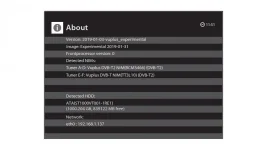
I've got vuplus-image-vuultimo4k-20190130152824_usb.zip running with 6 tuners configured.

I'd tried the one dated 18/02/2019 some time ago but couldn't get the tuners to work as expected, maybe I should have gone back further.

I've lots of timers running (up to a timer conflict), anyone know how to find out which tuners are actually in use??
 

Attachments

  • all_6.webp
    all_6.webp
    13.9 KB · Views: 9
  • about.webp
    about.webp
    16.4 KB · Views: 9
I know, I'm not trying to use DVB-C at all, but configuring them all as T2's results in tuner B becoming a DVB-C.

Sorry my bad, I miss understood what you were trying to do.
 
I've lots of timers running (up to a timer conflict), anyone know how to find out which tuners are actually in use??

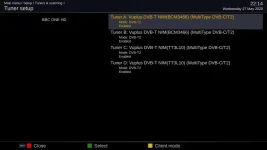
Found another skin which confirmed all 6 tuners active (and I've repaired a water leak under the landing floor. :p)

EDIT: Is there anything else I can do before wiping the image ?
 
Last edited:

OpenViX Feeds Status

Back
Top