
Rob van der Does
ViX Beta Tester
I was wondering the same thing. Trying to make a setting to get those services to output the same resolution as the source failed here.


I was wondering the same thing. Trying to make a setting to get those services to output the same resolution as the source failed here.


Hmmm...I look at a file once, for a coding issue, and become The Expert!!FYI: @Birdman, being our in-house AR-expert, will have a look at this.
That looks like 720p to me. But there is 720p24 and 720p25.Is it possible to add a mode for 1280*720 broadcasts to the plugin? (i.e. for German ARD channels etc.)
                                print "[AutoRes] new content is %sx%s%s%s" %(width, height, prog, frate)
...
print '[AutoRes] determined videomode', new_modeNot sure what you mean by "there being no mode available to set as 1080P in the plugin".They broadcast in this standard and with there being no mode available to set as 1080P in the plugin my TV defaults to the 2160P default in the AV settings menu.
It might help if you could record a few minutes of this and post the file somewhere for me to pick up?Is it possible to add a mode for 1280*720 broadcasts to the plugin?
That looks like 720p to me. But there is 720p24 and 720p25.
Could you switch to one of these channels and you'll see entries in the debug log from these statements:
What do they report? Indeed, any [AutoRes] lines would be of interest.Code:print "[AutoRes] new content is %sx%s%s%s" %(width, height, prog, frate) ... print '[AutoRes] determined videomode', new_mode
Not sure what you mean by "there being no mode available to set as 1080P in the plugin".
It sounds as though what is actually needed here is a maximum resolution to set (i.e. the user should be able to remove things from modes_available on the box if they aren't available on the TV that will be displaying them).
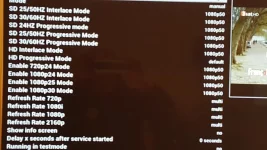
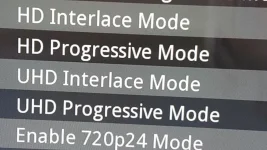
The box can only output resolution that are available to it. Does it actually have a 720p50 capability? (I suspect it does, but worth checking).All was fine until tuned to the FTA HD German channels on Astra 1 ... (e.g. 3 Sat 11347 V 22000 2/3) ... my 4K TV switched to the DEFAULT AV Setting of 2160p for these channels even though they show a Broadcast resolution of 1280*720p50 ... and so on my NON 4K TV's the screen is now black as the VU+ Box thinks its a 4K signal being received!!
The ONLY thing I put this down to is that the AUTORESOLUTION plugin needs an extra "Mode" added to deal with this resolution

The box can only output resolution that are available to it. Does it actually have a 720p50 capability? (I suspect it does, but worth checking).
So login to the box, run cat /proc/stb/video/videomode_choices and post the result.
root@vuultimo4k:~# cat /proc/stb/video/videomode_choices
pal ntsc 480i 576i 1080i 1080p 720p 480p 1080i50 1080p24 1080p25 1080p30 1080p50 1080p60 720p24 720p50 576p 2160p50 2160p 2160p24 2160p25 2160p30LOL.... That's the Ostrich policyHave you considered not using AutoResolution at all, fixing the output of your box to match the resolution of TV set to which it is connected and letting the box scale to that resolution?

LOL.... That's the Ostrich policy
Of course that's an option, but the idea of the AR-plugin is to let the box's output resolution to match the resolution of the source. Or in other words: to make the TV do all the scaling or the STB.
We do have a mini version of AR built in ViX, but the AR-plugin is meant for people who want to have all possible options.
I'll upload a short recording from a German 720p service to our FTP-server.
But it also means that you arrive at the situation where the box is scaling to one resolution, then your TV is scaling from that to its native resolution (which it will always have to do unless you send it a signal that is its native resolution - it only has one screen geometry).EXACTLY ... AR is meant to give you more choices!!!
But it also means that you arrive at the situation where the box is scaling to one resolution, then your TV is scaling from that to its native resolution (which it will always have to do unless you send it a signal that is its native resolution - it only has one screen geometry).
I was just promoting what I do. I let the box do all of the scaling, and it always outputs 1080p (or 1080i) to my TV. A setup that is simple and works.LOL.... That's the Ostrich policy
Both possible options! Either the TV or the box does the scaling. Although I have a suspicion (from reading the code) that using the AR plugin means that there will be situations where both the TV and the box will be doing something, which isn't ideal.but the AR-plugin is meant for people who want to have all possible options.
Thanks.I'll upload a short recording from a German 720p service to our FTP-server.
I actually meant that you set the output of your box to the highest shared resolution of the box + TV. You'll notice I mentioned 1080i and 1080p - that's because whereas my TV can handle both, one of my boxes can only do 1080i, not 1080p. So on that box I set it to that, while on the other I set it to 1080p.Yes ... I could have set my AV Settings to 1080p but then whats the point in me changing to the 4K VU+ box then or having a 4K TV??

Possibly true. But "available_modes" is actually something it reads from the box itself, so I need to look through the code to see why such an option needs to be added, rather than just appearing.This can all be fixed to work by adding UHD (2160p) Interlace & Progressive to available Modes in AR ...

