Superb quality and spec AB-Com PULSe 4K SE. Crazy offer! Only £99! FREE UK DELIVERY! 4K UHD, Enigma 2, Multiboot 4 images & more!...
Superb quality and spec AB-Com PULSe 4K Rev II Twin Satellite tuner only £149! FREE UK DELIVERY! 4K UHD, Enigma 2, SATA HDD facility, Multiboot 4 images & more!...

avi file playback from exertnal HDD

aldo2332

Forum Supporter
Donated Member
Joined
Apr 26, 2014
Messages
127
Reaction score
0
Points
16
Age
45
I have a 1tb HDD full of avi.files movies/box sets, etc. (format NTFS i think) I need to know if there is a way i can simply plug this into the VU+ duo directly via USB and play back/browse these files? I have plugged the HDD in and it recognises it but cant find a menu to browse the files already on it. I have only had the box set up a week and am just exploring what it can do. I am using openVIX image.Any help or guidance would be appreciated guys :)
(I use an internal for recording TV from the box)
 
Press your movie button (not sure what this is on the DUO) then press the yellow button and select your drive ;)
 
thanks for the reply im struggling to locate a movie button on the remote. Is it the button i use to open up my recorded files? (a button with several lines with a R next to them)
 
Thanks for your help. I have followed this but it can only locate the internal HDD media. Any guidance to why it wont find my external HDD plugged in the back USB port?
 
You say it recognises it, but you didn't mention installing the NTFS drivers :confused: have you done this?
 
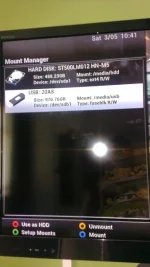
Can you see it in mount manager?

Where will i locate mount manager?

I go to storage devices menu and in filesystem check it shows, i then run a check and get and error message error: then a code
"fsck.ext3: Bad magic number in super-block while tryng to open/dev/sdb1" not sure if this has anything to do with what im trying to achieve.

ive not installed any NTFS drivers ive just simply plugged my HDD into the box and tried to access the files through the menus.
 
OK do this.

Hold down the blue button (not just press) and this will open the plugin browser.
Press the green button (Download plugins) wait while it loads.
Scroll down to "drivers" and press OK.
Scroll down to ntfs-3g and press OK. Choose yes and let it install.
Once installed press exit a few time to get back to the main screen.
Reboot the STB (proper reboot, not just an enigma reboot or just go into stanby)

Once you box is rebooted press the blue button (press not hold this time) and scroll down to "VIX" and press OK.
Scroll down to mount manager and press OK.
What is there? can you see your new hard drive? what is it mounted as? (can you get a screenshot)
 
Yes it is showing thank you for the help. Now do i need to press blue and mount it, red use as HDD or just leave it as it is? I am only using thisext HDD for viewing avi files on it not recording.

It is showing as a USB stick i can get you a screenshot iif you like to upload to the thread but can i do this on the box. Sorry i am a complete noob to this :confused:
 
Yes located the drive and played several movies at first there was no sound tried a few files and sound was OK then went back to the movie without sound and was OK. It plays all codec/formats so far. Thank you for all the help. Very pleased. Hope to explore more of what this box can do :thumbsup:
 
Thank you for that info as well marty i did not know that that you could watch movies on an External Hard Drive that was formated in NTFS
i have all my movies saved on a 2TB Internal Drive in my PC :D now i think i will put it in my Spare HD Caddy so i can swap it between my Solo2 instead of puting them on a USB stick when i want to watch them on the TV :thumbsup:
 

OpenViX Feeds Status

Back
Top