Superb quality and spec AB-Com PULSe 4K SE. Crazy offer! Only £129! FREE UK DELIVERY! 4K UHD, Enigma 2, Multiboot 4 images & more!...
Superb quality and spec AB-Com PULSe 4K Rev II Twin Satellite tuner only £179! FREE UK DELIVERY! 4K UHD, Enigma 2, SATA HDD facility, Multiboot 4 images & more!...

[GiGaBlue UHD UE 4K] Backups fail at 77%

well makes 2 of us ... I use both Ubuntu and Mint.
On both to transfer files use filezilla (login is receiver IP address, userid --> root password---> whatever you have set.
To control and send commands to the receiver for me Putty is best tool.
Both can be installed by your Linux's Software Manager.

As Joe90 has said, the gbue4K is a multiboot box, so no need to have a usb attached for flashing.
Also use online flash (via ImageManager) to install a new Image into a slot ..... you have as standard 3 image slots.
Install an updated image to a slot not used by current image and that way you can always return to previous image.
I have just made both an image backup and settings backup on my gbue4k and it worked fine for me.

To turn on debug logs ----> menu/setup/system/logs ---> settings --> enable, local time, save to hdd ---> take restart
logs should be save in /media/hdd/logs.
 
The backups are being save /hdd/backups.
Do you mean /media/hdd/backuos?
If it really is /hdd/backuos then that might be on the root partition.

And what type of file is produced.
A backup would be a tar.gz file, whereas an image backup would be a zip file.
 
Update;

Last night I tried to initialise the 500gb ssd disk. It through up the same error as in my post #5.

Earlier today , after posting here etc, and changing the backup location to /hdd/imagebackups, then rebooted the box.
I then did another backup of viximage 6.9.003 which went smoothly.

That backup is a tar.gz, and is 61.3Kb. I'm not sure why, but I did another backup shortly after, and that is 143.3MB
I then went to intialise the ssd disk which went smoothly again, not errors.

I rebooted again, and flash the box with 6.0.007 image, where I was asked which slot so I chose the 2nd slot.
I used the 6.9.003 backup file to restore my setttings, and all is ok again!

I haven't booted back into the 1st slot yet, but maybe later I will try it.

I think because the backups were being saved initially to the root folder, that was probably the cause of my problems. Maybe someone can say if it was or not.

No, it wasn't that because when I just tried to do an update of a file, the backup of files stopped yet again at 77%.
I wish I knew why it is so temperamental.

Thanks
 
Last edited:
I'm glad you're back up ( :) ) and running at this point.

I think you're still mixing up settings backup (which basically makes a copy of your /etc/enigma2 directory plus other nominated files and directories and compresses them into a .gz file and stores it into /media/hdd/backup) (usually) and image backup which makes a copy of your entire flash file system and stores it in /media/hdd/imagebackups as a zip file. The settings backup will be small KB - to MB depending on the contents of /etc/enigma2, whereas an image backup will be > 100MB. There is normally no need to do image backups, particularly on a multiboot machine.

As regards looking at files and directories on the box from a linux PC, you can just use the linux PC's built-in terminal (I use Mint on my PC) as you have been doing. I think the issue you had with displaying the contents of the settings file was just not using an appropriate command. You could use the cat command to display the entire contents of the settings file on the screen or use the more command to display it one page at a time. It's not necessary to install Putty on a linux box as this is more useful for Windows machines. I use FileZilla to transfer files between my receiver and my PC and this gives you a conventional file manages view of the structure of the receiver's file system including attached devices.

I'm not convinced that your settings/image backup problems will go away entirely until you ensure the SSD is handled correctly in mount manager. Is the SSD attached internally or is it in an external enclosure? Here's a df command output of my Vu Uno 4K SE:

Code:
root@vuuno4kse:/# df
Filesystem           1K-blocks      Used Available Use% Mounted on
/dev/mmcblk0p4         3655616   1953728   1496476  57% /boot
/dev/mmcblk0p4         3655616   1953728   1496476  57% /
tmpfs                   361968       116    361852   0% /var/volatile
tmpfs                   361968       116    361852   0% /sys/firmware/devicetree/base/chosen/bootargs
tmpfs                   361968       116    361852   0% /proc/cmdline
devtmpfs                352772        32    352740   0% /dev
tmpfs                       64         0        64   0% /media
/dev/sda1            998915048 310938720 687959944  31% /media/hdd
none                    361968         0    361968   0% /dev/shm

Yours won't be exactly the same due to the different flash layout etc., but you will see that my 1TB SSD (internally installed), identified as /dev/sda1 is mounted at /media/hdd. My recordings, timeshift, epg.dat, backup directory and imagebackups directory are all stored on the SSD. The imagebackups directory is where the Image Manager stores images downloaded from OpenVix prior to flashing them and also uses that directory if you perform a manual image backup (which is not usually needed).
 
Just an additional thought. Go into your backup and image manager settings - Setup/Vix/Image Manager and Setup/Vix/Backup Manager and press the menu key again. Check the location of the backup in each case. It should be /media/hdd. This is the default setting, but if you changed it at any point in the past then it may be the source of your problems. Any time you restore settings it will go back to what you set...
 
Yes I amusing the terminal in linux mint to issue the cmds , and I used the cat cmd to list the settings, thanks


Code:
root@gbue4k:/etc/enigma2# cat settings
config.audio.volume=80
config.autobouquetsmaker.addprefix=True
config.autobouquetsmaker.extensions=True
config.autobouquetsmaker.frequencyfinder=True
config.autobouquetsmaker.hidesections=sat_282_freesat:600|sat_282_freesat:700|sat_282_freesat:800|sat_282_freesat:949|sat_282_freesat:970|sat_282_freesat:999|terrestrial_uk_freeview:201|terrestrial_uk_freeview:260|terrestrial_uk_freeview:670|terrestrial_uk_freeview:700
config.autobouquetsmaker.indexmarkerstyle=<-- %s -->
config.autobouquetsmaker.markersinindex=True
config.autobouquetsmaker.nextscheduletime=1795136400
config.autobouquetsmaker.providers=sat_282_freesat:hd_freesat_110_a:9:|terrestrial_uk_freeview:emley_moor_________:9:
config.autobouquetsmaker.retry=30
config.autobouquetsmaker.schedule=True
config.autolanguage.audio_autoselect1=eng Englisch
config.av.autores=all
config.av.autores_delay=500
config.av.btaudiodelay=0
config.av.generalAC3delay=0
config.av.generalPCMdelay=0
config.av.policy_43=bestfit
config.av.videomode.HDMI=2160p
config.av.videorate.1080p=60Hz
config.av.volume_stepsize=5
config.backupmanager.backupdirs=['/etc/enigma2/', '/etc/fstab', '/etc/hostname', '/etc/network/interfaces', '/etc/passwd', '/etc/shadow', '/etc/etc/shadow', '/etc/resolv.conf', '/etc/ushare.conf', '/etc/inadyn.conf', '/etc/tuxbox/config/', '/etc/wpa_supplicant.conf', '/usr/softcams/', '/etc/auto.network', '/etc/samba/smb-user.conf', '/etc/samba/private', '/usr/keys', '/usr/script', '/etc/udev/known_devices', '/media/sda1/lost+found/', '/media/hdd/']
config.backupmanager.backupretry=30
config.backupmanager.lastbackup=0
config.backupmanager.number_to_keep=0
config.backupmanager.xtraplugindir=None
config.cccaminfo.ecmInfoTime=5
config.cccaminfo.serverNameLength=22
config.crash.daysloglimit=8
config.crash.debug_path=/media/hdd/logs/
config.crash.debugloglimit=4
config.crash.enabledebug=True
config.crash.logtimeformat=2
config.crash.sizeloglimit=10
config.epg.cacheloadtimer=24
config.epg.cachesavetimer=24
config.epg.freesat=True
config.epg.virgin=True
config.epgselection.enhanced_eventfs=0
config.epgselection.grid.eventfs=0
config.epgselection.grid.infowidth=50
config.epgselection.grid.piconwidth=100
config.epgselection.grid.prevtimeperiod=90
config.epgselection.grid.servfs=0
config.epgselection.grid.servicetitle_mode=servicenumber+picon+servicename
config.epgselection.grid.servicewidth=250
config.epgselection.grid.timelinefs=0
config.epgselection.grid.type_mode=text
config.epgselection.infobar.eventfs=0
config.epgselection.infobar.infowidth=50
config.epgselection.infobar.piconwidth=100
config.epgselection.infobar.servfs=0
config.epgselection.infobar.servicewidth=250
config.epgselection.infobar.timelinefs=0
config.epgselection.multi.eventfs=0
config.epgselection.multi.servicewidth=7
config.epgselection.overjump=True
config.epgselection.single.eventfs=0
config.hdmicec.bookmarks=['/', 'h', 'd', 'd', '/']
config.imagemanager.backupretry=30
config.imagemanager.lastbackup=1795089600
config.imagemanager.number_to_keep=0
config.imagemanager.query=False
config.imagemanager.schedule=True
config.lcd.bright=7
config.lcd.dimbright=3
config.logmanager.showinextensions=True
config.mediaplayer.defaultDir=None
config.misc.epgcachepath=/media/hdd/
config.misc.firstrun=False
config.misc.gcimaxpages=1
config.misc.initialchannelselection=False
config.misc.languageselected=False
config.misc.pluginWakeupName=AutoBouquetsMakerSessionStart
config.misc.restorewizardrun=True
config.misc.softcam_streamrelay_delay=100
config.misc.startCounter=6703
config.misc.videowizardenabled=False
config.misc.zapkey_delay=5
config.movielist.curentlyplayingservice=1:0:19:18E3:7FD:2:11A0000:0:0:0:
config.movielist.fontsize=0
config.movielist.last_videodir=/mnt/.Trash/
config.movielist.videodirs=['/media/hdd/movie/', '/mnt/']
config.Nims.0.advanced.sat.215.lnb=1
config.Nims.0.advanced.sats=215
config.Nims.0.diseqcA=282
config.Nims.0.diseqcB=3601
config.Nims.0.diseqcC=3601
config.Nims.0.diseqcD=3601
config.Nims.0.powerMeasurement=False
config.Nims.1.advanced.sat.192.lnb=1
config.Nims.1.diseqcA=282
config.Nims.1.diseqcB=3601
config.Nims.1.diseqcC=3601
config.Nims.1.diseqcD=3601
config.Nims.8.configModeDVBT=True
config.Nims.8.terrestrial=Emley Moor (Europe DVB-T/T2)
config.Nims.9.configModeDVBT=True
config.Nims.9.terrestrial=Emley Moor (Europe DVB-T/T2)
config.OpenWebif.webcache.moviedir=/media/hdd
config.OpenWebif.webcache.screenshot_high_resolution=False
config.OpenWebif.webcache.screenshot_refresh_auto=True
config.oscaminfo.intervall=10
config.osd.alpha=255
config.osd.dst_height=576
config.osd.dst_left=0
config.osd.dst_top=0
config.osd.dst_width=720
config.osd.language=en_GB
config.plugins.autotimer.delay=3
config.plugins.autotimer.editdelay=3
config.plugins.autotimer.interval=30
config.plugins.autotimer.maxdaysinfuture=0
config.plugins.autotimer.popup_timeout=5
config.plugins.autotimer.timeout=5
config.plugins.bluetoothsetup.audiodelay=-500
config.plugins.bluetoothsetup.gbrcuSkipFwVer=0
config.plugins.bluetoothsetup.scanTime=30
config.plugins.bluetoothsetup.voiceCheckDb=-33
config.plugins.epgimport.deepstandby=wakeup
config.plugins.epgimport.enabled=True
config.plugins.epgimport.import_onlybouquet=True
config.plugins.epgimport.longDescDays=5
config.plugins.epgsearch.history=['The Northumbria Mysteries', '101', 'Bargain Hunt', 'Breakfast', "London's Greatest Bridges with Rob Bell", 'Look North (Yorkshire)', 'New: Pointless', "Ricky & Ralf's Very Northern Road Trip", 'Roxy Music and Bryan Ferry at the BBC', 'Super League Show']
config.plugins.epgsearch.history_length=10
config.plugins.epgsearch.numorbpos=0
config.plugins.opentvzapper.nextscheduletime=0
config.plugins.opentvzapper.retry=30
config.plugins.opentvzapper.update_interval=6
config.radio.lastroot=1:7:1:0:0:0:0:0:0:0:FROM BOUQUET "bouquets.radio" ORDER BY bouquet;1:7:0:0:0:0:11A0000:0:0:0:(satellitePosition == 282) && (type == 2) || (type == 10) FROM PROVIDERS ORDER BY name:28.2E Astra 2E/2F/2G - Providers;
config.radio.lastservice=1:7:0:0:0:0:0:0:0:0:(provider == "BSkyB") && (satellitePosition == 282) && (type == 2) || (type == 10) ORDER BY name:BSkyB
config.recording.keep_timers=7
config.recording.margin_after=3
config.recording.margin_before=1
config.recording.offline_decode_delay=1
config.recording.split_programme_minutes=15
config.seek.selfdefined_13=15
config.seek.selfdefined_46=60
config.seek.selfdefined_79=300
config.seek.sensibility=10
config.skin.display_skin=skin_default/skin_display_picon.xml
config.softcammanager.softcamtimer=6
config.softwareupdate.checktimer=24
config.softwareupdate.updatelastcheck=1795101336
config.tv.lastroot=1:7:1:0:0:0:0:0:0:0:FROM BOUQUET "bouquets.tv" ORDER BY bouquet;1:7:1:0:0:0:0:0:0:0:FROM BOUQUET "userbouquet.abm.sat_282_freesat.main.tv" ORDER BY bouquet;
config.tv.lastservice=1:0:19:18E3:7FD:2:11A0000:0:0:0:
config.usage.allowed_timeshift_paths=['/media/hdd/timeshift/']
config.usage.alternative_number_mode=True
config.usage.alternatives_priority=1
config.usage.date.compact=%-d %b
config.usage.date.compressed=%-d%b
config.usage.date.displayday=%a %-d %b
config.usage.fast_skin_reload=True
config.usage.frontend_priority_dvbs=0
config.usage.frontend_priority_dvbt=8
config.usage.hdd_standby=60
config.usage.instantrec_path=/media/hdd/movie/
config.usage.last_movie_played=1:0:0:0:0:0:0:0:0:0:/media/hdd/movie/20261114 1659 - Sky Arts - The Hollies Look Through Any Window 1963-1975.ts
config.usage.menu_sort_weight={'mainmenu': {'submenu': {}}}
config.usage.movielist_piconwidth=100
config.usage.movielist_trashcan_days=8
config.usage.movielist_trashcan_reserve=40
config.usage.on_movie_start=beginning
config.usage.power.was_controlled_shutdown=False
config.usage.recording_frontend_priority=-1
config.usage.recording_frontend_priority_dvbs=-1
config.usage.recording_frontend_priority_dvbt=-1
config.usage.serviceinfo_fontsize=0
config.usage.serviceitems_per_page=10
config.usage.servicelist_mode=simple
config.usage.servicename_fontsize=0
config.usage.servicenum_fontsize=0
config.usage.servicetype_icon_mode=1
config.usage.show_bouquetalways=True
config.usage.show_event_progress_in_servicelist=barleft
config.usage.show_infobar_dimming_speed=40
config.usage.show_message_when_recording_starts=False
config.usage.timer_path=/media/hdd/movie/
config.version=53023
root@gbue4k:/etc/enigma2#
 
Just an additional thought. Go into your backup and image manager settings - Setup/Vix/Image Manager and Setup/Vix/Backup Manager and press the menu key again. Check the location of the backup in each case. It should be /media/hdd. This is the default setting, but if you changed it at any point in the past then it may be the source of your problems. Any time you restore settings it will go back to what you set...
Yes on both Backup Manager and ImageManager the location to save the files is /media/hdd

It is only when and if I want to upgrade /flash the current viximage to a later version, does the backup of the files starts, and mostly fails.If I could find some way of stopping that, then it would be easier.
 
I think I may have located the source of your issues...

The entry in your settings file for the item config.backupmanager.backupdirs=
contains these entries at the end of the string of directories - media/sda1/lost+found/, '/media/hdd/'

Basically, you are trying to backup the entire SSD and compress it into a .gz file and store it on the SSD.


Now, I don't know how this entry was added to the backup list, but the Backup Manager settings contains an option to add user-specified files or directories to the default settings for backup. You may have inadvertently "ticked" the hdd box when reviewing your backup list. The remainder of your files/directories to backup looks plausible.

Either edit the settings file directly to remove the spurious entries or go into Backup Manager and review the files to be backed up (YELLOW key). Open the "media" folder entry and make sure that hdd is not ticked. Same for "mnt".

Here are my backupdirs:


Code:
config.backupmanager.backupdirs=['/etc/enigma2/', '/etc/fstab', '/etc/hostname', '/etc/network/interfaces', '/etc/passwd', '/etc/shadow', '/etc/etc/shadow', '/etc/resolv.conf', '/etc/ushare.conf', '/etc/inadyn.conf', '/etc/tuxbox/config/', '/etc/wpa_supplicant.conf', '/usr/softcams/', '/etc/wpa_supplicant.wlan0.conf', '/etc/auto.network', '/etc/samba/smb-user.conf', '/etc/samba/private', '/usr/keys', '/usr/script', '/etc/cron/crontabs/root', '/var/lib/bluetooth/'
 
Last edited:
OK thanks.
Is there any way I can correct that line to what it should be
I hope so.
 
So in the text editor, do I change the said line to the same as you have

This mine as you saw earlier
Code:
config.backupmanager.backupdirs=['/etc/enigma2/', '/etc/fstab', '/etc/hostname', '/etc/network/interfaces', '/etc/passwd', '/etc/shadow', '/etc/etc/shadow', '/etc/resolv.conf', '/etc/ushare.conf', '/etc/inadyn.conf', '/etc/tuxbox/config/', '/etc/wpa_supplicant.conf', '/usr/softcams/', '/etc/auto.network', '/etc/samba/smb-user.conf', '/etc/samba/private', '/usr/keys', '/usr/script', '/etc/udev/known_devices', '/media/sda1/lost+found/', '/media/hdd/']
>

Or do I just remove /media/sda1/lost+found
 
Last edited:
As I posted earlier, using FileZilla (or a similar FTP client) from either linux or MS Windows is a handy way to access the files and folder on the receiver. You can edit files using a GUI in FileZilla, which may be easier.

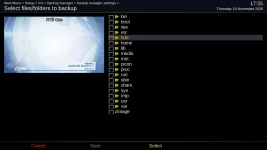
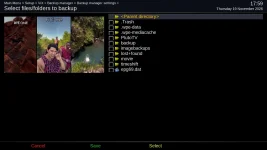
The Backup Manager menu entries on the receiver would probably be the easiest method right now. Just press the YELLOW key after pressing the menu key and you get this list:
Check that there are no tick marks on the hdd entry or any of the sub entries after clicking on the hdd entry. Same goes for the media and mnt entries.
 

Attachments

  • backup_menu.webp
    backup_menu.webp
    34.5 KB · Views: 6
  • backup_submenu.webp
    backup_submenu.webp
    56.7 KB · Views: 5
So in the text editor, do I change the said line to the same as you have

This mine as you saw earlier
Code:
config.backupmanager.backupdirs=['/etc/enigma2/', '/etc/fstab', '/etc/hostname', '/etc/network/interfaces', '/etc/passwd', '/etc/shadow', '/etc/etc/shadow', '/etc/resolv.conf', '/etc/ushare.conf', '/etc/inadyn.conf', '/etc/tuxbox/config/', '/etc/wpa_supplicant.conf', '/usr/softcams/', '/etc/auto.network', '/etc/samba/smb-user.conf', '/etc/samba/private', '/usr/keys', '/usr/script', '/etc/udev/known_devices', '/media/sda1/lost+found/', '/media/hdd/']
>

Or do I just remove /media/sda1/lost+found
You could do this (don't forget to remove /media/hdd also), or use the Backup Manager method.
 
When I use Playlist then Locations all the items in the list has right facing arrows against them. So I can't change anything.

Using Backup Manager, there is no options to change anything.
The backups are at the top of the screen and the location is in yellow at the bottom right of the screen.
 
I don't know what you mean by Playlist then Locations - unless you are talking about the movie list maybe?

From watching TV, press the menu key, then navigate to Settings / Vix / Backup Manager
In Backup Manager, press the menu key on your remote again. Then press the YELLOW key on your remote. That will bring up the backup list as per the screenshots in my post #32. Then navigate down to hdd and make sure there is no "tick mark" against it. Press the enter key to navigate further into hdd and make sure there are no tick marks set. Go back up one level and do the same for media and mnt. Remove any tick marks by pressing the YELLOW key (marked select on the display). Let me know if you have found any tick marks.

For full disclosure, in future, if you are editing files using a text editor be aware that many system files are held in memory by enigma, so if you edit them they may be subsequently overwritten by enigma and you may lose your edits. If doing this you need to stop enigma by using the command init 4, then do your edit and save. Restart enigma by using the command init 3.
 
Apologies, I didn't read your post properly.
I did as you explained and there are no tick marks against any of the listing.
Given that, is there any other way

Thanks
 
For information on my gigablue remote there is an elongated button at the bottom called Playlist. That shows my recordings in /media/hdd/movie.
In that screen there is a horizontal menu and 1 of them is yellow called Locations
I hope that helps.
 

OpenViX Feeds Status

Back
Top