Superb quality and spec AB-Com PULSe 4K SE. Crazy offer! Only £99! FREE UK DELIVERY! 4K UHD, Enigma 2, Multiboot 4 images & more!...
Superb quality and spec AB-Com PULSe 4K Rev II Twin Satellite tuner only £149! FREE UK DELIVERY! 4K UHD, Enigma 2, SATA HDD facility, Multiboot 4 images & more!...

Broken Lan, Can't Install Wifi Dongle

ppedroo

New member
Joined
Oct 27, 2024
Messages
7
Reaction score
0
Points
0
Hi,

I have a problem with my SOLO SE V2, in which the LAN connection stopped working.
I reinstalled OpenVix to the latest version 6.6,
I bought a Dongle based on the mt-7601u chipset.
Unfortunately, due to the lack of LAN, I cannot download this plugin to the decoder. Some version downloaded from the Internet does not work properly (WiFi does not appear in the decoder settings)

For comparison, I have another identical model VU + SOLO SE V2 and on it after downloading the plugin through the application built into Openvix - there is working Wi-Fi. I downloaded the plugin there using the plugin for downloading plugins. After inserting the dongle - a window appears to select the Wi-Fi network - which means the dongle is working and working.

But on the first one, where the LAN port does not work for me - I cannot do it in the same way, because there is no Internet connection, I can only download it to the computer and then manually add the plugin to the installation on the pendrive.

So my question:
Where can I find / at what address exactly this version of the plugin: enigma2-plugin-drivers-network-usb-mt7601u?
 
Hi,

I have a problem with my SOLO SE V2, in which the LAN connection stopped working.
I reinstalled OpenVix to the latest version 6.6,
I bought a Dongle based on the mt-7601u chipset.
Unfortunately, due to the lack of LAN, I cannot download this plugin to the decoder. Some version downloaded from the Internet does not work properly (WiFi does not appear in the decoder settings)

For comparison, I have another identical model VU + SOLO SE V2 and on it after downloading the plugin through the application built into Openvix - there is working Wi-Fi. I downloaded the plugin there using the plugin for downloading plugins. After inserting the dongle - a window appears to select the Wi-Fi network - which means the dongle is working and working.

But on the first one, where the LAN port does not work for me - I cannot do it in the same way, because there is no Internet connection, I can only download it to the computer and then manually add the plugin to the installation on the pendrive.

So my question:
Where can I find / at what address exactly this version of the plugin: enigma2-plugin-drivers-network-usb-mt7601u?
So how about……
Do settings backup on 2nd working box with dongle installed.
Assuming you have multiboot installed on 1st box(why not), flash different slot with 2nd box settings backup.
After initiallisation, disable lan, enable wifi usingdongle.
 
Hey, thanks for the idea, I tried it and the copy was restored on the second decoder. However, after inserting the dongle, it does not show the WiFi option to choose from in the settings. So I think I'm giving up on it and selling it as damaged because I have no ideas anymore.
 
Use box with internet
telent
Code:
opkg update
Code:
opkg download enigma2-plugin-drivers-network-usb-mt7601u

The downloaded ipk file is located in /home/root/
Now you download this file from /home/root/ to your pendrive
Install from pendrive.

EDIT
You can also check what this wifi needs.
If wifi needs a kernel, download it
Code:
opkg list | grep mt7601u
 
Last edited:
As you have two identical receivers, install the wi-fi dongle on the good receiver and configure it so it works on wi-fi. In Image manager, change the location where the backup is created to a USB device. Create an image backup, not a settings backup. Connect the USB to the bad receiver. Go to image manager and flash the image you created earlier. If it does not see the image backup, you may need to change the location first.
 
Hi @pololoko111 Your solution worked. I managed to get to the list of all drivers using telnet. I downloaded it and it worked. Unfortunately, I think I have a version error. On the old one I have version 6.6.010 and on the one I copied from I have 6.5.003. Theoretically, WiFi works, but OPenVix hangs from time to time. I wanted to downgrade from 6.6.010 to version 6.5.003, but now I have a problem with flash - USB does not boot after turning on the decoder. Or maybe because it's impossible to flash the newer version - the older one? Because I had previously flashed it to the latest version without any problems. apart from that, the USB works, the pendrive is detected, but it does not want to boot.

EDIT:
OK, I have a solution why I couldn't flash to a lower version (and actually no flash at all). When I formatted the pendrive using Disk utility on macos,
I chose Erase Scheme: GUID Partition Map, and it should be Master Boot Record. That's why I didn't want to flash the decoder :)
 
Last edited:
Unfortunately there is a problem:
1 I managed to flash and install version 6.5.003 (the same as on the second decoder)
In telnet it showed to download: enigma2-plugin-drivers-network-usb-mt7601u_1.0-r2_all.ipk
I managed to download from the openvix server that the decoders use. However, it was not enough.

2. I also downloaded: kernel-module-mt7601usta-3.13.5_3.0.0.4-r0_vusolose.ipk
It then added a wifi option in the settings, but it was not active / did not detect wireless networks

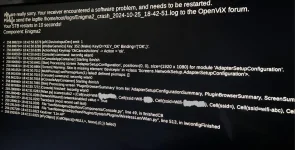
3. I tried to enable mt7601u_3.0.0.4-r0_vusolose.ipk but right after entering the WLAN settings, it throws an error on the screen (my home wifi networks are shown in the code in scanresults)

Does anyone know what I'm doing wrong?
 
Unfortunately there is a problem:
1 I managed to flash and install version 6.5.003 (the same as on the second decoder)
In telnet it showed to download: enigma2-plugin-drivers-network-usb-mt7601u_1.0-r2_all.ipk
I managed to download from the openvix server that the decoders use. However, it was not enough.

2. I also downloaded: kernel-module-mt7601usta-3.13.5_3.0.0.4-r0_vusolose.ipk
It then added a wifi option in the settings, but it was not active / did not detect wireless networks

3. I tried to enable mt7601u_3.0.0.4-r0_vusolose.ipk but right after entering the WLAN settings, it throws an error on the screen (my home wifi networks are shown in the code in scanresults)

Does anyone know what I'm doing wrong?

‘ it throws an error on the screen‘ - it crashes? Or reports an error? Debug logs would,be helpful if not crash…else post crash log
 
Hi, I don't have access to the logs - so I had to take a photo.

Screenshot 2024-10-31 at 10.24.22.webp


PS. Maybe another wifi dongle would work better? I see that there is another one based on the RT5370 chipset.
What do you think?
 
Last edited:
if not set debug logs, then crash log in /home/root/logs
set logs via menu/setup/system/logs/settings enable, save not in flash local time
copy attachment to /usr/lib/enigma2/python/Plugins/SystemPlugins/WirelessLan

using something like putty in telent(login root and password) stop system (init 4 ... space between)
copy attachment
then init 3 to restart

try again with dongle.
post debug log!!!!
 

Attachments

Hey @twol
I gave up using the dongle based on mt7601u.
I bought another one based on the RT5370 chipset.
It worked immediately without adding any other drivers. Everything works, no hangs. Thank you for your help, I managed to use another dongle, so if the mt7601 doesn't work, I suggest buying the rt5370.
 

OpenViX Feeds Status

Back
Top