Superb quality and spec AB-Com PULSe 4K SE. Crazy offer! Only £99! FREE UK DELIVERY! 4K UHD, Enigma 2, Multiboot 4 images & more!...
Superb quality and spec AB-Com PULSe 4K Rev II Twin Satellite tuner only £149! FREE UK DELIVERY! 4K UHD, Enigma 2, SATA HDD facility, Multiboot 4 images & more!...

[VU+ Solo2] Cannot access Software Update Settings

^^COMPASS^^

Forum Supporter
Donated Member
Joined
Dec 20, 2011
Messages
268
Reaction score
3
Points
18
Age
60
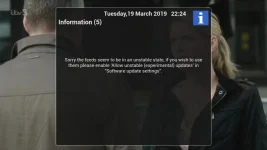
Are the team aware when the feeds are set to unstable it isn't possible to access "Software Update Settings"
within the remote control functions
as it's normally accessed after you have checked for an online update, using the Menu button on Remote.

For instance...

A) Menu, Information, About, Software Update!

B) Menu, Setup, System, Software Update!

Both bring up the following

Sorry the feeds seem to be in an unstable state, if you wish to use them please enable @allow unstable (experimental) Updates' in "Software update settings"


Yes I'm aware that you can access Software Update Settings within Webif, but not by VU Remote Control
 
Is there not a big red symbol on forum showing an issue and possibly why feeds are down?

https://www.world-of-satellite.com/forum.php

It states unstable if you scroll down.

Naturally I'm aware of that but you seem to be missing the point,

I did say Feeds seem to be in an unstable state & it clearly says If you wish to use them please enable 'allow unstable (experimental) Updates' in "Software update settings"

which isn't possible with your remote control!

that why i asked the following question: Are the team aware when the feeds are set to unstable it isn't possible to access "Software Update Settings"
 

Attachments

  • screenshot_2019-03-19_22-24-23.webp
    screenshot_2019-03-19_22-24-23.webp
    21.9 KB · Views: 23
Hi Compass
I see the same over here, not only on software update but also on plugin download. And I was also wondering where in the e2 menue I would find the software update settings.

nekrub2
 
Are the team aware when the feeds are set to unstable it isn't possible to access "Software Update Settings"
within the remote control functions
as it's normally accessed after you have checked for an online update, using the Menu button on Remote.

For instance...

A) Menu, Information, About, Software Update!

B) Menu, Setup, System, Software Update!

Both bring up the following

Sorry the feeds seem to be in an unstable state, if you wish to use them please enable @allow unstable (experimental) Updates' in "Software update settings"


Yes I'm aware that you can access Software Update Settings within Webif, but not by VU Remote Control

Aup @^^COMPASS^^ mate, when in Menu > Setup > System > Software Update, now press your Menu button & you should see some other options available. [emoji4]


Sent from my iPhone using Tapatalk
 
The menu for optioncan be selected once the notification is acknowledged/times out.
 
Hi Abu Baniaz

I tried as you described but neither by waiting the count-down nor confirm by ok nor by pressing the menue button on the remote did anything else but kick me out of the setup. If you like I will attach the log file.
Thanks for your support.

nekrub2

PS Made a netspeed test and got 40MBit download, also HbbTV works, so it is not related to the network but rather to the server.
 
Working fine here. See picture for proof.


6135a2127bb0d348dbb759c027a55c21.jpg


Sent from my iPhone using Tapatalk
 
Hi Abu Baniaz

I tried as you described but neither by waiting the count-down nor confirm by ok nor by pressing the menue button on the remote did anything else but kick me out of the setup. If you like I will attach the log file.
Thanks for your support.

nekrub2

PS Made a netspeed test and got 40MBit download, also HbbTV works, so it is not related to the network but rather to the server.

Exactly the same on my Ultimo 4k, pressing menu after the update times out just kicks me out :confused:
 
Also getting exactly the same on Menu, plugins, Download plugins

"Sorry feeds seem to be in an unstable state, if you wish to use them please enable 'Allow unstable (experimental) updates' in "software update settings".
 
I've set feeds back to stable and added a status warning message asking users not to online update to 5.2.033. So users can now use plugin feeds again.
 
From 6.0.004, there will be an option in plugin browser to allow the download of plugins when feeds are unstable.
 

OpenViX Feeds Status

Back
Top