Superb quality and spec AB-Com PULSe 4K SE. Crazy offer! Only £129! FREE UK DELIVERY! 4K UHD, Enigma 2, Multiboot 4 images & more!...
Superb quality and spec AB-Com PULSe 4K Rev II Twin Satellite tuner only £179! FREE UK DELIVERY! 4K UHD, Enigma 2, SATA HDD facility, Multiboot 4 images & more!...

[VU+ Solo] Can't Set Resolution TO 1080i

@bbbuk,
Online updates generally include driver updates.
I thought that but it doesn't look like it actually updates the drivers. OP said his drivers are dated end of December with build 153 which we know are way too old as build 153 was released beginning of March so will have Feb's drivers or Jan's drivers.

Another user also appeared to be using drivers that did not come with the image they were using. I shall try and find the thread and update this post with it...

UPDATE: This is thread I'm referring to where there appears to be a driver/build mismatch and this was because online update.
 
Last edited:
problem still exists on 141 and 142. you say there are 4 drivers but on all the solo images I have plashed there are only 3. these are

brcmfb.ko
dvb-bcm7325.ko
procmk.ko
 
I had 4 files under the old format on my solo2. Solo only uses 3 I've just checked.

If you only have drivers dated 31/12/14 then I think you must have done an online update from build 115 or little later as build 115 included drivers dated 31/12/14.

If you have time, can you do some testing with drivers on the backup build 153 for us?

Code:
http://www.vuplusteam.com/threads/43-Drivers-for-Vu-Solo?p=67883#post67883

The above website contains official VU solo drivers. Your drivers you said are dated 31/12/14 so if you could download drivers dated 31/12/14 and onwards to see at what point you have the problem. For consistency, I would stick with working build 153 and re-download 31/12/14 drivers again and drivers dated after this.

All those drivers are using the same kernel, 3.9.6.

The idea being is that with working build 153, you replace with drivers dated 31/12/14 and you have no problems and then go higher in driver dates until you find last one that worked, if any.
 
Last edited:
I thought that but it doesn't look like it actually updates the drivers. OP said his drivers are dated end of December with build 153 which we know are way too old as build 153 was released beginning of March so will have Feb's drivers or Jan's drivers.

Another user also appeared to be using drivers that did not come with the image they were using. I shall try and find the thread and update this post with it...

UPDATE: This is thread I'm referring to where there appears to be a driver/build mismatch and this was because online update.

The drivers are always updated as part of a online update where there are newer drivers in the GIT, the only way they dont update is where some users have included code to prevent this (for clone use).
 
I had 4 files under the old format on my solo2. Solo only uses 3 I've just checked.

If you only have drivers dated 31/12/14 then I think you must have done an online update from build 115 or little later as build 115 included drivers dated 31/12/14.

If you have time, can you do some testing with drivers on the backup build 153 for us?

Code:
http://www.vuplusteam.com/threads/43-Drivers-for-Vu-Solo?p=67883#post67883

The above website contains official VU solo drivers. Your drivers you said are dated 31/12/14 so if you could download drivers dated 31/12/14 and onwards to see at what point you have the problem. For consistency, I would stick with working build 153 and re-download 31/12/14 drivers again and drivers dated after this.

All those drivers are using the same kernel, 3.9.6.

The idea being is that with working build 153, you replace with drivers dated 31/12/14 and you have no problems and then go higher in driver dates until you find last one that worked, if any.

What I don't understand is I have a working 153. I copy the drivers from that, reflash 153. It doesn't do 1080i. I restore the drivers from the working 153 to this freshly flashed 153 and it doesn't do 1080i. It is precisely that that caused me to think it wasn't drivers.

However I will try drivers from the vuplus site and report back.
 
OK I gave you some duff info. I looked at the file date stamp of the working drivers rather than using information menu item. The menu information states the drivers are 02-03-2015.

download 02-03-2015 drivers and copy to working 153 image. 1080i ok
download 17-03-2015 drivers and copy to working 153 image. 1080i ok. However menu, information shows the drivers as being dated 02-03-2015. However the date stamp on the actual file is 17-03-2015 and one of the modules is bigger so I am confused still.

Am I putting them in the right place? I am using /lib/modules/3.9.6/extra and doing an init 4 before copying and an init 6 after to reboot.
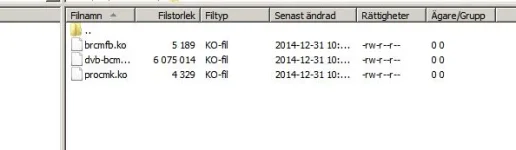
I guess is consistent with my post above though.
 
Last edited:
The driver date and version info shown in the About info page refers to the drivers that particular build was built with. Regardless of what drivers you place there your self that info will not change until unless you update the image and it comes with newer drivers as part of the update.

Sent from my SM-G900F using Tapatalk
 
Thanks phoenix. So I can copy drivers from a 1080i working 153 into a freshly flashed 153 and 1080i doesn't work. That says to me its not the drivers.
 
I've not read anything yet that rules out drivers being an issue just yet. You would need to try the other drivers you haven't yet tried.

As Pheonix has stated, driver date can be misleading if you're using drivers that aren't from that image which I believe you are. A guide is date/time stamp which you stated was 31/12/14. I believe your drivers are dated 31/12/14.

If you using your working 153 backup then just replace drivers with those from site above starting from 31/12/14 release version. I'm expecting that the drivers you download from above website dated 31/12/14 should work fine as they are same ones (from looks of things) that you already have.

Then you try each driver release after this date until you find one where it isn't working, if you do (obviously except for ones you have indicated you have tried).

If using your working 153 backup with all the drivers from 31/12/14 onwards and 1080 works then drivers are not the issue.
 
Last edited:
If you want to check driver version then you would have check md5, etc.

For that, I use hashmyfiles (for windows), as it lets you check folders.

You can then setup multiple folders and name them something like "original 311214" which would contain original drivers dated 31/12/14 from the above website and then another one like "vix153 311214" which contain the drivers from your 153 backup.

You would then add these two folders and it will highlight any files that match.
 
...one of the modules is bigger so I am confused still.
What do you mean modules is bigger? Do you mean one of the files is bigger? Are they named the exact same and same number of files?

Am I putting them in the right place? I am using /lib/modules/3.9.6/extra and doing an init 4 before copying and an init 6 after to reboot.
Yes, that is correct.
 
Hello, I don't know is this is a help or not, I have a working solo,( the 1080i issue,) it is the 153 img, and my drivers look like this, maybe size or date can give something.
Hope I can attach the dump. Good Luck, I will stay on 153 until the issue is solved. driver solo.webp
 
Working 153 image backup with drivers from 24-10-2014, 31-12-2014, 02-03-2015, 17-03-2015 supports 1080i
Fresh flash 153 with drivers from 24-10-2014, 31-12-2014, 02-03-2015, 17-03-2015 does not support 1080i
 
Ok, narrowing it down now.

I need another check when you have the time....

I need you to fresh usb flash 153 and I'm assuming the drivers included in this version are dated 02/03/15 (please check), can you then check filesize differences (and number of files) between the same dated drivers on that vu website I mentioned earlier.

Also, whilst on fresh usb flash 153, can you check if you have the option of animated screens. Should be from Menu > Setup > System > User Interface > Animations

I believe the drivers will be different (either file size or md5) due to introduction of animated screens (I think related to vu gles) and maybe even xbmc support.
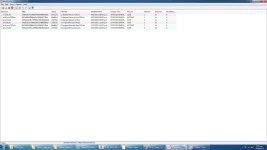
 
Hello, I don't know is this is a help or not, I have a working solo,( the 1080i issue,) it is the 153 img, and my drivers look like this, maybe size or date can give something.
Hope I can attach the dump. Good Luck, I will stay on 153 until the issue is solved. View attachment 41430
Did you do an online update to 153 or was that a fresh usb flash of build 153 directly from openvix website?
 
Ok, narrowing it down now.

I need another check when you have the time....

I need you to fresh usb flash 153 and I'm assuming the drivers included in this version are dated 02/03/15 (please check), can you then check filesize differences (and number of files) between the same dated drivers on that vu website I mentioned earlier.

Also, whilst on fresh usb flash 153, can you check if you have the option of animated screens. Should be from Menu > Setup > System > User Interface > Animations

I believe the drivers will be different (either file size or md5) due to introduction of animated screens (I think related to vu gles) and maybe even xbmc support.

Here are the results of comparing the files. Even though the flashed files are dated 4/3/15 they are identical to the 2/3/15 files.

file compare.webp

I do not have the option of animated screens on the freshly flashed 153
 
Here are the results of comparing the files. Even though the flashed files are dated 4/3/15 they are identical to the 2/3/15 files.
View attachment 41439

Working 153 image backup with drivers from 24-10-2014, 31-12-2014, 02-03-2015, 17-03-2015 supports 1080i
Fresh flash 153 with drivers from 24-10-2014, 31-12-2014, 02-03-2015, 17-03-2015 does not support 1080i
I can't see it being a driver related issue (at least on it's own) as exactly the same driver (confirmed by md5) exists in both backup 153 (which is result of an online update from a really old build) and fresh usb flash 153 but yet only the old backup 153 works whereas fresh usb flash doesn't.

You have tried the earliest flash you can find, build 141, from openvix archives and you still have 1080 issue.

It's therefore looking like a build issue (or at least a build/driver issue although less likely). Ideally, you need access to earlier builds than 141.

You originally had drivers dated 31/12/14 in your working build 153 so somewhere around or just after build 115 is what you initially fresh flash as it was around that build that would have had those drivers. Obviously since then an online update has been done.

The only main thing I could see changing in builds was introduction of animated screens/xbmc for most VU+s (but not Solo it appears) and that I think was around build 142.

If maybe an admin/mod could help get hold of build 131 to see whether this problem existed on this build or somewhere later!
 
Still seriuosly confused by this issue.
Why use 153 drivers on a backup 153 build?
Please report last fresh build & driver date (Menu - Information - About) without any restores that work as expected.
 
No build currently available to download and flash works as expected. I have tried every one from 141 to 160
 
Last edited:

OpenViX Feeds Status

Back
Top