Superb quality and spec AB-Com PULSe 4K SE. Crazy offer! Only £99! FREE UK DELIVERY! 4K UHD, Enigma 2, Multiboot 4 images & more!...
Superb quality and spec AB-Com PULSe 4K Rev II Twin Satellite tuner only £149! FREE UK DELIVERY! 4K UHD, Enigma 2, SATA HDD facility, Multiboot 4 images & more!...

Channels problem

Only seeing this as I'm going to bed. You shouldn't be pressing Providers - you should be pressing Favourites after running ABM. Just run ABM and it will generate bouquets (lists of channels). If you have ABM configured properly (lets say with Sky UK and Saorview), then when you press BLUE (Favourites), you will get a meny list for Sky and one for Saorview and when you select those you will get an ordered list of channels.


EDIT - @abu - can you assist here, please? I think @Agricola is just selecting the wrong view and I have to "hit the hay" right now so I can't stay:sleep:
 
Last edited:
Could i ask if the Terrestrial tuner was scanned for your area and were all those channels working ? Yes ?

Setting up ABM was it set for your area.

Wonder what signal quality you are getting as i had an issue with ABM due to signal issue.
 
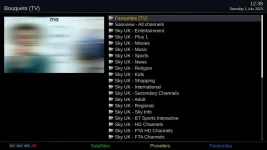
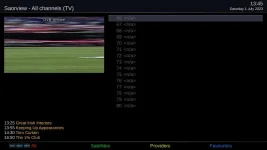
When I press favourites I get the following

1_0_1_27DA_806_2_11A0000_0_0_0_20230701123958.webp

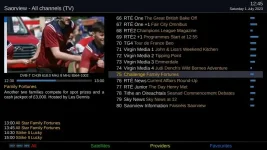
When I go into the Saorview folder I get

1_0_16_451_3E9_2174_EEEE0000_0_0_0_20230701124547.webp

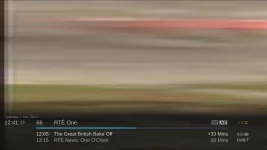
When I press on RTE1 I get the following

1_0_19_835_3EA_2174_EEEE0000_0_0_0_20230701124123.webp

Yes the terrestrial tuner was scanned to my area (Spur Hil) and they were all working so I am wondering if it is a signal issue?
 
Which image are you on? Please do not just say "latest".
Menu > Information > About will show you the details.

With regards to selecting channels, please see this thread:
https://www.world-of-satellite.com/showthread.php?63049-Bouquets-EPG-amp-Channel-navigation

You have scanned in the wrong transponders and added channels that you cannot receive.
Let us do the following:

1. Remove Terrestrial Services

Press Up (next to OK button near middle of remote)
Then Green (Orbital/satellite)
Highlight Terrestrial Services
Press Menu
Select "Remove Terrestrial Services"
Confirm the removal
Then restart the receiver using the remote

2. Do not use the scanning in Enigma2 for now. Especially not Automatic mode.

3. In AutoBouquetsMaker ensure that you select your region/area/mast.
Use ABM to "scan".

After ABM scans, refresh/reload your bouquets. Simplest way to explain this is: Restart your receiver using the remote

4. Check all the channels in the "Saorview - All Channels" bouquet/favourites group. Please do not use the provider group/category just yet.
Repot back if they are all working of if you have an issue.
 
Last edited:
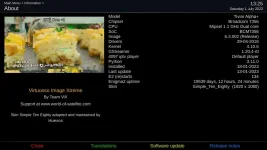
Hi, this is the image I am on

1_0_16_83F_3EA_2174_EEEE0000_0_0_0_20230701132533.webp

I will now follow your instructions and report back
 
If you do not get all channels at stage 4, which multiplex does not work for you? Once you open the bouquet, before you press OK select the channel, the view will list the frequency. It is either C45 (666MHz) or C39 (618MHz).

Another way to check is:
Menu > Setup > Tuners & Scanning > Signal finder

Use the up/down/left/right buttons to change options

Select the tuner you want to test
Satellite: Should be on Terrestrial if you selected the Terrestrial tuner
Tune: Select predefined transponder
Transponder: Press left/right to change to 666 MHz or 618 MHz and
The signal levels should show and you should have a lock
 
Steps 1 and 2 carried out and now have no terrestrial channels.

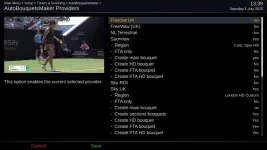
For step 3 I went in to ABM>Providers and the following are the settings
1_0_19_287B_800_2_11A0000_0_0_0_20230701133914.webp

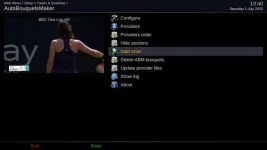
I then went into this
1_0_19_287B_800_2_11A0000_0_0_0_20230701134023.webp

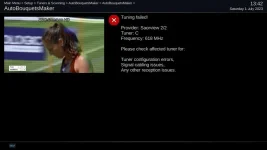
and ended up getting this
1_0_19_287B_800_2_11A0000_0_0_0_20230701134205.webp

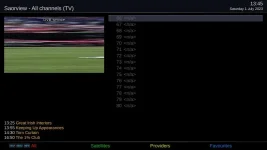
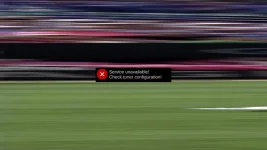
I then go and reboot the box (as opposed to selecting restart GUI - just in case I am doing that wrong?) but still end up with no Saorview channels getting the following
screenshot_20230701134532.webp

and
20230701134551.webp
 

Attachments

  • screenshot_20230701134532.webp
    screenshot_20230701134532.webp
    19 KB · Views: 3
If you do not get all channels at stage 4, which multiplex does not work for you? Once you open the bouquet, before you press OK select the channel, the view will list the frequency. It is either C45 (666MHz) or C39 (618MHz).

Another way to check is:
Menu > Setup > Tuners & Scanning > Signal finder

Use the up/down/left/right buttons to change options

Select the tuner you want to test
Satellite: Should be on Terrestrial if you selected the Terrestrial tuner
Tune: Select predefined transponder
Transponder: Press left/right to change to 666 MHz or 618 MHz and
The signal levels should show and you should have a lock

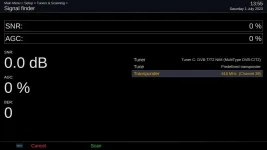
Having done this I figure that it is Channel 39 which is not really working, as it seems to come and go as per below

screenshot_20230701135536.webp

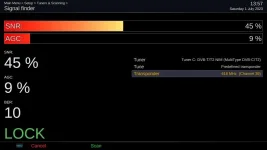
and sometimes I get

screenshot_20230701135733.webp
 
Last edited:
OK, so you will now have to investigate why you are not getting signal. If it is coming and going, usually a splitter or loose connection.

For now, Perform a manual scan. Ensure that you select only the working multiplex, 618MHz. You can do that in signal finder or manual scan. Once again, only one transponder/multiplex until you sort your signal issue.
 
Thanks abu baniaz and to Joe 90 and catkid for your input, I appreciate it. Back to checking aerials so and connections I guess!
 
Apologies for my intermittent support on this (family issues at present).

I've checked the Saorview website for service interruptions and to verify the transmitter frequencies. Definitely C39 and C45. The fact that you are getting the lower channel 39 and no signal on 45 might indicate a cabling issue or possibly water in the cable. Also could be an unsuitable aerial, but unlikely unless you are on the fringes of reception of Spur Hill. Can you confirm that the Saorview website is telling you that Spur Hill is your ideal transmitter? The website has an address checker and it will give the bearing and distance of the transmitter from your address. What is this bearing and distance? Are you sure your aerial is horizontal (the elements are flat and not pointing up and down)?

Other things I noticed in your setup. The channel numbers are not the actual numbers used by Saorview, so I suspect that you are not using "Alternative Numbering Mode". I use this as it simplifies things for me and other users in the house. Saorview starts with channel number 1 (RTE1), then channel 2(RTE2) and so on. The satellite channels for Sky start from 101.

Here is a screenshot of Alternative Numbering mode
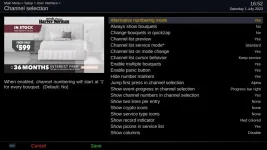
channel_numbering_mode.webp


Here is the Saorview list with the channels starting at 1
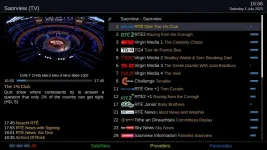
Saorview_bouquet.webp


Here is the Sky list with the channels starting at 101 - ignore the fact that the Saorview channel 30 and the PoP cartoon channels are on 50 and 58 - these are a consequence of my combined bouquet settings.
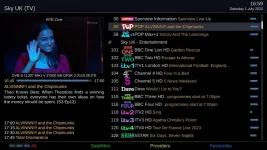
Sky_uk_bouquet.webp

I would also simplify the Sky ABM settings if I were you. You have all the sections bouquets enabled. I have only the main bouquet enabled which means it doesn't generate a separate listing for each section.
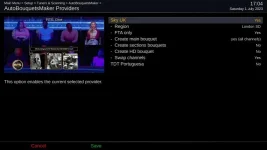
sky_uk_abm.webp

Finally - this is my list when I press the BLUE (Favourites) button in the channels list (press UP arrow or DOWN arrow first). Note that I have just one entry each for Saorview, Sky and Freesat. Again, ignore the multitude of IPTV lists - they are just testing placeholders for me.
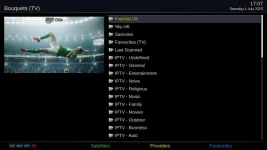
blue_button_bouquets.webp

Hope this helps in the configuration. You do seem to have some sort of signal/cabling issue, though.
 
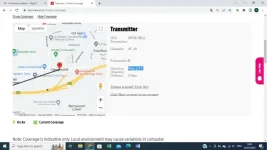
No problem Joe 90, and I appreciate your and the other people's time and effort in helping me. Yes Spur Hill is the transmitter as per Saorview website and bearing and distance is as below and yes aerial elements are flat

Screenshot (943).webp

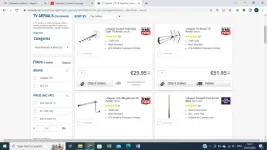
From what you are saying I too think that it's a cabling or aerial issue. The aerials have been there for years, but if I eliminate cabling issues I presume something like the one below for €25.95 will do the job?

Screenshot (944).webp

Thanks for the screenshots re tidying up my setup.
 

OpenViX Feeds Status

Back
Top