
Superb quality and spec AB-Com PULSe 4K SE. Crazy offer! Only £99! FREE UK DELIVERY! 4K UHD, Enigma 2, Multiboot 4 images & more!...
Superb quality and spec AB-Com PULSe 4K Rev II Twin Satellite tuner only £149! FREE UK DELIVERY! 4K UHD, Enigma 2, SATA HDD facility, Multiboot 4 images & more!...
You are using an out of date browser. It may not display this or other websites correctly.
You should upgrade or use an alternative browser.
You should upgrade or use an alternative browser.
[GiGaBlue UHD UE 4K] Content not accessible
- Thread starter avalon65
- Start date


If you set up the debug logs they should run permanently. Use a pen drive and make sure you have set them up to write to /media/usb.
The date of the debug log filename is when it was created which would have been yesterday.After the said error message appeared again earlier, I went to check the debug logs and there wasn't one for today
The receiver is now showing this screen, and there is no log for or about it.
It's like the receiver has a mind of its' own! The previous error message is now. not showing When I turned off the tv last night, the screen was normal, but now it is like someone has pressed a button on the remote to bring up this screen???
It's like the receiver has a mind of its' own! The previous error message is now. not showing When I turned off the tv last night, the screen was normal, but now it is like someone has pressed a button on the remote to bring up this screen???
Attachments



No I didn't press any buttons on the remote as I went to OW and clicked on the TV button for the remote. Anyway, I have since flashed the receiver with the latest image 6.4.003, and the problem seems to have gone away now, with no error messages nor any other strange things happening.
Thanks
Thanks
The ABM run is happening because you programmed it that way and lately one of the transponders it is searching is a bit weak. Are you searching terrestrial? Maybe a tree is blocking a bit of signal.
This other problem is something different. Either:
This other problem is something different. Either:
- The dog stepped on the remote, or
- Something in the room is sending commands that conflict with this equipment, or
- Your remote control is knackered, maybe a stuck button, or
- Your receiver is knackered.
Ok, but how do I program the ABM, like what settings should I change. I just left it at the default setting AFAIK
I don't have a dog.
Whatever was sending commands which conflict with the equipment, it iis not doing it now
The remote is only 5 months old
And the receiver is almost 1 year old
As I said earlier, I flashed the receiver with the latest image 6.4.003, and noting untoward has happened since I did it.
Thanks
I don't have a dog.
Whatever was sending commands which conflict with the equipment, it iis not doing it now
The remote is only 5 months old
And the receiver is almost 1 year old
As I said earlier, I flashed the receiver with the latest image 6.4.003, and noting untoward has happened since I did it.
Thanks
You obviously didn't leave it as default because those aren't the default settings... but as you are not able to provide a log it is not possible to help.Ok, but how do I program the ABM, like what settings should I change. I just left it at the default setting AFAIK
It is not a software problem.As I said earlier, I flashed the receiver with the latest image 6.4.003, and noting untoward has happened since I did it.
No, you are right, I was not thinking properly, I didn't leave ABM as default, but set it up for my providers etc and the epg is set to download at 01.00am now
I cannot provide a log because as I have said before, no logs were generated for the initial error message. it is beyond me why this is so.
I have never said it was a software problem, just that the error message seemed to have only started since I flashed the receiver with the 6.4.002 image. Coincidence or what?
Now it is flashed with 6.4.003 image there are no error messages, nor anything else wrong ,m so I don't need any help now.
I cannot provide a log because as I have said before, no logs were generated for the initial error message. it is beyond me why this is so.
I have never said it was a software problem, just that the error message seemed to have only started since I flashed the receiver with the 6.4.002 image. Coincidence or what?
Now it is flashed with 6.4.003 image there are no error messages, nor anything else wrong ,m so I don't need any help now.
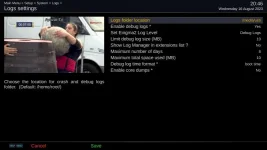
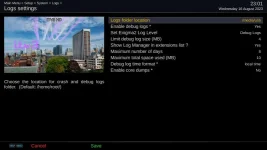
Then there should be logs in /media/usb/logs.
Similar threads
- Replies
- 2
- Views
- 1K
- Replies
- 0
- Views
- 515
- Replies
- 3
- Views
- 582
- Replies
- 12
- Views
- 1K
- Replies
- 6
- Views
- 2K