Superb quality and spec AB-Com PULSe 4K SE. Crazy offer! Only £129! FREE UK DELIVERY! 4K UHD, Enigma 2, Multiboot 4 images & more!...
Superb quality and spec AB-Com PULSe 4K Rev II Twin Satellite tuner only £179! FREE UK DELIVERY! 4K UHD, Enigma 2, SATA HDD facility, Multiboot 4 images & more!...

[Mut@nt] HD51 Crash at end of recording, when end margin starts

@Mickkie - if you get a crash you will see a load of stuff on the screen describing the crash, the system will then reboot enigma and restart.
What you are seeing is an activity starting that consumes the processor (hence the ViX spinner) - maybe a debug log will show what is happening.
 
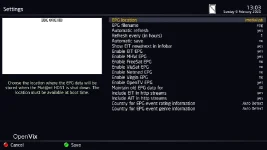
Thanks twol, from what you're saying I'm exhausting the resources of the box and it barfs while this is happening. I retraced my steps, thinking what I might have changed in the config to cause this problem. From what I recall I changed the EPG refresh settings, asking it to automatically save the EPG. I disabled it now as shown in the attached screenshot. Could someone please confirm if these are the default settings, or what I could/should change to minimise any adverse impact on the box?
 

Attachments

  • BBC ONE HD-922020-133.webp
    BBC ONE HD-922020-133.webp
    28.9 KB · Views: 11
For whatever reason the crash took place, inc. the state of the fs, it seems it was remounted as ro when it errored out.
That's what Linux does when certain errors occur. To stop things getting any worse.
 
Thanks twol, from what you're saying I'm exhausting the resources of the box and it barfs while this is happening.
From the logs you appear to be using /epg.dat to store EPG data.

< 57428.683> [eEPGCache] /media/hdd/epg.dat not found, try /epg.dat

That could well run you out of space.
 
Thanks birdman, I've gone through some changes in the settings moving the epg.dat location from /media/usb/ to /media/hdd/ and back when among other checks I had unmounted the /media/usb device to fsck its vfat filesystem. I have reset the epg.dat to be stored on /media/usb/ instead of the spinning disk. I assume this is OK for an 8G USB disk, or is the recommended storage space for EPG the spinning disk? The current epg.dat size following a reboot looks OK to me:
Code:
root@mutant51:~# ls -la /media/usb/epg.dat 
-rwxrwxrwx    1 root     root            40 Feb  9 15:45 /media/usb/epg.dat

I've also set the debug logs to be captured on the USB and I'll see if disabling the autosave for the EPG has resolved my problem.
 
epg.dat is only read once at boot time, and written once when shutting down (and more often if you think you need to), so I'd put it on the hdd.

epg.dat should end up much bigger than the 40bytes you're seeing.
 
Thank you css, for this useful pointer. I have moved the EPG cache to the hard drive. I wonder if this is what caused all these problems in the first place.
 
This is my (terrestrial only) epg.dat

Code:
root@et10000:/media/hdd# ls -l epg.dat                                                                                                    
-rw-r--r--    1 root     root       2931039 Feb  9 16:41 epg.dat                                                                        
root@et10000:/media/hdd#
 
I have reset the epg.dat to be stored on /media/usb/ instead of the spinning disk. I assume this is OK for an 8G USB disk, or is the recommended storage space for EPG the spinning disk?
I have mine on a USB stick. Since I have UK Freeview the EPG data is updated at various times, so I have things set to updated this file from time to time and I don't want to needlessly spin up the disk.
 
@birdman - I think the EPG data is held in RAM during normal running, so it shouldn't be spinning the HDD up. Only when going into standby/deep standby should the system be transferring the EPG cache to disk.
 
@birdman - I think the EPG data is held in RAM during normal running, so it shouldn't be spinning the HDD up. Only when going into standby/deep standby should the system be transferring the EPG cache to disk.
That's how I see it, and it only needs saving more often if you suffer power cuts or crashes (unlikely).
I reckon my HDD hardly ever needs to spin up to save the epg, but that's the way I use the box - it's either recording or I'm watching a recording.
And if the OP uses timeshift, the disc never spins down anyway.
 
@birdman - I think the EPG data is held in RAM during normal running, so it shouldn't be spinning the HDD up.
Menu -> Setup -> EPG -> Settings -> Automatic save (On)
Save every (in hours)

So you can save it regularly if you wish.
 
Menu -> Setup -> EPG -> Settings -> Automatic save (On)
Save every (in hours)

So you can save it regularly if you wish.

Thank you all. I have left my EPG cache on the spinning disk, because the USB seems to take up more resources to save the cache and when combined with storing debug logs (on the USB) it caused a black screen and spinner to show up intermittently. Since I use timeshift there is no latency observed because the disk is spinning anyway at the time. I have also disabled the EPG cache auto save. The Mut@nt is running off a UPS to deal with power cuts and brown outs we suffer from in our area, so regular saving wouldn't offer much to me.

I've now flashed the latest firmware, 5.3.016. With multiboot the Mut@nt is now using a different partition. There are no filesystem errors reported, or anything untoward. For a few days now I thought the problem I reported was caused by me switching the EPG cache to USB and all was sorted out.

Nevertheless, the same problem manifested again earlier today. :(

I paused BBC1 HD, while I went to get a coffee. Rewound to the beginning of the BBC programme upon my return, played/paused a couple of times, then left it paused. After about 20 minutes of so, the TV suddenly started playing again all on its own and all the timeshift buffer was gone! I tried to rewind unsuccessfully. Then I looked at the list of recordings and noticed a recording had started (Ian King Live, timestamp 18232.722 in the attached log). I also saw two entries for this recording - one contained the full recording, the other empty:
Code:
-rw-r--r--    1 root     root             0 Feb 14 13:26 20200214 1327 - Sky News - Ian King Live.ts
-rw-r--r--    1 root     root           258 Feb 14 14:24 20200214 1327 - Sky News - Ian King Live.ts.meta
-rw-r--r--    1 root     root           213 Feb 14 13:26 20200214 1327 - Sky News - Ian King Live_001.eit
-rw-r--r--    1 root     root     411808736 Feb 14 14:05 20200214 1327 - Sky News - Ian King Live_001.ts
-rw-r--r--    1 root     root         27824 Feb 14 14:05 20200214 1327 - Sky News - Ian King Live_001.ts.ap
-rw-r--r--    1 root     root            36 Feb 14 14:24 20200214 1327 - Sky News - Ian King Live_001.ts.cuts
-rw-r--r--    1 root     root           274 Feb 14 14:24 20200214 1327 - Sky News - Ian King Live_001.ts.meta
-rw-r--r--    1 root     root        967408 Feb 14 14:05 20200214 1327 - Sky News - Ian King Live_001.ts.sc

There was no crash log, but I captured a debug log which I attach in this post. I can see a problem from timestamp 18274.201, but I don't know what caused this.
 

Attachments

There was no crash log, but I captured a debug log which I attach in this post. I can see a problem from timestamp 18274.201, but I don't know what caused this.
The lack of a crash log would appear to be odd.

The debug log you've posted show enigma2 starting up at ~13:26:50.
Given the timestamp of your files it looks like a recording was started (13:26 20200214 1327 - Sky News - Ian King Live.ts) but never written to. Then enigma2 restarted (unknown reason) and on starting found a pending recording (the same one) so started it again (the 001 series of files) and that worked.
Also odd is that the original meta file appears to be being updated, even though the associated recording isn't.

The errors seem to be associated with timeshift, rather than the Sky News recording.

If you have the previous debug log to the one you've posted it might be more interesting, as that may show why enigma2 restarted.
 
Yes, there is more info in the previous log along with a backtrace - attached. I tried to play both 'Ian King Live' recordings to confirm the first was empty, this could have altered the meta files?

Anyway, I had another crash during the night, when the box wakes up to record a weather report, which resulted in this unexpected message and made me suspect the NTP setting:
Code:
<  6714.077> [Task] job Components.Task.Job name=Cleaning Trashes #tasks=1 completed with [] in None
<  6714.079> [InputHotplug] connectionLost? [Failure instance: Traceback (failure with no frames): <class 'twisted.internet.error.ConnectionLost'>: Connection to the other side was lost in a non-clean fashion: Connection lost.
]<  6714.079> 
<  6714.083> [AutoBouquetsMaker] next wakeup due 0
<  6714.083> set wakeup time to 2020/02/15 18:22
<  6714.083> recordTimerWakeupAuto True
<  6714.123> [AutoTimer] No changes in configuration, won't parse
<  6714.130> [EPGRefresh] Stopping Timer
<  6714.131> [XMLTVImport] autostart (1) occured at 1581730200.49
<  6714.131> [XMLTVImport] Stop
<  6714.131> [ABM-Scheduler][Scheduleautostart] reason(1), session None
<  6714.131> [ABM-Scheduler][Scheduleautostart] Stop
<  6714.134> [eDVBDB] ---- saving lame channel db
<  6714.136> [eDVBDB] saved 10 channels and 178 services!
<  6714.145> [eDVBResourceManager] release cached channel (timer timeout)
<  6714.145> [eDVBLocalTimerHandler] remove channel 0xf385e0
<  6714.145> [eEPGCache] remove channel 0xf385e0
<  6714.145> [eDVBResourceManager] stop release channel timer
<  6714.146> [Avahi] avahi_timeout_new
<  6714.147> [Avahi] avahi_timeout_free
<  6714.148> [Avahi] avahi_watch_free
<  6714.148> [Avahi] avahi_timeout_update
<  6714.148> [Avahi] avahi_timeout_free
<  6714.154> [eEPGCache] store epg to realpath '/media/hdd/epg.dat'
<  6714.193> [eEPGCache] 28417 events written to /media/hdd/epg.dat
<  6714.375> [eventData] EPG Cache is corrupt (eventData::~eventData), you should restart Enigma!
<  6714.413> [eventData] EPG Cache is corrupt (eventData::~eventData), you should restart Enigma!
[snip ...]

<  6714.478> [eventData] EPG Cache is corrupt (eventData::~eventData), you should restart Enigma!
<  6714.498> [eDVBLocalTimeHandler] set RTC to previous valid time
<  6714.498> [eDVBLocalTimerHandler] set RTC Time
<  6714.498> [eInit] - (41) eServiceFactoryDVD
<  6714.498> [eInit] - (41) eServiceFactoryWebTS
<  6714.498> [eInit] - (41) eServiceFactoryTS
<  6714.498> [eInit] - (41) eServiceFactoryHDMI
<  6714.498> [eInit] - (41) eServiceFactoryM2TS
<  6714.498> [eInit] - (41) eServiceFactoryMP3
<  6714.498> [eInit] - (41) eServiceFactoryFS
<  6714.498> [eInit] - (41) eServiceFactoryDVB
<  6714.498> [eInit] - (41) Encoders
<  6714.498> [eInit] - (41) Stream server
<  6714.498> [eInit] - (40) eServiceCenter
<  6714.498> [eInit] - (35) CI Slots
<  6714.498> [eInit] - (35) CA handler
<  6714.498> [eInit] - (30) eActionMap
<  6714.498> [eInit] - (22) Hdmi CEC driver
<  6714.499> [eInit] - (21) input device driver
<  6714.617> [eInit] - (20) DVB-CI UI
<  6714.617> [eInit] - (20) UHF Modulator
<  6714.617> [eInit] - (20) RC Input layer
<  6714.617> [eInit] - (20) misc options
<  6714.617> [eInit] - (20) AVSwitch Driver
<  6714.617> [eInit] - (15) eWindowStyleManager
<  6714.617> [eInit] - (10) gRC
<  6714.617> [gRC] waiting for gRC thread shutdown
<  6714.617> [gRC] thread has finished
<  6714.617> [eInit] - (9) GFBDC
<  6714.621> [eInit] - (9) gLCD
<  6714.621> [eInit] - (9) Font Render Class
<  6714.622> [eInit] - (8) graphics acceleration manager
<  6714.622> [eInit] - (5) Tuxtxt
<  6714.622> [eInit] - (1) Background File Eraser
<  6714.622> [eInit] reached rl -1
[MAIN] executing main
TuxTxt cache cleared
cleaning up
TuxTxt cache cleared
When I checked this morning after seeing the above log I discovered there was no /media/hdd/epg.dat file around. Could a non-responsive NTP server cause these problems? A recording timer kicks in and starts a recording, then the time is changed as it starts and this causes the crash? Anyway, I've changed it to use Transponder time for now to see if this fixes it.
 

Attachments

Yes, there is more info in the previous log along with a backtrace - attached. I tried to play both 'Ian King Live' recordings to confirm the first was empty, this could have altered the meta files?
Yes, it would. It will update the meta file with the size of the recording.
Thanks.
 
Anyway, I had another crash during the night, when the box wakes up to record a weather report, which resulted in this unexpected message and made me suspect the NTP setting:
Not sure why.
Any time it checks the time is sets the RTC (Real Time Clock), which enables the box to know what time it is as soon as it wakes up.

All of the problems relate the the EPG cache. I have no idea what could cause it to become corrupt so often.

When I checked this morning after seeing the above log I discovered there was no /media/hdd/epg.dat file around.
Once it is seen to be corrupt (which happens on writing - it's the in-memory data which is corrupt) it deletes the file (as it has no confidence in what it would write to it as the data is corrupt...).
 
Not absolutely sure if the OP is only using freeview, but there have been a number of re-tune events in the last 10 days.

Maybe this could be the issue with the epg?

Code:
https://www.freeview.co.uk/corporate/platform-management/700mhz-clearance/clearance-events-2020
 
Not absolutely sure if the OP is only using freeview, but there have been a number of re-tune events in the last 10 days.

Maybe this could be the issue with the epg?
I doubt it (but I never run timeshift).

My transmitter had a Mux change on Wednesday. This just resulted in a 1-line change to lamedb (the frequency for that Mux - all of the network ids were unchanged).
Starting the box up with the "wrong" lamedb didn't cause any problems. Just as well, otherwise re-tuning might be an issue.
 
Thanks for pointing the Freeview transmitter changes to me. I'm tuned into the Crystal Palace transmitter and have no satellite tuners. I don't recall this being a problem in the past, but I rescanned all channels this morning and ran the autobouquet scan too. Let's see if this makes any odds.

I wasn't capturing and looking at debug logs on a regular basis to know if the EPG cache was corrupted as often in the past, but it seems to be a regular occurrence in the last few days. I temporarily set it to autosave every 8 hours to see if it would stop the crashes, but it doesn't. The crashes happened whether I store the EPG on the spinning disk or on a USB stick.

Last night there was a crash-fest. More about it below, but here's a list of some things I have tried to see if they stop these 'crashes':

1. Change theme.
2. Change the time NTP servers, also change source from NTP to Transponder.
3. Store the EPG cache on the spinning disk, instead of USB stick.
4. Go back a couple of versions on the firmware.
5. Install the latest firmware in a different slot.
6. Ran fsck on the USB, hard disk and mmc partitions after unmounting them.

None of the above efforts worked to eliminate crashes. The crashes coincide around the start or end of recordings, when the timer margin kicks in. They will always happen if I'm recording more than one programme at at time, but may also happen as a recording starts while I'm watching of have paused something in timeshift.

For example last night I started recording Endeavour on ITV HD (20:00-22:00) and Top Gear on BBC TWO HD (20:00-21:00), plus The Pale Horse on BBC ONE HD (21:00-22:00).

At around 20:32 we started playing back Endeavour (with subtitles on) from the list of recordings.

At 20:57 as the Top Gear was finishing and the Pale Horse recording started, the now familiar crash took place. The TV screen went black for a second or two, all recordings stopped and then restarted creating additional files. Here's the Top Gear and Pale Horse files we ended up with - I have not played back any of them yet to avoid altering their meta files:
Code:
root@mutant51:~# ls -ltcr /media/hdd/movie/
[snip ...]
-rw-r--r--    1 root     root           166 Feb 16 19:56 20200216 1957 - BBC TWO HD - Top Gear.eit
-rw-r--r--    1 root     root       1473712 Feb 16 20:58 20200216 1957 - BBC TWO HD - Top Gear.ts.sc
-rw-r--r--    1 root     root     2427191296 Feb 16 20:58 20200216 1957 - BBC TWO HD - Top Gear.ts
-rw-r--r--    1 root     root        154128 Feb 16 21:04 20200216 1957 - BBC TWO HD - Top Gear_001.ts.sc
-rw-r--r--    1 root     root            24 Feb 16 21:05 20200216 1957 - BBC TWO HD - Top Gear_001.ts.cuts
-rw-r--r--    1 root     root          6736 Feb 16 21:05 20200216 1957 - BBC TWO HD - Top Gear_001.ts.ap
-rw-r--r--    1 root     root     294517228 Feb 16 21:05 20200216 1957 - BBC TWO HD - Top Gear_001.ts

Code:
root@mutant51:/media/hdd/movie/Drama# ls -ltcr
-rw-r--r--    1 root     root           236 Feb 16 20:56 20200216 2057 - BBC ONE HD - The Pale Horse.eit
-rw-r--r--    1 root     root         33680 Feb 16 20:58 20200216 2057 - BBC ONE HD - The Pale Horse.ts.sc
-rw-r--r--    1 root     root      33304576 Feb 16 20:58 20200216 2057 - BBC ONE HD - The Pale Horse.ts
-rw-r--r--    1 root     root           298 Feb 16 20:59 20200216 2057 - BBC ONE HD - The Pale Horse.ts.meta
-rw-r--r--    1 root     root       1480080 Feb 16 22:00 20200216 2057 - BBC ONE HD - The Pale Horse_001.ts.sc
-rw-r--r--    1 root     root     1438834688 Feb 16 22:00 20200216 2057 - BBC ONE HD - The Pale Horse_001.ts
-rw-r--r--    1 root     root           302 Feb 16 22:00 20200216 2057 - BBC ONE HD - The Pale Horse_001.ts.meta
-rw-r--r--    1 root     root        110496 Feb 16 22:05 20200216 2057 - BBC ONE HD - The Pale Horse_001_002.ts.sc
-rw-r--r--    1 root     root            24 Feb 16 22:05 20200216 2057 - BBC ONE HD - The Pale Horse_001_002.ts.cuts
-rw-r--r--    1 root     root          4592 Feb 16 22:05 20200216 2057 - BBC ONE HD - The Pale Horse_001_002.ts.ap
-rw-r--r--    1 root     root     213626468 Feb 16 22:05 20200216 2057 - BBC ONE HD - The Pale Horse_001_002.ts
-rw-r--r--    1 root     root           300 Feb 16 22:16 20200216 2057 - BBC ONE HD - The Pale Horse_001_002.ts.meta

We had to watch the Endeavour recordings over 3 different files due to the interruptions in the recording.

I've looked through the logs, a new hobby I developed recently and which I'm increasingly spending more time doing than using the Mut@nt. LOL!

Every time there is a crash this is what is captured at the end of the debug file (interestingly as a rule no crash files are generated):
Code:
<  3913.531> [eSubtitleWidget] disp width 1920, disp height 1080
<  3913.531> [eSubtitleWidget] add 0 906 1920 58
<  3913.531> [eSubtitleWidget] disp width 1920, disp height 1080
<  3916.033> [eEPGCache] start caching events(1581886700)
<  3916.033> [eDVBSectionReader] DMX_SET_FILTER pid=211
<  3916.033> [eDVBSectionReader] DMX_SET_FILTER pid=561
<  3916.033> [eDVBSectionReader] DMX_SET_FILTER pid=18
<  3916.034> [eDVBSectionReader] DMX_SET_FILTER pid=18
<  3916.034> [huffman] read.. '/usr/share/enigma2/otv_eeee0000_233a_4084.dict'
<  3916.034> [eEPGCache] abort non avail OpenTV EIT reading
<  3916.187> [eSubtitleWidget] setPage
<  3916.187> [eSubtitleWidget] add 0 848 1920 58
<  3916.187> [eSubtitleWidget] disp width 1920, disp height 1080
<  3916.187> [eSubtitleWidget] add 0 906 1920 58
<  3916.187> [eSubtitleWidget] disp width 1920, disp height 1080
<  3917.741> [eSubtitleWidget] setPage
<  3917.741> [eSubtitleWidget] add 0 906 1920 58
<  3917.741> [eSubtitleWidget] disp width 1920, disp height 1080
<  3919.957> [eSubtitleWidget] setPage
<  3919.957> [eSubtitleWidget] add 0 848 1920 58
<  3919.957> [eSubtitleWidget] disp width 1920, disp height 1080
<  3919.957> [eSubtitleWidget] add 0 906 1920 58
<  3919.957> [eSubtitleWidget] disp width 1920, disp height 1080
<  3920.278> Backtrace:
<  3920.279> /usr/bin/enigma2(_Z17handleFatalSignaliP9siginfo_tPv) [0x1844A4]
<  3920.279> /lib/libc.so.6(__default_rt_sa_restorer) [0xB6D1DE20]
<  3920.280> /usr/bin/enigma2(_ZN9eventDataD2Ev) [0x14533C]
<  3920.282> /usr/bin/enigma2(_ZN9eEPGCache11sectionReadEPKhiPNS_12channel_dataE) [0x14A54C]
<  3920.283> /usr/bin/enigma2(_ZN9eEPGCache12channel_data8readDataEPKhi) [0x14AD30]
<  3920.283> /usr/bin/enigma2(n/a) [0x1688C0]
<  3920.283> /usr/bin/enigma2(_ZN17eDVBSectionReader4dataEi) [0x159728]
<  3920.284> /usr/bin/enigma2(n/a) [0x1753E8]
<  3920.284> /usr/bin/enigma2(n/a) [0x17C07C]
<  3920.284> /usr/bin/enigma2(_ZN9eMainloop15processOneEventElPP7_object9ePyObject) [0x182134]
<  3920.284> /usr/bin/enigma2(_ZN9eMainloop7iterateEjPP7_object9ePyObject) [0x182290]
<  3920.284> /usr/bin/enigma2(_ZN9eMainloop7runLoopEv) [0x182380]
<  3920.284> /usr/bin/enigma2(_ZN9eEPGCache6threadEv) [0x14A024]
<  3920.284> /usr/bin/enigma2(_ZN7eThread7wrapperEPv) [0x174078]
<  3920.284> -------FATAL SIGNAL (11)

Backtraces are identical for each crash. I attach the debug log from the events leading up to last night's first crash. You'll notice towards the end at timestamp 3916.033, there was an EPG caching attempt, but I don't know if this caused the problem.

I have also looked at the OS logs but couldn't see anything suspicious in there. The OS itself is not crashing, or rebooting.

I have not yet opened the box to measure voltages in case the PSU is on its way out, but I'm thinking if it were a RAM or power supply issue, wouldn't the OS be complaining about it too?
 

Attachments

Last edited:

OpenViX Feeds Status

Back
Top