Superb quality and spec AB-Com PULSe 4K SE. Crazy offer! Only £99! FREE UK DELIVERY! 4K UHD, Enigma 2, Multiboot 4 images & more!...
Superb quality and spec AB-Com PULSe 4K Rev II Twin Satellite tuner only £149! FREE UK DELIVERY! 4K UHD, Enigma 2, SATA HDD facility, Multiboot 4 images & more!...

Day One with VU+ Duo.. Questions!

Create a Picons folder on your Hard D m8, not the root folder of the Vu Duo, your hard drive you have installed.
rive
h**p://www.world-of-satellite.com/showthread.php?15138-Astra-28E-HD-Picons-by-Sandman
 
Last edited by a moderator:
Create a folder on your VU+ Duo's hard drive, call it Picons, the file you have just downloaded containing the picons, copy contents to the Picons folder on your hard drive in the Vu+ Duo.
 
I thought the folder had to be called picon? Without the s?

At least, that's what my folder is called.
 
yes the folder is called picon. just place the picon folder containing the picons onto the root of a USB stick or the flash of the receiver i would not recommend using picons from a HDD as the disc must spin up every single time a channel is changed adding several seconds onto the zap time in most cases.
 
hi guys,

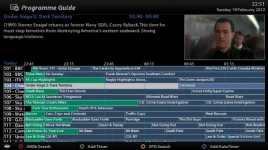
i have a picons folder on the duo (see attached screenshot) not sure why i cant see them on the epg.. maybe someone might upload a screenshot of what they look like in the epg?

Also I want to change the behaviour of the buttons on the remote and im not sure if its possible. When i press up/down on the centre button it brings me to the single epg - what id like to happen here is for the channel banner to scroll (the same way sky does)

is there any way to do that with my current image etc?

Cheers,
Mick
 

Attachments

  • picons.webp
    picons.webp
    77.4 KB · Views: 23
also guys, anyone any suggestions on reducing the noise of the Duo? Im not sure if its the hard disk or the fan (guessing fan) would removing the fan and inserting rubber washers etc help? Cheers, mick
 
picons for me never work if i just transfer them to the flash, the image just doesnt recognise them. in order for the image to recognise them in flash i have to download a set of picons from plugins feeds and set them to be placed in flash, then replace the ones in flash with the ones i want and then they work fine
 
hi guys,

i have a picons folder on the duo (see attached screenshot) not sure why i cant see them on the epg.. maybe someone might upload a screenshot of what they look like in the epg?

Also I want to change the behaviour of the buttons on the remote and im not sure if its possible. When i press up/down on the centre button it brings me to the single epg - what id like to happen here is for the channel banner to scroll (the same way sky does)

is there any way to do that with my current image etc?

Cheers,
Mick
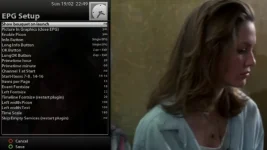
Are you talking about the multi channel EPG, if so when in it press MENU and than "enable PIG" and than items per page to 5 or and save.
 
Are you talking about the multi channel EPG, if so when in it press MENU and than "enable PIG" and than items per page to 5 or and save.
no basically when i press up/down i dont want an epg at all, i would like the channel banner to come up and be able to scroll through channels and then press the centre button to change channel.. same as sky etc.. cheers mick
 
I've been trying out different images all weekend but decided to come back to ViX. I am also having the issue with the picons not showing in the EPG. - Even though my settings are as they were before.

Here are my settings:
NjQ9Z.webp

Here is the EPG, not showing picons:
Ep6SG.webp

Here is the info bar, showing picon:
g0uDl.webp

So obviously the picons work... Just not in the EPG. :confused:

Any ideas?
 
no basically when i press up/down i dont want an epg at all, i would like the channel banner to come up and be able to scroll through channels and then press the centre button to change channel.. same as sky etc.. cheers mick


press left/right on the circle button instead.
 
Last edited:
Thats exactly whats happening on my setup!

I've been trying out different images all weekend but decided to come back to ViX. I am also having the issue with the picons not showing in the EPG. - Even though my settings are as they were before.

Here are my settings:
View attachment 14941

Here is the EPG, not showing picons:
View attachment 14942

Here is the info bar, showing picon:
View attachment 14943

So obviously the picons work... Just not in the EPG. :confused:

Any ideas?
 
im at work right now, but i have my items per page set to 8 i think... will try reducing this evening
 
usually i have mine set to show 10 but its now set to 14 and working perfectly with the SGTFlipFlop sky uk picons.

This is my setup.

p.s this is on the ultimo, although the exact same setup works fine on the duo as i have just tested this.
 
SGTFlipFlop picons?

usually i have mine set to show 10 but its now set to 14 and working perfectly with the SGTFlipFlop sky uk picons.

This is my setup.

p.s this is on the ultimo, although the exact same setup works fine on the duo as i have just tested this.
 

OpenViX Feeds Status

Back
Top