
Superb quality and spec AB-Com PULSe 4K SE. Crazy offer! Only £99! FREE UK DELIVERY! 4K UHD, Enigma 2, Multiboot 4 images & more!...
Superb quality and spec AB-Com PULSe 4K Rev II Twin Satellite tuner only £149! FREE UK DELIVERY! 4K UHD, Enigma 2, SATA HDD facility, Multiboot 4 images & more!...
You are using an out of date browser. It may not display this or other websites correctly.
You should upgrade or use an alternative browser.
You should upgrade or use an alternative browser.
[ABM-MISC] Dsayers custommix importer plugin support thread
- Thread starter dsayers
- Start date


dsayers
ViX Beta Tester
- Joined
- Mar 19, 2016
- Messages
- 1,872
- Reaction score
- 20
- Points
- 38
Lioverpool FC TV doesn't show on the custom mix, can this be added.
Thanks,
Added but not sure why anyone would want that in epg :sofahide:
Is that Sky Sports Mix channel number correct?
Odd numbering there
18/07/17 407 472 Sky Sports Mix Move 121 286
That's what I thought as well but it was on a Sky corporate site. Seems strange to put a Sports channel in Entertainment but it is available with an Entertainment sub, so they may be trying to get more viewers that didn't know it existed to try and get them to upgrade to Sports.
The VM Numbering changed around midnight, actually before Sky. The custom file does need a couple of changes, I assume dsayers either has done or will do soon his plugin.
Personally, I decided to keep Sports Mix in sports and put it at 410, moving Eurosport 1 & 2 down one place
Personally, I decided to keep Sports Mix in sports and put it at 410, moving Eurosport 1 & 2 down one place
Z
zino
Guest
How do I "hack" to rename the following cable channels to the new proper names? I don't want to rename using remote as the next scan will just undo the changes.
I only know how to swap channels. I just want to learn how to rename any channel to whatever name I want using custom mix file.
Could someone give me one example please.
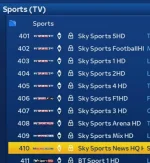
I've run ABM a few times and not all the new channel names for sports don't come up under Cable bouquet.
(ignore channel order, i use custom mix file to put ss premier lge at 401).
I only know how to swap channels. I just want to learn how to rename any channel to whatever name I want using custom mix file.
Could someone give me one example please.
I've run ABM a few times and not all the new channel names for sports don't come up under Cable bouquet.
(ignore channel order, i use custom mix file to put ss premier lge at 401).
Last edited by a moderator:
Z
zino
Guest
In abm delete bouquets then in service searching do an automatic scan then rescan abm
Sent from my SM-G925F using Tapatalk
Thank you.
I would still like to learn how to rename channels.
I dislike really long CABLE channel names like
Universal Channel HD
Sky Sports Football HD
I want to change them to
Universal HD
Sky Sports FB HD
How do I use ABM to permanently change CABLE channel names to anything I want, and it is kept even after ABM runs everyday?
Z
zino
Guest
My "test" I did 101 and checked channel number 101, not realising that correponds to "original" 101 which is 115 on my box due to the "HD autoswap" by ABM. Plus i had forgetten to do Enigma2 restart. I've got it working exactly how I want now. Channel numbers used are the default original ones for the swaps ABM does automatically for HD swap, and for "manual" swaps I do, I use the new number. This works perfect.
Thanks to Abu for the link
I've renamed a small handful of channels, Happy days.
Thanks to Abu for the link
I've renamed a small handful of channels, Happy days.

No need for a restart.i had forgetten to do Enigma2 restart.
Z
zino
Guest
No need for a restart.
I said I had forgotten to do restart, which means the changes from the "hack" didn't show up until I restarted enigma.
Everything working as I wanted now.

abu baniaz
Moderator
You dont have to remember to restart then. Enigma2 caches the boiquets in RAM, selecting another bouquet then going back would suffice.
There is no need for restart although that will result on reloading bouquets too.
There is no need for restart although that will result on reloading bouquets too.
Or just press the TV button.selecting another bouquet then going back would suffice.
Could be just me as I've not seen it mentioned elsewhere but some channels seem to not be in the correct positions.
Mine currently shows :
118 ITV 4 HD
119 ITV 3
120 ITV 4
Thanks.
Sent from my iPhone using Tapatalk
Mine currently shows :
118 ITV 4 HD
119 ITV 3
120 ITV 4
Thanks.
Sent from my iPhone using Tapatalk
dsayers
ViX Beta Tester
- Joined
- Mar 19, 2016
- Messages
- 1,872
- Reaction score
- 20
- Points
- 38
No that's not correct it should be,
118 ITV 2
119 ITV 3
120 ITV 4
Either all sd with sky uk channel swap no or HD sky uk channel swap to yes.
My custommix doesn't have 118 in the Custommix maybe scan with debug logs http://www.world-of-satellite.com/s...ase-read-before-raising-ABM-support-questions
118 ITV 2
119 ITV 3
120 ITV 4
Either all sd with sky uk channel swap no or HD sky uk channel swap to yes.
My custommix doesn't have 118 in the Custommix maybe scan with debug logs http://www.world-of-satellite.com/s...ase-read-before-raising-ABM-support-questions
dsayers
ViX Beta Tester
- Joined
- Mar 19, 2016
- Messages
- 1,872
- Reaction score
- 20
- Points
- 38
Could be just me as I've not seen it mentioned elsewhere but some channels seem to not be in the correct positions.
Mine currently shows :
118 ITV 4 HD
119 ITV 3
120 ITV 4
Thanks.
Sent from my iPhone using Tapatalk
With my Custommix you should be using your area HD I have changed channels swap to yes and no and both show,
118 ITV 2 HD
119 ITV 3 HD
120 ITV 4 HD
None show sd in those positions.
dsayers
ViX Beta Tester
- Joined
- Mar 19, 2016
- Messages
- 1,872
- Reaction score
- 20
- Points
- 38
Off topic but a note for ABM devs
https://www.tvchannellists.com/List_of_line-up_changes_on_Sky_(UK_and_Ireland)_in_2017
Changes on 01/08/17
Based on SD listing.
ITV 2 HD 207
ITV 3 HD 208
ITV 4 HD 225
There maybe other swaps that need checking.
https://www.tvchannellists.com/List_of_line-up_changes_on_Sky_(UK_and_Ireland)_in_2017
Changes on 01/08/17
Based on SD listing.
ITV 2 HD 207
ITV 3 HD 208
ITV 4 HD 225
There maybe other swaps that need checking.
Last edited:
A
a100
Guest
It works with both Virgin media Ireland and the UK.
I have managed to install this on my [unsupported box, please read the forum rules] works like a charm.
Just needed a restart. so dont forget that.
I also tried to work this out on my IPTV Miracle box but it crashed.
Which boxes can I run this on exactly? only enigma 2?
I have managed to install this on my [unsupported box, please read the forum rules] works like a charm.
Just needed a restart. so dont forget that.
I also tried to work this out on my IPTV Miracle box but it crashed.
Which boxes can I run this on exactly? only enigma 2?
Last edited by a moderator:
Off topic but a note for ABM devs
https://www.tvchannellists.com/List_of_line-up_changes_on_Sky_(UK_and_Ireland)_in_2017
Changes on 01/08/17
Based on SD listing.
ITV 2 HD 207
ITV 3 HD 208
ITV 4 HD 225
There maybe other swaps that need checking.
Those changes need adding to the standard 28e swaps. I added them to my own private files a few Days ago - haven't noticed any others needing changing but they are always tweaking something

Similar threads
- Replies
- 1
- Views
- 2K

[ABM-DVB-T/T2]
Example files don't appear after updating provider files
- Replies
- 5
- Views
- 3K

- Replies
- 6
- Views
- 1K

- Replies
- 81
- Views
- 7K

- Replies
- 2
- Views
- 3K