Superb quality and spec AB-Com PULSe 4K SE. Crazy offer! Only £99! FREE UK DELIVERY! 4K UHD, Enigma 2, Multiboot 4 images & more!...
Superb quality and spec AB-Com PULSe 4K Rev II Twin Satellite tuner only £149! FREE UK DELIVERY! 4K UHD, Enigma 2, SATA HDD facility, Multiboot 4 images & more!...

Duo2 Forgetting HDD

kev1372003

Forum Supporter
Donated Member
Joined
Apr 23, 2014
Messages
24
Reaction score
0
Points
0
Hi Chaps,

I have a duo2 running helios build 17

Yesterday I Installed a HDD(WDC WD10 1TB) and all went well apparently, but I have noticed that when the unit Is powered down or engima gui Is restarted then It forgets to mount It and I have to do It again.

It Is mounted as device: /dev/sda1 and mounted as /media/hdd which I believe to be correct.

I have a usb stick mounted as /media/sdb1 and have no problems with that being mounted every time.

Thanks In advance for any help you can provide me with.
 
did you save your settings - Menu/Setup/vix/Mount Manager/Setup Mounts (green button)/save
 
Last edited:
Yes I do save the settings and at that point It asks for a reboot, If i reboot then the hdd Is not mounted but If I dont reboot then It is and working till the next reboot
 
I had the same problem with that exact same hdd. Turned out I had setup a network mount to use as hdd on another box.

If you have any network mount check you haven't set any up to use as hdd


Sent from my iPad using Tapatalk
 
I had the same problem with that exact same hdd. Turned out I had setup a network mount to use as hdd on another box.

If you have any network mount check you haven't set any up to use as hdd


Sent from my iPad using Tapatalk

Spot on and issue resolved, thanks very much
 
Hey guys i was using a vu solo with an 2tb external hdd (ntfs) for recording tv and for storing movies of my computer. I just got a new receiver LX3 and i'm trying to use the same external hdd but it won't mount. Using mount manager it says mount failed, when i try to view old files be pressing media all i get is empty directories. I can not view old recorded movies, or record new content, i have not initialised the drive as i don't want to lose my recorded show/movies. Can it be mounted without wiping it and how?
 
It's quite possible the Goldenstar doesn't support ntfs, you should have been using ext 3 or 4, if the drive truly is ntfs you can back your movies up via a PC.
 
Strangely enough I had the same problem with my LX3
when I had my Solo2 I had an External 1TB Hard Drive formatted as Ext 4 but when I tried to use it in my LX3 it did not recognise the Drive
Plugged it in to my Duo2 and it works perfectly :confused: it's a shame really as I have a 3TB Internal Drive fitted in my Duo2 so I rarely use it I might transfer all the files from it to the Duo 2 and try it as a Dedicated External drive for the LX3
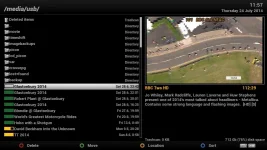
Now that's a strange thing I just decided to try it again but only plugged it in to the Front usb socket on the LX3 and it is now working

External HD.webp
 
Last edited:
I have tried plugging it into all the usb ports but the ntfs is still not recognised, i really don't want to format it because there is 1.5tb of files on it and i have no where to store them. Would this be a vix image problem? i had no problem mounting it on my vu solo vti image. Would flashing a different image work? has anyone had any success with different images like open atv, or egami?
 

OpenViX Feeds Status

Back
Top