Superb quality and spec AB-Com PULSe 4K SE. Crazy offer! Only £129! FREE UK DELIVERY! 4K UHD, Enigma 2, Multiboot 4 images & more!...
Superb quality and spec AB-Com PULSe 4K Rev II Twin Satellite tuner only £179! FREE UK DELIVERY! 4K UHD, Enigma 2, SATA HDD facility, Multiboot 4 images & more!...

Engima 2 - Samsung SMART TV Streaming app

make sure your logged in as developer. Go to you apps and long press enter screen on a installed App e.g youtube. select ip address and point it to you laptop or pc that your running the installer. long press entre screen again and select start user app sync.

I have a 2014 TV and it works fine
Doh! Got it thanks. For some silly reason I was long-pressing on one of the recommended apps instead of 'my apps'. Now to look at the pc and see if I can get e2stream going.
 
Yeeeee Hahhh!!! Eventually got it sorted on my 2014 Samsung. Getting the 'app' over from the PC was tricky for me because 'long-pressing' within the 'My Apps' panel was very hit and miss => sometimes the app would open, sometimes you'd get the menu (IP setting, update apps etc). Very impressed with the video quality as I'd feared it might be glitchy based on some bad experiences with casting.

Much appreciated Pembo. Now I'm eagerly awaiting the 'full-screen' release ... No pressure mind you ...:)
 
Yeeeee Hahhh!!! Eventually got it sorted on my 2014 Samsung. Getting the 'app' over from the PC was tricky for me because 'long-pressing' within the 'My Apps' panel was very hit and miss => sometimes the app would open, sometimes you'd get the menu (IP setting, update apps etc). Very impressed with the video quality as I'd feared it might be glitchy based on some bad experiences with casting.

Much appreciated Pembo. Now I'm eagerly awaiting the 'full-screen' release ... No pressure mind you ...:)

It's coming :) still working on it at every opportunity when work or family doesn't get in the way, with a hope of getting it released over the weekend.
 
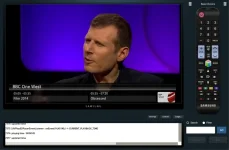
Just a quick screenshot to show progress:
2014_Smart_TV_Emulator.webp
2014_Smart_TV_Emulator2.webp
 
Great stuff - I got it up and running relatively easily but all the SD channels won't go fullscreen?
 
Great stuff - I got it up and running relatively easily but all the SD channels won't go fullscreen?

It's an issue with newer model tvs and the player class. I've hopefully once and for all resolved this in the next release!
 
I'm pleased to announce the release of E2Stream v1.5

You can download v1.5 and get more information on installation here
http://www.pembo.co.uk/e2stream

Change Log
Code:
v1.5

Rewrite of the video player class and programme selection screens to hopefully once and for all resolve the full screen 4:3 issue that has plagued previous versions!
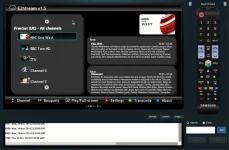
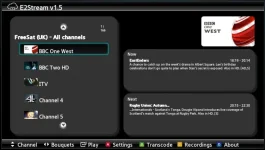
- Detect and use Picons either via service ID or service Name
- Expanded space for now/next on programme list screen

- Full screen mode, which includes an info bar showing now/next
   * Info button shows/hides the info bar
   * Program up/down change channels in full screen mode to the next channel in the bouquet

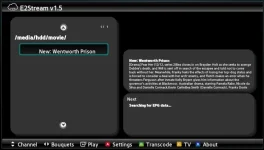
- Beta implementation to list and playback recordings. ◾Press Yellow[c] to change between records and TV mode
   * Use left/right to change recording locations
   * Use up/down to select recording and enter to play
   * Note – Rewind/FFwd functions are still to be implemented..

As usual, you can raise any bug here on at http://www.pembo.co.uk/bugs


e2_1.webpe2_2.webpe2_3.webp
 
I have v1.2 installed already. Im trying to upgrade to 1.5; logged in as developer on tv and ran installer on pc but getting fatal error and message "unable to bind server to port 80, please close down any webservers..running on port 80 and stsrt this installer again."
Any idea what I'm doing wrong?
 
I have v1.2 installed already. Im trying to upgrade to 1.5; logged in as developer on tv and ran installer on pc but getting fatal error and message "unable to bind server to port 80, please close down any webservers..running on port 80 and stsrt this installer again."
Any idea what I'm doing wrong?

The installer starts up a webserver on port 80.

I'd try and reboot first just incase you've managed to open the installer twice, if that doesn't fix it, open a command prompt as admin (assuming your running windows) and run the following command:

netstat -a -b

Look down the list for what is running on port 80 and kill it in the task manager
 
Thanks pembo reboot sorted it. I just had a quick look at it and getting buffering msg on top left of screen. Tried it on a couple of channels with same result. Channel name and now/next displaying ok on bottom but no picture. I'll try again later (when the missus leaves the room :)
 
it'll take a few seconds to buffer the stream before it kicks in.
 
it'll take a few seconds to buffer the stream before it kicks in.
Quick update... a couple of channels have come in fine with buffering only taking a few seconds (great picture btw) but two others just ain't working even after 3 mins.

Another channel has audio only. Let me know if you need any more dtls.
 
Last edited by a moderator:
Yeah please pm me details.. Could also be worth trying again. I've had a couple of issues where my tv has dropped the stream for unknown reasons... I'll keep doing more digging.
 
Hi Pembo,

Seems to be working well.

Just a few question on how to get picons working as I ready have picons on usb and work fine on box but cant seem them your app.

Also I am using ZoomZoomLuke's Custom 28.2 xml to hide a few channels but I have noticed it the show up as hidden on app

Also once in full screen how can you change channel or go back to the channel list
 
Last edited:
In full screen, just use the channel up/down buttons, or press enter again to return to the programme list.

If the picons are not working in the epg in openwebif they won't work in the app.
Check there and report back.

I'll have a look at hidden channels to see what I can do.
 
Hi Pembo, Thanks got the channel up/down working.

Regarding the picons I have on a usb in /media/sdb1/picons as I have another USB drive which is for moves on /media/usb

When I check in openwebif I don't see the picons. Do you think its because of the location as /media/sdb1/picons
 
Hi Pembo, Thanks got the channel up/down working.

Regarding the picons I have on a usb in /media/sdb1/picons as I have another USB drive which is for moves on /media/usb

When I check in openwebif I don't see the picons. Do you think its because of the location as /media/sdb1/picons

quite probably - I'm going to guess they need to be in /picons /media/hdd/picons or /media/usb/picons.
Could always raise a bug against openwebif with a screenshot of the EPG showing the picons missing.
 
The picon loactions have never included a mount point of sdb1 and folder must be "picon" without the "s" (ignore if typo please). Very easy to remount it as /media/hdd/ or create a symlink.
 
sorry for the typo.

I have fixed the issue. The picon need to be mounted as /media/usb for openwebif to pick them up even if they seem to pickup fine on the box if they are set to /media/sdb1/

If you have two USB connected then first one is setup as /media/sdb1/. If you change the mount to usb1 and usb2 it reverts back to one of the usb as /media/sdb1/

Now I can see them in openwebif they don't seem to appear in the app
 
Last edited:
Are you using service name based picon files or service id ones.
If you don't know, look in the picon folder and see if the names are recognisable,

if they're called for example:
bbconehd.png - then they're service name based

if they're called:
1_0_1_1B1D_802_2_11A0000_0_0_0.png (or similar)

Then you're using service id picons.

The app tries to detect which you are using (or neither) and then links to them accordingly by querying for the image from the first channel in the bouquet. If there is no picon for this channel, it will not show any.

So some questions.
1. What picon type are you using (name/id) in /media/usb/picon?
2. Does your first channel in the list have a picon file?
3. What is your first channel in the app?
3. Do you see a missing image placeholder (square with an 'x') in the app or just no picture at all?
 

OpenViX Feeds Status

Back
Top