Superb quality and spec AB-Com PULSe 4K SE. Crazy offer! Only £99! FREE UK DELIVERY! 4K UHD, Enigma 2, Multiboot 4 images & more!...
Superb quality and spec AB-Com PULSe 4K Rev II Twin Satellite tuner only £149! FREE UK DELIVERY! 4K UHD, Enigma 2, SATA HDD facility, Multiboot 4 images & more!...

EPG files test: Phase 1. Refactor

It's not a required file you can use the skin without tabs

I’m aware that it’s optional to install the skin with or without the additional mods.

But as I was using the EPG tabs mod prior to to build 28 it is indeed a requirement to install epgselection-mod a required file for Slyk 1080 R19 skin! Within that setup.

I’m happy to stay with build 27 for now (as she who must be obeyed likes having the tabs epg mod), until Kiddac finds the approximate time to make the necessary changes.

But thanks for clarification.
 
I’m aware that it’s optional to install the skin with or without the additional mods.

But as I was using the EPG tabs mod prior to to build 28 it is indeed a requirement to install epgselection-mod a required file for Slyk 1080 R19 skin! Within that setup.

I’m happy to stay with build 27 for now (as she who must be obeyed likes having the tabs epg mod), until Kiddac finds the approximate time to make the necessary changes.

But thanks for clarification.

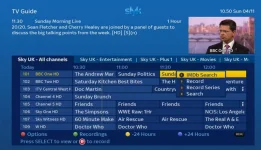
Can you show me some pics of this Skin please? And where are Kiddac’s skins available to download, which site? Thanks.


Sent from my iPhone using Tapatalk
 
Just a reminder from a week ago....

dsayers I have hacked my JediMakerXtream plugin to work with this new code for catchup. (that was fun). I will post the fix on my normal threads.

I will test all my skins and see if everything is still fine. Quick initial test, I had no problems.
 
I get that ist possible to add lots of extra code to adapt but since all was working fine with build 027
what was the reason to change all this since its breaking every skin there is for VIX???

You can try any skin thats in the image by default and they all are broken now.
And then we have OpenBlackhole thats built on the VIX source where all skins also are broken

And it would be an easy fix if i just could add a parameter code instead of adding lots of extra code into the screens
I also assume that VIX are consulting there own skinners before doing changes like this??

Last time this happend we did change the python code instead of changing 200 skins to adapt this error ;)
 
I get that ist possible to add lots of extra code to adapt but since all was working fine with build 027
what was the reason to change all this since its breaking every skin there is for VIX???
I'm not aware of it breaking every skin.

It maybe affecting skins once Kiddacs tabbed mod has been installed but this type of thing can happen anytime a mod is in place that changes existing vix files in someway.

I know as I was one of the users that kept trying to keep the coloured keys mod upto date. However, it it can be a lot of work keeping modded files upto date to reflect natural progression of changes to Vix (and other images).

The ultimate idea is that features like being able to re-assign coloured keys is hoped to be introduced, subject to approval, as standard to save this have to be modded so no need to keep modding things in same way.
 
I dont have KiddaC mods or skin installed so its not because of that the multi epg screen is squashed togather
its probably because the scaling factor is adapted wrong and probably set to some old screen sizes like 570p and 720p
 
I dont have KiddaC mods or skin installed so its not because of that the multi epg screen is squashed togather
its probably because the scaling factor is adapted wrong and probably set to some old screen sizes like 570p and 720p
Can you provide more info about what issue you're having is including screenshot and how to create that issue so that we can look into it?
 
I dont have KiddaC mods or skin installed so its not because of that the multi epg screen is squashed togather
its probably because the scaling factor is adapted wrong and probably set to some old screen sizes like 570p and 720p
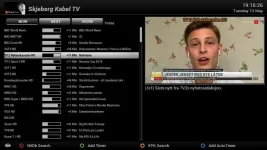
Its the serviceName scaling that have to little room and should be larger, now set to 6.5


multiepg-fuckedup.webp
 
Do you have a before screenshot for comparison? Were you running with a standard skin? What are your settings for the multi-epg?
 
Accully i am on OpenBlackhole image but its built on VIX and after som research i found that OBH did a fix for this but of cause when image is merged with VIX this fix
gets over written and we are back to squashed multiepg ;)

This is how it used to look where thescale factor was set to: servScale, timeScale, durScale, wideScale = parameters.get('EPGMultiColumnScales', (11.5, 4.0, 4.5, 0.5))
Screenshot is from latest OpenVIX where i just change the scale factors in the new /usr/lib/enigma2/python/Components/EpgListMulti.py
Skin is YouVix Blue

youvix-blue.webp
 
If you post link to the fix, we can add it to our one. Will avoid issues if/when the other mods are added.
 
I will tweak it a littlebit more and then upload the file here for testing :)
 
I will tweak it a littlebit more and then upload the file here for testing :)
Attached is a small little mod I've implemented to allow this to be adjusted to user preference based on things like skin used.

Could you test it for me and if okay, I'll submit this to Vix for possible inclusion (installation instructions in rar file)...

View attachment ServiceNameLengthMultiEPG.rar

Instructions of use (once installed):
Press menu with MultiEPG and higlight "Service Name Length"
use left/right arrow to increase figure up/down. Default is 7 and is user adjustable from 5 to 20.
 
Last edited by a moderator:
Here is my suggestion for MultiEPG settings it can probably be even better tweaked but looks a lot better then before :)
Would be nice if some from the VIX skinning Team did a final tweak to match as good as possible :)


IMPORTANT!!!
But before you do any testing be sure to backup the file /usr/lib/enigma2/python/Components/EpgListMulti.pyo
And to restore upload the backup file but first delete the file named EpgListMulti.py file or it will overwrite your restored EPGListMulti.pyo

YouVix Blue

aftermultiepg.webp

This is YouVix NightHD

aftermultiepg720.webp
 

Attachments

Here is my suggestion for MultiEPG settings it can probably be even better tweaked but looks a lot better then before :)
Would be nice if some from the VIX skinning Team did a final tweak to match as good as possible :)
I've quickly done something that can be changed by user from MultiEPG menu. Feel free to test it and let me know please. It allows user themselves to change as they want directly from MultiEPG menu and it applies straight away. Ideal if skin in use differs on layout, etc.

See post #234
 
Last edited:
[STRIKE]Can you highlight what the changes are or upload one that has got the same formatting please?<br>[/STRIKE]<br><br>Scrub that. Service name length in config is the way to go, seeing as the grid EPG has it
 
Last edited:
Service name length in config is the way to go, seeing as the grid EPG has it
Thanks. Once tested by several users, I'll submit a PR back to Vix dev branch for potentially future inclusion.
 
Thanks. Once tested by several users, I'll submit a PR back to Vix dev branch for potentially future inclusion.

Excellent!!! this is just what i have been wanting for this works just perfect and now you saved about 200 skins
This should go straight into the next update
 
Excellent!!! this is just what i have been wanting for this works just perfect and now you saved about 200 skins
This should go straight into the next update
Thanks to you for highlighting this issue and providing reference to variable that needs to be adjusted :)

I've submitted a PR here.
 

OpenViX Feeds Status

Back
Top