Superb quality and spec AB-Com PULSe 4K SE. Crazy offer! Only £99! FREE UK DELIVERY! 4K UHD, Enigma 2, Multiboot 4 images & more!...
Superb quality and spec AB-Com PULSe 4K Rev II Twin Satellite tuner only £149! FREE UK DELIVERY! 4K UHD, Enigma 2, SATA HDD facility, Multiboot 4 images & more!...

[GiGaBlue QUAD+ PLUS] Frequent 'pauses' during playback.

leshay

New member
Joined
Sep 6, 2014
Messages
289
Reaction score
0
Points
0
Location
Livingston, Scotland
Hi

Flashed latest image today and straightaway have issues.

Playing back a recording from either internal HDD or NAS - every few minutes, picture freezes and sometimes sound continues other times also freezes.

In ALL cases, a skip back (my skip values are defaults) results in playing through same position without issue.

The issue happens with both recordings made with old image and with new image.

The issue also happens with recordings which were issue free using the old image.

The issue has happened with all recordings played back, which so far has only been a handful of recordings, a couple of which were recordings previously OK with old image.

Live TV does not show the issue - only issue being the 'old' one where the freezing happens only when using 'skip' keys.

Have tried a 'fresh' reboot (meaning a reboot other than the installation one(s)), with no improvement.

I have no exotic plugins/settings.
 
Can you try OpenATV image to see if same issue occurs?

Theres been no driver changes since April 2018, so older image had same drivers.

I'd suggest initialising another storage device and checked recording / playback again.
 
Some peeps use old drivers on newer images, but not sure if Giga have had a kernel change between then. Hopefully someone might be able to help with that question. Probably go back to the working image for the time being if its a problem for you. Any issues best being reported to Gigablue directly yeah.


Sent from my iPhone using Tapatalk
 
Some peeps use old drivers on newer images, but not sure if Giga have had a kernel change between then. Hopefully someone might be able to help with that question. Probably go back to the working image for the time being if its a problem for you. Any issues best being reported to Gigablue directly yeah.


Sent from my iPhone using Tapatalk


?? Theres been no driver updates since April 2018 for this model:
Code:
https://github.com/oe-alliance/oe-alliance-core/commits/4.3/meta-brands/meta-gigablue/recipes-drivers/gigablue-dvb-modules-gb7356.bb
 
I’ve read somewhere with peeps having issues with Gigablue and stuttering playback problems. Maybe related to certain TVs, but then again using 5.2.045 doesn’t have the issue so doesn’t make sense I guess.


Sent from my iPhone using Tapatalk
 
I'm fairly sure this is an old bug which has resurfaced recently. I have a Quad Plus and have experienced similar stuttering playback issues and they are worse when I am simultaneously recording. I believe it is memory related, maybe a setting in recent builds which has caused the machine to keep caching stuff in memory until it runs out of RAM. As a workaround, I have installed the cacheflush plug-in and it seems to have resolved it for the moment- you could try this @leshay. The bug is reported to ViX devs and I'll update when resolved.
 
Hi
Thanks for that. I will however, remain on the older version for now rather than try a work around. Maybe GigaBlue will wake up sometime and deal with the issues (assuming they are driver issues).
 
Hi

OK, have gone back to version 5.2.045 and no more of that issue.

Would you be able to post a link to the driver download page, please? I'd like to try that as a possible fix for stuttering playback on our GB Quad & the one our in-laws have.

Thanks,

Steve
 
OK, have gone back to version 5.2.045 and no more of that issue

Oh, sorry I thought it was an older driver version that was suggested as a possible fix? Is the idea to flash an older OpenVix as the potential solution?
 
Replacing drivers isn't as easy at it sounds, the OP has chosen to use an older version of ViX.

Maybe try the cacheflush plug-in?
 
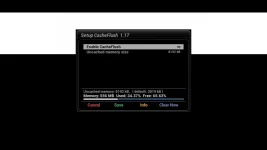
I think it's probably unlikely that GigaBlue will update drivers as the box is quite old. The drivers haven't changed since mid 2018 I think, and are included in the builds as they are released by the manufacturer. In any case I was getting the issue occasionally even on 5.2.045. I'm on 5.3.001 now. I'll keep you updated should I hear of a more permanent fix. The OpenATV forums (German) recommend using some form of cache flushing and setting a minimum memory. I would suggest installing the cacheflush plugin, setting the mininum memory to 8192kb and pressing the grren button to save the setting. I don't even activate the plugin to flush the caches, just set the minimum RAM as per the screenshot. It works for me. We are just back from holiday and my wife has been watching all the recordings of soaps made while we were away. No issues noted since installing the plugin. Was happening every couple of minutes before.
cacheflush.webp
 
Last edited:
I think it's probably unlikely that GigaBlue will update drivers as the box is quite old. The drivers haven't changed since mid 2018 I think, and are included in the builds as they are released by the manufacturer. In any case I was getting the issue occasionally even on 5.2.045. I'm on 5.3.001 now. I'll keep you updated should I hear of a more permanent fix. The OpenATV forums (German) recommend using some form of cache flushing and setting a minimum memory. I would suggest installing the cacheflush plugin, setting the mininum memory to 8192kb and pressing the grren button to save the setting. I don't even activate the plugin to flush the caches, just set the minimum RAM as per the screenshot. It works for me. We are just back from holiday and my wife has been watching all the recordings of soaps made while we were away. No issues noted since installing the plugin. Was happening every couple of minutes before.
View attachment 59217

Many thanks Tony I'll try that.

Cheers,

Steve
 
Try doing a couch flash/usb flash of Vix 5.3.002 followed by a settings restore. Some GigaBlue-specific data in /etc/sysctl.conf seems to have been dropped in previous releases and has now been reinstated (thanks @twol). It provides for some extra memory headroom, similar to what cacheflush was doing. I've been testing the amended settings for a couple of weeks now (without cacheflush) and have had no issues with playback.
 
I would just do a settings backup and then flash online with ImageManager

Do you mean use Menu > System > Software Update ? That tells me that I'm on the final 5.2.x release

Is there no 5.3.x for the Gigablue Quad HD ?

Steve
 

OpenViX Feeds Status

Back
Top