Superb quality and spec AB-Com PULSe 4K SE. Crazy offer! Only £99! FREE UK DELIVERY! 4K UHD, Enigma 2, Multiboot 4 images & more!...
Superb quality and spec AB-Com PULSe 4K Rev II Twin Satellite tuner only £149! FREE UK DELIVERY! 4K UHD, Enigma 2, SATA HDD facility, Multiboot 4 images & more!...

GT-Sat GT-S3DCSS24 SCR no signal

StephenRadford

New member
Joined
Aug 10, 2018
Messages
13
Reaction score
0
Points
1
Age
66
HI ALL, Help needed, I have installed a new Technomate 65cm Mesh Satellite Dish with a GT-Sat GT-S3DCSS24 LMB and a new VU+ Duo 4K SE. To cut a long story short I have pulled most of my hair out over the last few days trying to get the unicable part sorted.
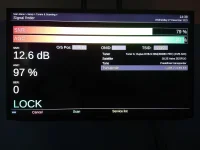
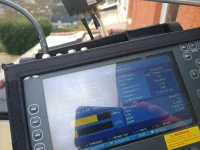
I currently have a 3m length of coax running from the legacy output of the LMB directly into the VU+ box (to reduce any connection issues), the receiver is running the latest firmware (6.4). the output from the legacy is very good with a signal of 79% and an AGC of 97% using transponder 11038V (pic 1 legacy settings.jpg)
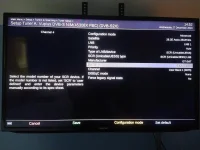
I then swapped the cable into the unicable output and set the receiver configuration as :-

Config mode - Advanced
Satellite - 28.2E Astra
LNB - LNB 1
Priority - Auto
Type of LNB/device - SCR (Unicable/JESS)
SCR (unicable/JESS) type - SCR (Unicable/JESS) LNB
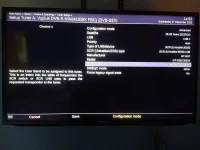
Model - GT-S3DCSS24
Channel - User band1(0975)
DiSEqC mode - none
Force legacy signal stats - no
(Image - model GT-SAT LMB.jpg)

I also tried changing the Model to :-
model - dLNB dHello

the rest remains the same
(Image - using @Hello.jpg)

I have read a lot of posts about unicable configuration and followed the settings as posted in this forum, but I can not find where the fault is.
I am not able to get a signal using unicable could anyone suggest anything to help.

Thanks in advance Stephen
 

Attachments

  • using @Hello.webp
    using @Hello.webp
    43.9 KB · Views: 19
  • model GT-SAT LMB.webp
    model GT-SAT LMB.webp
    41.9 KB · Views: 18
  • PIC 1 legacy settings.webp
    PIC 1 legacy settings.webp
    30.2 KB · Views: 16
I am pretty sure that the LNB comes programmed in two varieties, one is for the Italian market. Note the word "or" at the bottom of the leaflet. One side of the leaflet has the frequencies used for the 24 SCR/user bands/channels, the other has the fewer frequencies used for the Italian market. Try the Italian option, the first user band is 1210 MHz instead of 975

P.S
Link to guide on taking screenshots in my signature if you need it.

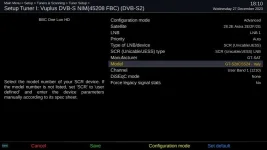
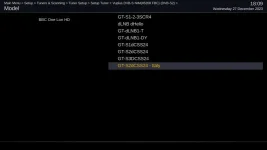
Edit: Screenshots showing the GT sat models as well as just one tuner setup to illustrate the configuration.
 

Attachments

  • GTSat italy 2.webp
    GTSat italy 2.webp
    28.7 KB · Views: 14
  • GTSat italy.webp
    GTSat italy.webp
    12.6 KB · Views: 18
Last edited:
Thank you I will try that.
The piece of paper in the box is single sided with Userband-ID and Userband-Frq columns.
1 - 975 Mhz
to
24 - 2125 Mhz.
Thank you for the screenshot tip.
 
The Italian one only has 16 usable bands. But worth trying anyway.

Sorry to ask, are you sure that you are connecting to the unicable output?
 
Hi Abu,
Still nothing with the Italian model selected :(
Do you think there might be a fault with the actual LNB?
Does the box need a reboot to send the info to the LNB?
Does it need time to react to any LNB changes?
Sorry for the simple questions, I am lost now.
Not getting any signal on any of the transponders.
 
yes, three legacy which work fine, one unicable.

What has just come up on reboot after the channel, it is now asking "connected through another tuner"
That was not there before.
 
Last edited:
Can you post your settings. / etc/ enigma2 … sometimes when you flip between different setups it gets confused.
 
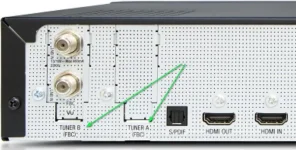
Which slot is your FBC tuner in?
I've had a look online and all the images of a single twin satellite FBC tuner show it in the Tuner B slot and you seem to be setting up Tuner A.
I don't know if this makes a difference?

VuTuners.webp
 
TWOL
please explain what you want to see and how do I get to it. It has been reset several times and not using any backup. If that helps
 
Last edited:
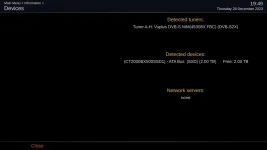
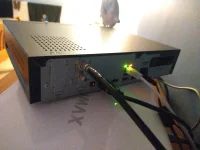
Please post a screenshot of Menu > Information > Devices. If possible, please also post a picture of the rear of the receiver showing the wires/tuners.
Please do not mixup slots and tuners. No matter which slot in the motherboard the card/module is inserted into, the top physical input will be the lower letter. I have not had a problem with the tuner card being in motherboard socket A on my Duo 4k (not SE), but feel free to try inserting in motherboard socket B. If you have one tuner card, It will still be shown as Tuner A-H

The settings file is located in /etc/enigma2. Transfer it to PC, you will have to zip it before you can upload it to forum.
 
Last edited:
TWOL
please explain what you want to see and how do I get to it. It has been reset several times and not using any backup. If that helps

in /etc/enigma2 directory on the box, there is a settings files.(/etc/enigma2/settings)
If you can extract to a PC with Filezilla or another tool and post here, we can then see what the box has defined in the tuner settings compared to the menu setups etc
 
Please post a screenshot of Menu > Information > Devices. If possible, please also post a picture of the rear of the receiver showing the wires/tuners.
Please do not mixup slots and tuners. No matter which slot in the motherboard the card/module is inserted into, the top physical input will be the lower letter. I have not had a problem with the tuner card being in motherboard socket A on my Duo 4k (not SE), but feel free to try inserting in motherboard socket B. If you have one tuner card, It will still be shown as Tuner A-H

The settings file is located in /etc/enigma2. Transfer it to PC, you will have to zip it before you can upload it to forum.

As requested, I think I am uploading the correct way, I am getting used to using forums.
1 -Devices (screen shot)
2 -images rear of receiver
3 - zip file of enigma2 directory. (Iam not sure if this has worked correctly?)

SETTINGS FILE
config.misc.firstrun=False
config.misc.initialchannelselection=False
config.misc.languageselected=False
config.misc.startCounter=2
config.misc.SyncTimeUsing=ntp
config.misc.videowizardenabled=False
config.Nims.0.advanced.lnb.1.lof=unicable
config.Nims.0.advanced.lnb.1.scrfrequency=975
config.Nims.0.advanced.lnb.1.scrList=1
config.Nims.0.advanced.lnb.1.unicableManufacturer=GT-SAT
config.Nims.0.advanced.lnb.1.unicableProduct=GT-S3DCSS24
config.Nims.0.advanced.sat.282.lnb=1
config.Nims.0.advanced.sats=282
config.Nims.0.configMode=advanced
config.Nims.1.configMode=nothing
config.osd.dst_height=576
config.osd.dst_left=12
config.osd.dst_top=0
config.osd.dst_width=708
config.osd.language=en_GB
config.plugins.epgsearch.numorbpos=0
config.softwareupdate.updatelastcheck=1703793223
config.tv.lastroot=1:7:1:0:0:0:0:0:0:0:FROM BOUQUET "bouquets.tv" ORDER BY bouquet;
config.unicable.unicableManufacturer=GT-SAT
config.unicable.unicableProduct=GT-S3DCSS24
config.usage.date.compact=%-d %b
config.usage.date.compressed=%-d%b
config.usage.date.displayday=%a %-d %b
config.version=53023
 

Attachments

  • VU+Duo4Kse Devices.webp
    VU+Duo4Kse Devices.webp
    11.3 KB · Views: 17
  • IMG_20231228_195711945.webp
    IMG_20231228_195711945.webp
    41.9 KB · Views: 21
  • VUpluse4KSE enigma2.zip
    VUpluse4KSE enigma2.zip
    3.7 KB · Views: 6
Last edited:
I've just fresh flashed my box and only set up tuners A & B and these are my tuners in the settings file:

config.Nims.0.advanced.lnb.1.lof=unicable
config.Nims.0.advanced.lnb.1.powerinserter=False
config.Nims.0.advanced.lnb.1.scrfrequency=975
config.Nims.0.advanced.lnb.1.scrList=1
config.Nims.0.advanced.lnb.1.unicableManufacturer=GT-SAT
config.Nims.0.advanced.lnb.1.unicableProduct=GT-S3DCSS24
config.Nims.0.advanced.sat.282.lnb=1
config.Nims.0.advanced.sats=282
config.Nims.0.configMode=advanced
config.Nims.1.advanced.lnb.1.lof=unicable
config.Nims.1.advanced.lnb.1.powerinserter=False
config.Nims.1.advanced.lnb.1.scrfrequency=1025
config.Nims.1.advanced.lnb.1.scrList=2
config.Nims.1.advanced.lnb.1.unicableManufacturer=GT-SAT
config.Nims.1.advanced.lnb.1.unicableProduct=GT-S3DCSS24
config.Nims.1.advanced.sat.282.lnb=1
config.Nims.1.advanced.sats=282
config.Nims.1.configMode=advanced
 
I've just fresh flashed my box and only set up tuners A & B and these are my tuners in the settings file:

config.Nims.0.advanced.lnb.1.lof=unicable
config.Nims.0.advanced.lnb.1.powerinserter=False
config.Nims.0.advanced.lnb.1.scrfrequency=975
config.Nims.0.advanced.lnb.1.scrList=1
config.Nims.0.advanced.lnb.1.unicableManufacturer=GT-SAT
config.Nims.0.advanced.lnb.1.unicableProduct=GT-S3DCSS24
config.Nims.0.advanced.sat.282.lnb=1
config.Nims.0.advanced.sats=282
config.Nims.0.configMode=advanced
config.Nims.1.advanced.lnb.1.lof=unicable
config.Nims.1.advanced.lnb.1.powerinserter=False
config.Nims.1.advanced.lnb.1.scrfrequency=1025
config.Nims.1.advanced.lnb.1.scrList=2
config.Nims.1.advanced.lnb.1.unicableManufacturer=GT-SAT
config.Nims.1.advanced.lnb.1.unicableProduct=GT-S3DCSS24
config.Nims.1.advanced.sat.282.lnb=1
config.Nims.1.advanced.sats=282
config.Nims.1.configMode=advanced

I have just reconfigured to A & B and got this, it looks like the two lines in BOLD are the difference. This line as it is false should not make a difference "config.Nims.0.advanced.lnb.1.powerinserter=False"

config.Nims.0.advanced.lnb.1.lof=unicable
config.Nims.0.advanced.lnb.1.scrfrequency=975
config.Nims.0.advanced.lnb.1.scrList=1
config.Nims.0.advanced.lnb.1.unicableManufacturer=GT-SAT
config.Nims.0.advanced.lnb.1.unicableProduct=GT-S3DCSS24
config.Nims.0.advanced.sat.282.lnb=1
config.Nims.0.advanced.sats=282
config.Nims.0.configMode=advanced
config.Nims.1.advanced.lnb.1.lof=unicable
config.Nims.1.advanced.lnb.1.scrfrequency=1025
config.Nims.1.advanced.lnb.1.scrList=2
config.Nims.1.advanced.lnb.1.unicableManufacturer=GT-SAT
config.Nims.1.advanced.lnb.1.unicableProduct=GT-S3DCSS24
config.Nims.1.advanced.sat.282.lnb=1
config.Nims.1.advanced.sats=282
config.Nims.1.advanced.unicableconnected=True
config.Nims.1.advanced.unicableconnectedTo=0

config.Nims.1.configMode=advanced
 
That should be correct for your setup because you only have one cable connected. I have cables connected to both tuner inputs.
Are you absolutely sure that the cable is connected to the unicable output of the LNB and not the legacy output?
Have you actually tried scanning with ABM?

2023-12-28-221613.webp
 
Last edited:
That should be correct for your setup because you only have one cable connected. I have cables connected to both tuner inputs.
Are you absolutely sure that the cable is connected to the unicable output of the LNB and not the legacy output?
Have you actually tried scanning with ABM?

View attachment 65999

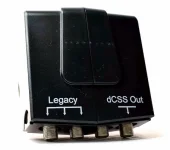
Tried scanning nothing found, the cable is connected to the right hand output of your imageIMG_20231222_123453501.webp This images show the black cable connected to the dCSS output, the others are to the legacy outputs which work fine.
From this video I found on Youtube, (https://www.youtube.com/watch?v=2TRH_jyWUoM&t=84s) can you tell me if he is programming the frequency of the output? (I have an old Amiko XFinder which is not registering any signal output, I'm not sure if it is unicable I or II)
 
The first 4 channels are always unicable 1 anyway. I think you have a faulty LNB. Double check with retailer and see what they suggest you test.
 
The first 4 channels are always unicable 1 anyway. I think you have a faulty LNB. Double check with retailer and see what they suggest you test.

I think you are correct, I want others opinion to confirm. It took me sometime to check all the options as it was a new item.
Thanks to everyone for your help.
 
I also have this LNB and same box as you and generally no issues at all except for when it seems it gets cold, I find I have no signal and a full power reboot (by physical switch) I occasionally have to do during winter months. My rare no signal is first thing of a morning which only thing it does of a morning (around 6am) is a daily ABM update and EPG update just after. I find that when I do have to do a phsyical power reboot, it's fine for rest of the day and sometimes for days after.

It's weird as had this setup for well over a year and it is only during really cold/icy weather I have this no signal issue so for 10+ months of year it's perfectly fine! At least that is pattern I've only been able to find. I too had the LNB switched out by supplier (WoS) and same thing.

I live with this issue as it's obviously very rare and a power cycle fixes it.

I use 1x legacy that goes to a Solo2 but the main feed goes to my Duo4KSE. My Duo4KSE has two actual tuners so I have a splitter at end feed from LNB.

I'm not using latest OpenVix, however. Just 6.4.008.

If it helps, I've attached my (generally) working settings file...
View attachment settings.rar
 
Last edited:

OpenViX Feeds Status

Back
Top