
Superb quality and spec AB-Com PULSe 4K SE. Crazy offer! Only £99! FREE UK DELIVERY! 4K UHD, Enigma 2, Multiboot 4 images & more!...
Superb quality and spec AB-Com PULSe 4K Rev II Twin Satellite tuner only £149! FREE UK DELIVERY! 4K UHD, Enigma 2, SATA HDD facility, Multiboot 4 images & more!...
You are using an out of date browser. It may not display this or other websites correctly.
You should upgrade or use an alternative browser.
You should upgrade or use an alternative browser.

- Status
- Not open for further replies.

M
moulin
Guest
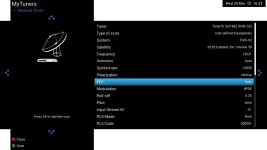
Thanks maxben, but that's my problem, I am only allowed to choose a specific FEC (1/2, 2/3, 3/4, 3/5 through to 9/10). There is no auto option in DVB-S2.
Last edited by a moderator:
M
moulin
Guest
Ah, but you've cracked it for me, because I've just tried it on DVB-S setting (which does allow an auto FEC choice) and hey presto it's found the three channels in question.
Counter-intuitive but you've got the problem solved for me, THANK YOU.
Counter-intuitive but you've got the problem solved for me, THANK YOU.
M
moulin
Guest
Again, seems to be another defficiency in Open ATV then, although one that can be worked around.
When I'm feeling braver I will have a go at flashing it with ViX - wish I'd chosen that originally but hey you only find these things out by using them.
When I'm feeling braver I will have a go at flashing it with ViX - wish I'd chosen that originally but hey you only find these things out by using them.

I am amazed at how much you have achieved ... certainly a fast learnerAgain, seems to be another defficiency in Open ATV then, although one that can be worked around.
When I'm feeling braver I will have a go at flashing it with ViX - wish I'd chosen that originally but hey you only find these things out by using them.

M
moulin
Guest
Well when that fateful day comes I'm relying on you twol to show me the fool-proof way of doing it that I think you mentioned. But I'll stick with Open ATV for the moment as it's doing what I want, with the help of DreamboxEdit which is really very good.
M
moulin
Guest
Hello again. I've been quiet because in the main I and OpenATV have a truce and it's mostly doing the very basic things I need it to do now, mainly the multistrams on 5 deg W.
However....
I'm able to record programmes to a USB stick and watch them with VLC player on my computer. But here's the stupid bit: I haven't found a way to play them on the Octagon itself. When I put the USB stick into the Octagon with programmes that the latter has itself recorded on that very stick, it says "No displayable files on this media found".
Going to Movie Centre (which is probably the wrong thing anyway) gets me nowhere.
Please - what am I doing wrong??!!
However....
I'm able to record programmes to a USB stick and watch them with VLC player on my computer. But here's the stupid bit: I haven't found a way to play them on the Octagon itself. When I put the USB stick into the Octagon with programmes that the latter has itself recorded on that very stick, it says "No displayable files on this media found".
Going to Movie Centre (which is probably the wrong thing anyway) gets me nowhere.
Please - what am I doing wrong??!!

Andy_Hazza
Moderator
If I had to take a wild guess looking at the remote, the recordings will be in Playlist. (Next to the record button)
Sent from my iPhone using Tapatalk
Sent from my iPhone using Tapatalk
Andy_Hazza
Moderator
Also depends what format your usb device is? My guess is NTFS?
Sent from my iPhone using Tapatalk
Sent from my iPhone using Tapatalk
M
moulin
Guest
Thank you. Tried and ended up in Enhanced Movie Centre (as before) with no files visible. However, then tried Menu and Reload Directory (I think it was) and magically the files have appeared.
I think it's a FAT USB as it was formatted in my Aston Simba Fransat box which does FAT not NTFS.
Thanks again.
I think it's a FAT USB as it was formatted in my Aston Simba Fransat box which does FAT not NTFS.
Thanks again.
Andy_Hazza
Moderator
Glad you sorted it. [emoji1360]
Sent from my iPhone using Tapatalk
Sent from my iPhone using Tapatalk
M
moulin
Guest
After a good 16 months of calm with the Octagon 4008, I've run into problems big time trying to record.
It all started when I decided to clear out the 64 GB USB stick I use. I reformatted in my laptop. Put it back in the Octagon, recordings were made but were no longer visible via the PLAYLIST button on the remote, although they were visible to the laptop. Long story short, it seemed to be that the Octagon was no longer putting them in the "movie" subfolder that it used to use. Eventually I sorted that out, in the menus I set the three destination folders (in record setup) to media/hdd/movies, and thought I was OK, it certainly worked fine that evening.
A few days later I discover that I can no longer make recordings at all on any USB stick. I've tried fomatting them in the Octagon itself (using the set up storage initialisation red button), it doesn't create a movie folder. I've tried creating a movie folder with the laptop, I've tried doing without and telling the Octagon to record on the root of the hdd. I've tried everything I can think of and have become EXTREMELY CROSS!!!!!! I just keep getting the message "unable to record - disc full?". Well none of the discs are full, they've been reformatted, and in both cases I've tried the Octagon reformat AND a laptop reformat.
Why does this box have to be so damned complicated and the menus so user-unfriendly? I ask because I now have the Octagon SX88+ and all my irritation with the 4008 disappears because the SX88 is simple, intuitive, clean, and easy. What I can't get the little box to do is to record everything with a specified programme name, one of the things I like about the 4008 (probably called EPG series link or search-and-record) and if I could I'd put the 4008 in the bin. But now the 4008 is refusing to record anything at all it may well go in the bin anyway unless one of you clever people can see what I'm doing wrong.
I've considered a factory reset but as it took me so long to get the channel lists the way I want, and as I'm uncertain I could save and reload them, that's not really an option.
Anyway, if any of you can help I'd be very VERY grateful. But please keep it simple......
One basic question, should I be using FAT32 or NTFS? I'm sure the original working formatting was FAT32 but when I did get it working briefly a few days ago I have a feeling I'd used NTFS on the laptop.....
It all started when I decided to clear out the 64 GB USB stick I use. I reformatted in my laptop. Put it back in the Octagon, recordings were made but were no longer visible via the PLAYLIST button on the remote, although they were visible to the laptop. Long story short, it seemed to be that the Octagon was no longer putting them in the "movie" subfolder that it used to use. Eventually I sorted that out, in the menus I set the three destination folders (in record setup) to media/hdd/movies, and thought I was OK, it certainly worked fine that evening.
A few days later I discover that I can no longer make recordings at all on any USB stick. I've tried fomatting them in the Octagon itself (using the set up storage initialisation red button), it doesn't create a movie folder. I've tried creating a movie folder with the laptop, I've tried doing without and telling the Octagon to record on the root of the hdd. I've tried everything I can think of and have become EXTREMELY CROSS!!!!!! I just keep getting the message "unable to record - disc full?". Well none of the discs are full, they've been reformatted, and in both cases I've tried the Octagon reformat AND a laptop reformat.
Why does this box have to be so damned complicated and the menus so user-unfriendly? I ask because I now have the Octagon SX88+ and all my irritation with the 4008 disappears because the SX88 is simple, intuitive, clean, and easy. What I can't get the little box to do is to record everything with a specified programme name, one of the things I like about the 4008 (probably called EPG series link or search-and-record) and if I could I'd put the 4008 in the bin. But now the 4008 is refusing to record anything at all it may well go in the bin anyway unless one of you clever people can see what I'm doing wrong.
I've considered a factory reset but as it took me so long to get the channel lists the way I want, and as I'm uncertain I could save and reload them, that's not really an option.
Anyway, if any of you can help I'd be very VERY grateful. But please keep it simple......
One basic question, should I be using FAT32 or NTFS? I'm sure the original working formatting was FAT32 but when I did get it working briefly a few days ago I have a feeling I'd used NTFS on the laptop.....
Last edited by a moderator:
Andy_Hazza
Moderator
Reformatted your USB equals ‘the files will no longer be visible.
Also as you have reformatted your USB, you will need to initialise the USB within ViX to format it to Ext 3/4 etc.
Sent from my iPhone using Tapatalk
Also as you have reformatted your USB, you will need to initialise the USB within ViX to format it to Ext 3/4 etc.
Sent from my iPhone using Tapatalk
M
moulin
Guest
Should have been clearer - sorry. I regularly record on the 64 GB stick, then transfer the files elsewhere (well just the *.ts file, that's all that's needed for VLC player) for permanent storage. What I mean is that - whilst it was allowing me to record until recently - the files THAT HAD ONLY JUST BEEN RECORDED weren't visible on the Octagon via the PLAYLIST button. I could get at them though via the mediaplayer, but that was a faff....
OK, so you say I need to initialise it within VIX. Isn't that what I've done (as described above) by going SETUP -> SYSTEM -> STORAGE DEVICE -> Initialisation....? I've done all that on both USB sticks, and they still won't allow recordings.
But thank you for trying to help, it must be something simple that has gone wrong....
OK, so you say I need to initialise it within VIX. Isn't that what I've done (as described above) by going SETUP -> SYSTEM -> STORAGE DEVICE -> Initialisation....? I've done all that on both USB sticks, and they still won't allow recordings.
But thank you for trying to help, it must be something simple that has gone wrong....
M
moulin
Guest
FWIW for a while a 32 GB stick that I normally use in another sat receiver was still working fine, but I've just tested that and get the same message about not being able to record.
My guess is that in trying to get the 64 GB to work I've upset something in the Record location/default movie location settings. Could someone please remind me what the default settings should read for default movie location, instant record location and timer record location and I'll set them again. I've got them all set to /media/hdd/movie at the moment....
My guess is that in trying to get the 64 GB to work I've upset something in the Record location/default movie location settings. Could someone please remind me what the default settings should read for default movie location, instant record location and timer record location and I'll set them again. I've got them all set to /media/hdd/movie at the moment....
Andy_Hazza
Moderator
Do you not have an internal HDD in your SF4008?
Sent from my iPhone using Tapatalk
Sent from my iPhone using Tapatalk
M
moulin
Guest
No, prefer to record on a stick and then keep the recordings safe on completely separate drives.
M
moulin
Guest
duplicate post - sorry.
Andy_Hazza
Moderator
Instead of unplugging the usb every time you want to transfer to a pc, why not just ftp into the receiver and just move from the box to the pc?
Sent from my iPhone using Tapatalk
Sent from my iPhone using Tapatalk
- Status
- Not open for further replies.
Similar threads
- Replies
- 15
- Views
- 12K

- Replies
- 1
- Views
- 1K


- Replies
- 75
- Views
- 14K
- Replies
- 12
- Views
- 6K
- Replies
- 8
- Views
- 6K