

Hi, I have a 3 month old HD61 4K with a pre-installed Toshiba 1TB HDD. It's worked flawlessly (openatv 6.4, 7.0 and OpenVix 6) until a few days ago. Now the HDD cannot be seen - it cannot be mounted, I get 'mount failed' and any operation on the HDD fails, even initialisation - which I see the attached error for. can anyone suggest how to resolve this issue? I've got a number of recordings on it but am resigned to losing them. I just want a HDD that works.
media/usb the usb stick that I'm using for backups, epg etc I've tried renaming the HDD to media/HDD but it reverts back
I've even tried mounting via telnet but get the following...
Also...
Can anyone help please?
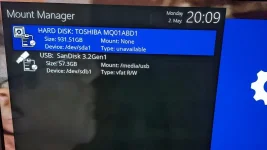
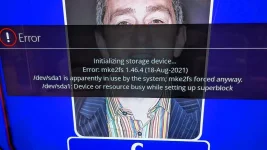
media/usb the usb stick that I'm using for backups, epg etc I've tried renaming the HDD to media/HDD but it reverts back
I've even tried mounting via telnet but get the following...
Code:
mount /dev/sda1 /media/hdd
NTFS signature is missing.
Failed to mount '/dev/sda1': Invalid argument
The device '/dev/sda1' doesn't seem to have a valid NTFS.
Maybe the wrong device is used? Or the whole disk instead of a
partition (e.g. /dev/sda, not /dev/sda1)? Or the other way around?
mount: mounting /dev/sda1 on /media/hdd failed: No such file or directory
Also...
Code:
~# df -h
Filesystem                Size      Used Available Use% Mounted on
/dev/mmcblk0p23           5.2G      1.5G      3.4G  31% /
devtmpfs                929.3M     40.0K    929.3M   0% /dev
tmpfs                    64.0K         0     64.0K   0% /media
/dev/mmcblk0p4            2.0M     20.0K      2.0M   1% /boot
tmpfs                   929.6M      1.6M    928.0M   0% /var/volatile
/dev/sdb1                57.3G      1.2G     56.1G   2% /media/usb
Can anyone help please?


