
Superb quality and spec AB-Com PULSe 4K SE. Crazy offer! Only £99! FREE UK DELIVERY! 4K UHD, Enigma 2, Multiboot 4 images & more!...
Superb quality and spec AB-Com PULSe 4K Rev II Twin Satellite tuner only £149! FREE UK DELIVERY! 4K UHD, Enigma 2, SATA HDD facility, Multiboot 4 images & more!...
You are using an out of date browser. It may not display this or other websites correctly.
You should upgrade or use an alternative browser.
You should upgrade or use an alternative browser.
Help with Picon installation
- Thread starter psionguy
- Start date


abu baniaz
Moderator
@psionguy, please a screenshot of your picon path in the plugin menu. Please do not post a screenshot from openwebif settings.
abu baniaz
Moderator
@bellejt
Where have you set these paths. Please only post details about the options in the plugin menu.
config.PiconPath=/LCD4picon/
config.PiconPathAlt=/media/usb/LCD4picon/
Where have you set these paths. Please only post details about the options in the plugin menu.
config.PiconPath=/LCD4picon/
config.PiconPathAlt=/media/usb/LCD4picon/
abu baniaz
Moderator
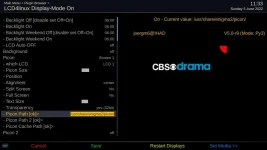

psionguy
Member
- Joined
- May 26, 2010
- Messages
- 319
- Reaction score
- 0
- Points
- 16
As requested
I have noticed that when I change the settings to USB it reverts back to HDD after a re boot.
When you download picons from the download site are they automatically stored in Media usb or hdd?
I am begining to think this may be a hardware issue, although picons where working perfectly prior to the clean instal.
I have noticed that when I change the settings to USB it reverts back to HDD after a re boot.
When you download picons from the download site are they automatically stored in Media usb or hdd?
I am begining to think this may be a hardware issue, although picons where working perfectly prior to the clean instal.
Attachments
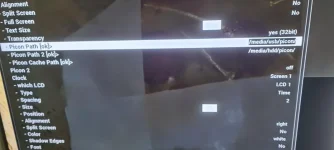
Last edited:

If you download picons from OpenViX feeds they will be stored wherever you specify before saving.
abu baniaz
Moderator
Once you have saved the picon location, please select the extended debug logs, and re-upload it. Zap/select a few different channels before you get the log.
If you want to take clearer/better screenshots instead of using your camera, guide is here: https://www.world-of-satellite.com/showthread.php?44054-How-to-take-screen-shots-How-to-attach-files
If you want to take clearer/better screenshots instead of using your camera, guide is here: https://www.world-of-satellite.com/showthread.php?44054-How-to-take-screen-shots-How-to-attach-files
abu baniaz
Moderator
You are getting these, so it is finding the picons, a bit too many I think.
14:37:16 Piconsearch ['/media/usb/picon/1_0_19_1B1D_802_2_11A0000_0_0_0.png', '/media/usb/picon/BBC One HD.png', '/media/usb/picon/BBC One HD.png', '/media/usb/picon/bbconehd.png', '/media/usb/picon/BBC One HD.png', '/media/usb/picon/1_0_1_1B1D_802_2_11A0000_0_0_0.png', '/media/hdd/picon/1_0_19_1B1D_802_2_11A0000_0_0_0.png', '/media/hdd/picon/BBC One HD.png', '/media/hdd/picon/BBC One HD.png', '/media/hdd/picon/bbconehd.png', '/media/hdd/picon/BBC One HD.png', '/media/usb/picon/1_0_1_1B1D_802_2_11A0000_0_0_0.png', '/media/usb/picon/1_0_1_1B1D_802_2_11A0000_0_0_0.png', '/media/hdd/picon/1_0_1_1B1D_802_2_11A0000_0_0_0.png', '/media/usb/picon/picon_default.png']
14:37:16 load new Picon /media/usb/picon/1_0_1_1B1D_802_2_11A0000_0_0_0.png
14:37:16 Push: 0.218 (0/0/0) Wait: 0.006
You are also getting these, which I think are the problem
14:37:17 Error write Picture
Please uninstall the picon pack using plugin menu and use MK ones or different one.
14:37:16 Piconsearch ['/media/usb/picon/1_0_19_1B1D_802_2_11A0000_0_0_0.png', '/media/usb/picon/BBC One HD.png', '/media/usb/picon/BBC One HD.png', '/media/usb/picon/bbconehd.png', '/media/usb/picon/BBC One HD.png', '/media/usb/picon/1_0_1_1B1D_802_2_11A0000_0_0_0.png', '/media/hdd/picon/1_0_19_1B1D_802_2_11A0000_0_0_0.png', '/media/hdd/picon/BBC One HD.png', '/media/hdd/picon/BBC One HD.png', '/media/hdd/picon/bbconehd.png', '/media/hdd/picon/BBC One HD.png', '/media/usb/picon/1_0_1_1B1D_802_2_11A0000_0_0_0.png', '/media/usb/picon/1_0_1_1B1D_802_2_11A0000_0_0_0.png', '/media/hdd/picon/1_0_1_1B1D_802_2_11A0000_0_0_0.png', '/media/usb/picon/picon_default.png']
14:37:16 load new Picon /media/usb/picon/1_0_1_1B1D_802_2_11A0000_0_0_0.png
14:37:16 Push: 0.218 (0/0/0) Wait: 0.006
You are also getting these, which I think are the problem
14:37:17 Error write Picture
Please uninstall the picon pack using plugin menu and use MK ones or different one.
psionguy
Member
- Joined
- May 26, 2010
- Messages
- 319
- Reaction score
- 0
- Points
- 16
Have already done this, did notice their was way too many picons. so deleted and downloaded a new set, but has made no difference. I know it is finding them as they are on EPG. I have come to the conclusion that my VU Duo 2, which is very old is faulty,I notice their was another member who had the same problem, and it it was down to a couple of diodes which he replaced and fix the problem, so repair or a new box has to be my next option.
Thanks very much for your help, appreciated.
Thanks very much for your help, appreciated.
Since when does the EPG use LCD4Linux?I know it is finding them as they are on EPG.

bellejt
Forum Supporter

- Joined
- Dec 24, 2013
- Messages
- 2,253
- Reaction score
- 53
- Points
- 48
- Age
- 65
probably the box finds the picons and they are visible in EPG. Try to find the directory and see if the picons are referece mode expl 1_0_19_1B1D_802_2_11A0000_0_0_0.png and not channel names. Maybe that is the problem. Do you push save in the webif LCD4 ?
So does LCD4Linux require Service Ref Picons?
abu baniaz
Moderator
LCD4Linux will use both SNP and SRP. The log above shows the ones it is finding. The screenshot I posted was also using SNPs.
If I remember correctly, there were 471 instances of "Error write Picture" in psionguy's log. To me, that is a software issue with creating the pictures on the LCD screen. We had another thread some time ago where the Ocram picons were not being rendered.
Anyway, the OP is convinced it is a hardware fault. We don't know which picon pack he is using.
If I remember correctly, there were 471 instances of "Error write Picture" in psionguy's log. To me, that is a software issue with creating the pictures on the LCD screen. We had another thread some time ago where the Ocram picons were not being rendered.
Anyway, the OP is convinced it is a hardware fault. We don't know which picon pack he is using.
psionguy
Member
- Joined
- May 26, 2010
- Messages
- 319
- Reaction score
- 0
- Points
- 16
LCD4Linux will use both SNP and SRP. The log above shows the ones it is finding. The screenshot I posted was also using SNPs.
If I remember correctly, there were 471 instances of "Error write Picture" in psionguy's log. To me, that is a software issue with creating the pictures on the LCD screen. We had another thread some time ago where the Ocram picons were not being rendered.
Anyway, the OP is convinced it is a hardware fault. We don't know which picon pack he is using.
I am happy to try different picon packs, any recommendations from the download section?
There are picons on the feeds.
Similar threads
- Replies
- 17
- Views
- 338

- Replies
- 8
- Views
- 2K
[GiGaBlue UHD QUAD 4K]
Gigablue UHD QUAD 4k - updating from 5.1.025
- Replies
- 10
- Views
- 1K
- Replies
- 5
- Views
- 1K