Superb quality and spec AB-Com PULSe 4K SE. Crazy offer! Only £99! FREE UK DELIVERY! 4K UHD, Enigma 2, Multiboot 4 images & more!...
Superb quality and spec AB-Com PULSe 4K Rev II Twin Satellite tuner only £149! FREE UK DELIVERY! 4K UHD, Enigma 2, SATA HDD facility, Multiboot 4 images & more!...

[VU+ Uno4KSE] help with this auto-timer

sandiego69

Forum Supporter
Donated Member
Joined
Jan 26, 2013
Messages
218
Reaction score
0
Points
16
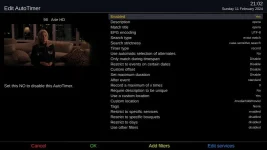
Please help setting this Autotimer.

I want to record on only ONE satellite and on ANY channel any program which has, for example showing 'OPERA'.

I attach the settings so far, but I have had no luck in getting this to work.
 

Attachments

  • screenshot_2024-02-11_21-02-16.webp
    screenshot_2024-02-11_21-02-16.webp
    30.9 KB · Views: 16
So is your intention that there should only ever be one instance of a timer recording running at a time for this Autotimer, even if there were multiple overlapping OPERA items?
 
- also - your setting of "opera" and "exact" in the title criteria would mean that the box would only ever record a programme with that exact title. If you wanted to record any programme which had "opera" anywhere in its title, then you could use "partial match".
 
Also, set to case-insensitive so Opera will be picked up as well as opera anywhere in the title. If you set search type to description match, descriptions will be searched. If you want both title and description matched then two autotimers will be needed. Note that partial and description matching will provide hits on other words such as operation and operator.
 
Unable to look at the suggestions until tomarrow. Meanwhile thanks.
 
And further, you have restricted the autotimer to one or more services. This is okay for a specific series, but for a general search you may want to just restrict to a bouquet.

Personally, I set up a favourites bouquet with the channels that interest me and generally just restrict to that.

You can set defaults in Menu-> Timers -> AutoTimers then press Menu again and choose Edit New Timer Defaults.
 
I have now tried the suggestions above and all is now working. Thank you.

One question though, how do select the whole satellite, say 13w, instead of laboriously selecting numerous channels?
If I understand 'Valiant' I can put all the channels I want to monitor in their own Bouquet, is that right?
 
Find the Bouquets(TV) screen, the TV button on your remote. This lists the Bouquets that you have.

Press Menu and you can choose Add bouquet.

After creating your favourites bouquet you can select channels in the other bouquets and again using the Menu option choose Add service to bouquet to copy into your favourites bouquet.

Choose Enable move mode to highlight channels in your favourites bouquet and order them to your liking.
 
Last edited:
I am assuming that you are creating bouquets somehow. I use the AutoBouquetsMaker in Menu -> Setup -> Tuners and scanning.
 
Everything now working perfectly.

My thanks to all above especially Valiant.
 

OpenViX Feeds Status

Back
Top