Superb quality and spec AB-Com PULSe 4K SE. Crazy offer! Only £99! FREE UK DELIVERY! 4K UHD, Enigma 2, Multiboot 4 images & more!...
Superb quality and spec AB-Com PULSe 4K Rev II Twin Satellite tuner only £149! FREE UK DELIVERY! 4K UHD, Enigma 2, SATA HDD facility, Multiboot 4 images & more!...

How do I setup FBC Tuners when NOT using Unicable LNB? (using old Sky Dish LNB)

SkyFan

New member
Joined
Dec 29, 2012
Messages
562
Reaction score
0
Points
0
I have a VU+ Ultimo 4K with 2 twin Satellite DVB-S/S2/S2X FBC Tuners and 4 satellite cables connected to them. However they are connected to a standard LNB that came with my Sky dish. Does this require a different tuner configuration or do I just use the old way as below? I wish to be able to record as many channels at once as possible from Freesat HD and Sky HD (such as ITV 3 HD):

Tuner A

Configuration Mode: Simple
Mode: DiSEqC A/B
Port A: Astra 2 (28.2E)
Port B: Astra 2 (28.2E)
Set Voltage and 22 Khz: Yes.
Send DiSEqC only on satellite change: No.
Force legacy signal stats: No (this menu item is only on later images)

Tuner B: Equal to Tuner A
Tuner C: Equal to Tuner A
Tuner D: Equal to Tuner A
 
How do I setup FBC Tuners when NOT using Uni

Are you using diseqc switches?

If not,
A= Simple, single, 28.2
B = Simple, single, 28.2
I = Simple, single, 28.2
J = Simple, single, 28.2

All the other 12 should be left as FBC Automatic
 
Last edited:
I don't even know what diseqc is. My dish doesn't move if that helps.

Can I set B, I and J as "Equal to" Tuner A or do I have to use the settings you said?

Also, I'm trying to connect to my Ultimo box via FTP. But can't seem to do it. I'm using the same FTP details as I did with my Duo 2 box but it won't connect.

What's the username and password and host address?
 
Up to you, both should work. "Equal to" means "same as".

You need to set a password on ViX 5.4
 
Also, I'm trying to connect to my Ultimo box via FTP. But can't seem to do it. I'm using the same FTP details as I did with my Duo 2 box but it won't connect.

What's the username and password and host address?

username = root
password = what ever you have set it to
host address = IP number of your box --- 192.168.xxx.yy

Depending how you have configured your router the IP address of a new box may differ from that of the old box.
And/or the IP of the box may change each time it connects unless you configure your router to assign the same IP on every connection.

On Vix versions before 5.4.001 the password may have been blank but with 5.4.001 you need to set a password up on your box for FTP
https://www.world-of-satellite.com/showthread.php?62552-FTP-4-4-branch-images
 
Last edited:
Can I put an FBC tuner in my VU+ Duo 2 or does it only work in newer boxes such as the Ultimo?
 
The Ultimo4k has the most flexibility with regards to onboard tuners as well as largest number. You can even use one out of the Duo2. I really don't understand why you need two receivers. That's without even adding a Unicable 2 LNB to the mix.
 
I have 2 boxes for the odd occasion when recordings get dropped frames due to bad weather or whatever. I've got 2 dishes. Main box is on 1 dish and a backup box is on another dish. If 1 recording has a dropped frames then I can hopefully get one without dropped frames from my other box which is connected to a different dish.
 
Are you using diseqc switches?

If not,
A= Simple, single, 28.2
B = Simple, single, 28.2
I = Simple, single, 28.2
J = Simple, single, 28.2

All the other 12 should be left as FBC Automatic

What should I do if I have just 1 FBC twin tuner?
 
As you have an ordinary LNB for 28.2.

A= Simple, single, 28.2
B = Simple, single, 28.2

Leave the other 6 as FBC Automatic.

If you are not sure what you have, post a picture of the back of your box. Also screen shot of Menu, Information, Devices
 
What should I do if I have 2 FBC twin Tuners in tuner slot A and B with cables in both tuners apart from the bottom cable slot of Tuner B which doesn't have a cable in it?

A twin FBC tuner is only letting me record 5 channels at once on different transponders from each other. I thought it was supposed to let me record 6 at once? I can see 6 tuners free in the tuner config so it's very odd.
Two twin FBC tuners with only 3 cables connected to them only let me record 6 channels at once.
 
Last edited:
Maybe check post #12, and provide the information requested.
 
What should I do if I have 2 FBC twin Tuners in tuner slot A and B with cables in both tuners apart from the bottom cable slot of Tuner B which doesn't have a cable in it?

A twin FBC tuner is only letting me record 5 channels at once on different transponders from each other. I thought it was supposed to let me record 6 at once? I can see 6 tuners free in the tuner config so it's very odd.
Two twin FBC tuners with only 3 cables connected to them only let me record 6 channels at once.


Perhaps the number of channel that you can record is simply down to the channels you are selecting? You are using a traditional universal LNB and each output from that LNB can only be set in one of 4 states (Hi-V, Lo-V, Hi-H and Lo-H) so down one cable cable you will only be able to record transponders on, say, Hi-V and any on the other 3 states will be unavailable on that cable/ tuner or anything sourced from that one cable/tuner.
 
How do I setup FBC Tuners when NOT using Uni

You are saying different things at different times. I asked for screenshot and picture to stop confusion and help you.

If you have two FBC tuner modules and are only using top connection on both modules.

A, Simple, single, 28.2
B, loop through to A
C-H, FBC Automatic
I, Simple, single, 28.2
J, loop through to I
K-P, FBC automatic
 
Sorry, I don't have a camera to take a photo. There's 2 phsycial tuner card slots. Tuner A and Tuner B. I have a twin tuner in both slots. Tuner A has 2 cables connected to it. Tuner B has 1 cable connected to the top port.

So what tuner configuration should I use?

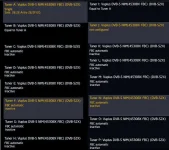
Screenshot of my tuner screen is below:

Tuner Setup File 1.webp

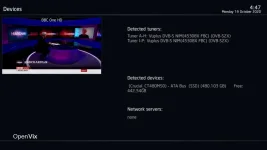
Screenshot of devices menu below:

Menu, Information, Devices Screenshot.webp
 
Sorry, I don't have a camera to take a photo. There's 2 phsycial tuner card slots. Tuner A and Tuner B. I have a twin tuner in both slots. Tuner A has 2 cables connected to it. Tuner B has 1 cable connected to the top port. My Sat dish is using a normal LNB.

So what tuner configuration should I use?

Screenshot of my tuner screen is below:

View attachment 60760

Screenshot of devices menu below:

View attachment 60759
 
Based on what you have just said

A, Simple, single, 28.2
B, Simple, single, 28.2
C-H, leave as FBC Automatic
I, Simple, single, 28.2
J, loop-through to I. if not available, leave as disabled.
K-P, Leave as FBC Automatic.
 

OpenViX Feeds Status

Back
Top