Superb quality and spec AB-Com PULSe 4K SE. Crazy offer! Only £129! FREE UK DELIVERY! 4K UHD, Enigma 2, Multiboot 4 images & more!...
Superb quality and spec AB-Com PULSe 4K Rev II Twin Satellite tuner only £179! FREE UK DELIVERY! 4K UHD, Enigma 2, SATA HDD facility, Multiboot 4 images & more!...

How to Setup Inadyn ViX

punisher

Forum Supporter ,
Joined
Oct 26, 2010
Messages
4,641
Reaction score
47
Points
48
Location
Bel Air
Website
www.world-of-satellite.com
In this tutorial I will show you how to use a DynDNS account to setup Inadyn so you can use your own dns host for the receiver. This is a new feature in ViX 2.2.1

For this you will need a dyndns account, something a long the lines of xxxxxxx.dyndns.org (for the purpose of this example). If you don't have one then you can register a free one for your IP Address at

Code:
https://www.dyndns.com/account/services/hosts/add.html

Once you have your dyndns account setup, you need to enter into the Inadyn Setup which can be found by pressing Menu/Setup/System/Network
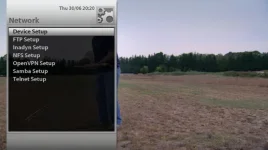
1.webp

Go into Inadyn Setup and you will see the default screen with the setup below
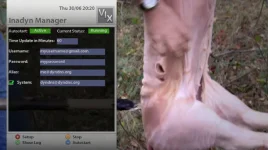
2.webp

You will need the details here that you registered when you setup your dyndns account

Your DynDNS Account Username
Your DynDNS Account Password
Your DynDNS Host Name

If you Press the Red Button "Setup" you will see the below screen where you will need to add your own account details as mentioned above

3.webp

Once you have entered them Press Red "Save" and you will be shown your settings as below

4.webp

Now this is important, You NEED to press Yellow "Stop" and then Yellow "Start" In order to start up Inadyn properly.

If you have set everything up correctly, press Green "Show Log" and you should see a screen similar to below with your Internet IP address as successful

5.webp

And that is it, you have no successful setup your DynDNS account. I use this so I can access the box when I am not at home for FTP use or Streaming use or accessing the Web Interface. Aslong you have the relevant Ports Forwarded in your router then you can access your receiver anywhere :p

Hope you find this useful
 
Last edited:
Port Forwarding

:Hi Wanted to know which port to forward as I want to use this on my iphone 4 so I can login like the skyplayer all your help is appreciated
 
Thanks you punisher for your reply do i forward this in the virtual server section in my router as you can see i am a novice i want to be able to stream the channel to my iphone 4 :)
 
Sorry forgot to ask punisher, i want to be able to do this when i am away from home such as set recorings and stream video i have 10meg broardband is this possible :D
 
Yes u need to forward it in the virtual server section of your router. You will really struggle and probably not be able to stream externally due to the fact you need a high upstream speed of about 5mb+. I have a 5meg upload and works fine but on occasions stutters so im guessin 6meg upstream shud do it. The only other thing you can do is google slingbox and have a read about that if you want to stream externally
 
This is really valuable information. Would you mind if I post this content to other forums so that other ET forum users can also be informed about the external home network streaming?
 
Yeh i havent got an issue aslong as u can leave thanks to me hehe :p

I am currently in the process of trying it out for myself. However I am already having trouble installing the ViX image 2.2.1 on my bootloader ET9x00 (the newest one)
I inserted the USB stick onto ET9k(with the Vix image files on the root folder ET9X00) Turned off my system turned it back on. VFD recognized the image
and then I pressed ok. after flashing, it would only show the Xtrend starting page (the gateway for smart linux TV) and then it would reboot itself several times.
From here on I can't do anything but to install my Open PLI image back on to my ET. Could the new bootloader(9-29-11) be a problem? I asked around, and some ppl have told me that the
ViX image can only be supported by the previous bootloader version. Some people say that downgrading is not possible and that I need to wait for the new ViX image to be released since that
will support the newest bootloader et9x00. Link to newest bootloader et9x00. http://www.et-view.com/main.php?board=ET9000
 
yes the problem is the newest bootloader you have loaded to the receiver as VIX 2.2.100 is not compatible with this bootloader. VIX 2.3 is fully compatible and will hopefully be released as soon as we can.
 
Thank you for clarifying this issue! There were some people who told me that it would be possible to install ViX image on the et9x00 bootloader, and some people said that it's not. So I was mad confused, however in terms of downgrading your bootloader on et, is that possible? If I downgrade my bootloader, then would I be able to install ViX 2.2.1? At the moment I am using the HD freaks image which has a modern and clean design and also works with et9x00 bootloader. I like it:) And one more final question: is ViX image the only image that has the Inadyn menu? once again thank you!!!
 
If you do somehow manage to downgrade your bootloader, then yes, you could install ViX 2.2.1. If you do find a way please share it with us.
 
If you do somehow manage to downgrade your bootloader, then yes, you could install ViX 2.2.1. If you do find a way please share it with us.

I tried this many times today, however it won't let me install the previous version of the bootloader. Would you have any idea on how to downgrade (maybe format)? Or do we have to wait until the Vix image 2.3 gets released? :(
 
I tried this many times today, however it won't let me install the previous version of the bootloader. Would you have any idea on how to downgrade (maybe format)? Or do we have to wait until the Vix image 2.3 gets released? :(

Last time, you CANT downgrade the very latest bootloader dated 29/09/11.
 
Last time, you CANT downgrade the very latest bootloader dated 29/09/11.

Hold on! I just received an e-mail. there is a way!! So let's not confirm that downgrading is impossible. It might get a little complicated and the process might be complex, however I will find out very soon and will share how this process goes.
 
give me that email mate i will try i got 2 et9ks and am happy to try as i am with sicilian on this you cant downgrade bootloader
 
give me that email mate i will try i got 2 et9ks and am happy to try as i am with sicilian on this you cant downgrade bootloader

I'd rather try it out for myself :) If I succeed I'll share, however having 2 et9ks probably won't help you with downgrading bootloader mate.
 
when i refer to having 2 that was to state in trying if i screw one up then no bother

but i am rearing to try what knolledge you have if at all it is true
 
@ Premiumtaste, if you do manage this, please PM the proceedure to either myself or another member of staff for testing. I'd rather we check the proceess than risk someone bricking their receiver. Once tested and if it work we will post.

Thanks.
 
I'd rather try it out for myself :) If I succeed I'll share, however having 2 et9ks probably won't help you with downgrading bootloader mate.

the point was that we have many beta testers with this receiver who are more than willing to risk damaging their receivers testing this process rather than you, your self risking yours. but as long as you understand the risks involved the ultimate decision is yours. were always willing to help as and when we can.
 

OpenViX Feeds Status

Back
Top