Superb quality and spec AB-Com PULSe 4K SE. Crazy offer! Only £99! FREE UK DELIVERY! 4K UHD, Enigma 2, Multiboot 4 images & more!...
Superb quality and spec AB-Com PULSe 4K Rev II Twin Satellite tuner only £149! FREE UK DELIVERY! 4K UHD, Enigma 2, SATA HDD facility, Multiboot 4 images & more!...

[VU+ Duo4K] IPTV stream not starting

donjoe

Forum Supporter
Donated Member
Joined
Apr 15, 2021
Messages
6
Reaction score
1
Points
3
What type of support thread are you creating?
Possible bug
What OpenViX Image build number are you using?
6.8.003
Have you tried re-flashing WITHOUT settings restore?
NO
Have you tried re-flashing WITH a settings restore?
YES
Hello,

I'm trying set up some public TV streams so that I could watch them from my TV, but am unable make them work.
I have added the following lines to /etc/enigma2/userbouquet.tv.tv:

#SERVICE 4097:0:1:0:197:F36:0:0:0:0:https%3A//live-hls-apps-aje-fa.getaj.net/AJE/index.m3u8:Al Jazeera English (1080p)
#DESCRIPTION Al Jazeera English (1080p)

The "channel" appears in the EPG so I can switch to it, but when I do that, it does not start streaming, but instead a static OpenVix branded picture is shown. I have attached an excerpt from the debug log showing what happens when I switch to that channel. There seem to be some errors there, but I have no competence to analyze them, unfortunately.

I am certain that the stream url works as I can open it in VLC.

Please let me know if you need any more information or want me to take whatever troubleshooting / debugging steps. I am familiar with Linux and The Command Line. Also, I trust you'll tell me to report this in Github instead, if you see that appropriate.

Thanks,
dj
 

Attachments

I have been playing with this too over the last few days. Many failures but this works for me. I'm not an expert so take below as you find it and I hope it is of use :-)

-------------------

Try using m3iptv plugin and playing with the use of Gstreamer vs DVB. Certain combo's work and other don't.
I resorted to creating my own M3U8 file on the HDD and pointing the m3iptv to it. You will notice that the first entry is the EPG download source and I found the source below works well (at the moment) but there are a ton that are junk!!.

#EXTM3U x-tvg-url="https://raw.githubusercontent.com/dp247/Freeview-EPG/master/epg.xml"
#EXTINF:-1 tvg-name="BBC Two HD" tvg-logo="https://upload.wikimedia.org/wikipe...logo_2021.svg/330px-BBC_Two_logo_2021.svg.png" tvg-id="BBCTwoHD.uk" group-title="UK",BBC 2 HD

This is a working stream for BBC Two HD. Works on my box - put into a file on hdd called StaticStreams.m3u8

Al Jazeera English has a channel ID of the below in the EPG source:

<channel id="AlJazeeraEnglish.qa">
<display-name lang="en">Al Jazeera HD</display-name>
<icon src="https://upload.wikimedia.org/wikipedia/en/thumb/f/f2/Aljazeera_eng.svg/512px-Aljazeera_eng.svg.png"></icon>
</channel>

so you might need:

#EXTM3U x-tvg-url="https://raw.githubusercontent.com/dp247/Freeview-EPG/master/epg.xml"
#EXTINF:-1 tvg-name="Al Jazeera HD" tvg-id="AlJazeeraEnglish.qa" group-title=Al Jazeera HD

I also created a custom.channels.xml in EPGImport plugin and added the following line to it:

<channel id="BBCTwoHD.uk">1:0:19:3EC:1:1:CCCC0000:0:0:0:</channel><!BBC Two HD -->

I expect your channel might be something like:

<channel id="AlJazeeraEnglish.qa">1:0:19:1BC4:835:2:11A0000:0:0:0:</channel><!Al Jazeera English HD -->

This makes the EPG download kick in and match the channels. I chose to make all of mine "1:0:19" as I already had a sat tuner setup and this was the prefix for SAT channels.

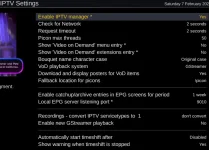
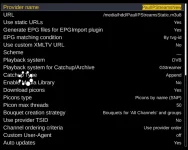
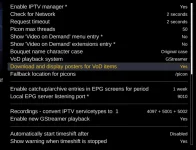
These are the main settings I use in M3IPTV:
1770508449673.webp
PS Timeshift does not work and nor does any kind of catchup. If you enable the timeshift option you may well get a spinner.


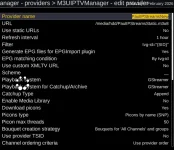
This is the settings for the provider:
1770508521264.webp
 
First of all you have static playlist on your hdd or flash. So you must set "Use static URLs" to "Yes".
Then you dont need to create anything for EPGImport. M3UIPTV plugin will care for it once you set "Use static URLs" to "Yes".
Just you need to regenerate bouquets.
 
Thank you smipx and DimitarCC very much for your replies! You both seem to mention EPG and this m3iptv plugin I am not yet familiar with. Will definitely take a look.

However, I have a hunch that the issue I'm experiencing might not be related to EPG or what is displayed there.

It is that the steam just doesn't start while the same .m3u8 file plays nicely on VLC player. As per the debug log I attached, there are critical errors in the enigma2 process when I try to start the stream, so I think it would be beneficial if an OpenVix developer took a quick look into this.

Thanks,
dj
 
According to your log you have set somewhere "Enable new GStreamer playback".
You MUST turn that off since that is not working option.
There is no other issues in the log.
 
First of all you have static playlist on your hdd or flash. So you must set "Use static URLs" to "Yes".
Then you dont need to create anything for EPGImport. M3UIPTV plugin will care for it once you set "Use static URLs" to "Yes".
Just you need to regenerate bouquets.
Hi DimitarCC, What (on a technical level) does the "Use Static URL's" actually do?

I must say I am having some issues too. I have yet to find a combination in M3IPTV that allows both the viewing of the live stream (in my example above for BBC2 HD) and also being able to record the stream using "timers" and additionally being able to instigate timeshift. I have tried all sorts of settings but hte best I can get to is to be able to watch a stream and pause a stream / play a stream (with no timeshift functionality and no FF once it is paused - only "play" and "Pause" work.

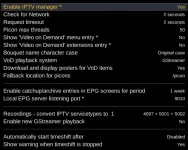
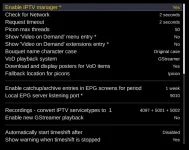
The only settings that work to allow viewing a live stream (but no recording and no Timeshift) is:
1770545317179.webp
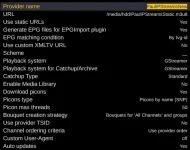
together with:
1770545357288.webp
Better than nothing but it would be a real boon to be able to record the stream sucessfully and an even greated boon to be able to timeshift it.

Bit of background. I have a poor satellite and Terrestrial signal in my crappy rental property and hope to be able to rely on these few IP channels (BBC 1,2,4, Sky news and GB News) to get me through a sticky time until I get my own place and am free to affix my own diskes and aerials
:)


Some tips on the right settings in M3IPTV would be most appreciated. I have read the guide in the forum posts but still confused :-)

It's not like I am trying to do anything illegal and I do have a UK TV license too before anyone chimes in. All of my streams are freely accessible streams broadcast without encryption (mostly iPlayer streams + GB News and Sky news streams from their open websites). No VPN or shady goings on here (yet!!) :ROFLMAO: :ROFLMAO:. When Sky F1 starts it may be a different matter mind!!

DonJoe, Sorry to hijack your thread but you will likely find this useful too :-)

Thanks
Paul
 

Attachments

  • 1770544324812.webp
    1770544324812.webp
    38.6 KB · Views: 2
  • 1770544282589.webp
    1770544282589.webp
    44.1 KB · Views: 2
When I tried to record BBC 2 "Winter Olympics " just now this is what I saw in my log and this is what the file being recorded looks like on the disk. This was after about 5 minutes of recording time elapsed (attached files:

recording not working1.webp
 

Attachments

and this is my corresponding m3u8 file:

#NAME PaulIPStreamsNew - All channels
#SERVICE 4097:0:1:3E8:1:1:CCCC0000:0:0:0:https%3a//linear417-gb-hls1-prd-ak.cdn.skycdp.com/100e/Content/HLS_001_1080_30/Live/channel(skynews)/index_1080-30.m3u8:Sky News•PaulIPStreamsNew
#DESCRIPTION Sky News•PaulIPStreamsNew
#SERVICE 4097:0:1:3E9:1:1:CCCC0000:0:0:0:https%3a//live-gbnews.simplestreamcdn.com/live5/gbnews/bitrate1.isml/manifest.m3u8:GB News•PaulIPStreamsNew
#DESCRIPTION GB News•PaulIPStreamsNew
#SERVICE 4097:0:19:3EA:1:1:CCCC0000:0:0:0:https%3a//streamer.nexyl.uk/48559ccd-6400-457d-8acc-06b9e24c2ed8.m3u8:BBC 4 HD•PaulIPStreamsNew
#DESCRIPTION BBC 4 HD•PaulIPStreamsNew
#SERVICE 4097:0:19:3EB:1:1:CCCC0000:0:0:0:https%3a//vs-cmaf-pushb-uk-live.akamaized.net/x=4/i=urn%3abbc%3apips%3aservice%3abbc_one_south_west/iptv_mse_v0_hevc.mpd:BBC 1 HD•PaulIPStreamsNew
#DESCRIPTION BBC 1 HD•PaulIPStreamsNew
#SERVICE 4097:0:19:3EC:1:1:CCCC0000:0:0:0:https%3a//vs-cmaf-push-uk-live.akamaized.net/x=4/i=urn%3abbc%3apips%3aservice%3abbc_two_hd/iptv_mse_v0_hevc.mpd:BBC 2 HD•PaulIPStreamsNew
#DESCRIPTION BBC 2 HD•PaulIPStreamsNew
 
So in general "Use static URLs" is working like that:

1. If set to Yes it read the playlist and store in bouquets exactly what is written in the playlist.

2. If set to No it reads the playlist but in bouquets it saves a link to the playlist and stream (usually by tvg-id). So in case of stream URL change in the playlist to can pick it up without rebuilding the list.
That is suitable for providers that have tokens in their stream urls.
Not suitable for local playlists since they are anyway static.

As for recording/timeshift issues....

Situation is like that:

1. You can watch and record at same time ONLY if Playback system is DVB and your provider allows more than one simultaneous connection.

2. If Playback system is Gstreamer/HiSilicon and your provider allows more than one simultaneous connection AND the stream is GStreamer compatible for recording.
The recording pipeline of GStreamer is fragile and not supports every stream.

3. If simultaneous connections are not allowed you have no choice but to watch something else during recording.

4. Catchup is a provider provided feature. If the source doesnt offer catchup you dont get it.

5. Timeshift (in the way implemented in Enigma2) works with a temporal recording on HDD so all the problems with recording above apply.
 
That is all really useful. Thanks for that.

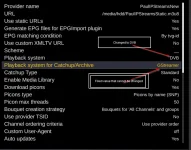
I have tweaked my playlist and selected DVB as per image below, deleted and recreated bouquets and rebooted the box. When I try to view the stream it displays nothing. The stream is not from a paid provider. It is a stream from the iplayer app so recording and watching should not be an issue. when set to DVB the screen is blank but when put back to gstreamer on the playlist setting it streams okay (but no record). Seems to be a bit odd?

1770549757677.webp
1770549893938.webp
This above settings give no picture for live view. (gstreamer disabled, DVB selected in provider settings).

Also tried with above settings but the conversion set to "none"
1770550118585.webp

Rebooted and still a blank screen. The only setting that seems to yield a picture is the playback system set to "gstreamer"

All very confusing. Arrrrrgh!!
I feel so close to making it all work but yet feel so far away. Going around in circles 😵‍💫
 
If it not works in DVB mode then that means the stream is not DVB compliant. So your only option is Gstreamer or Exteplayer3.
With Gstreamer you can get recording fo some streams. With Exteplayer3 you can not get any recording unfortunately.

So i think you are in a dead end. Your streams seems can not be recorded via Gstreamer due to incopatability or other issues. On the other hand your streams are not DVB compatible.
So no choice i guess.
 
Damn and damn again. Never mind. I will loof for some alternative streams I guess. Is there any tweaks to Gstreamer that I can try to make it more compatible I wonder?
 
According to your log you have set somewhere "Enable new GStreamer playback".
You MUST turn that off since that is not working option.
There is no other issues in the log.
Hello,

Yes, that's the ticket! I have no recollection of ever touching that setting, but it indeed was enabled, and now that I disabled it, I can see the stream playing. Thank you!
However, the streams I configured, Al-Jazeera and NHK World, don't have sound. I'll have to keep poking around.
 
This thread is getting out of hand 😅 but I don't mind.
 
Hello,

Yes, that's the ticket! I have no recollection of ever touching that setting, but it indeed was enabled, and now that I disabled it, I can see the stream playing. Thank you!
However, the streams I configured, Al-Jazeera and NHK World, don't have sound. I'll have to keep poking around.
Okay, figured this out too. There are settings regarding automatic volume adjustment, and for some reason for IPTV streams it apparently was way too low. I had to set the automatic volume way higher for each stream I added.
 
If it not works in DVB mode then that means the stream is not DVB compliant. So your only option is Gstreamer or Exteplayer3.
With Gstreamer you can get recording fo some streams. With Exteplayer3 you can not get any recording unfortunately.

So i think you are in a dead end. Your streams seems can not be recorded via Gstreamer due to incopatability or other issues. On the other hand your streams are not DVB compatible.
So no choice i guess.
Just tried gstreamer again and I get these errors in the log. Maybe some update required to gstreamer, maybe gstreamer just can't handle the mpd??

One error says:
15:46:05.9620 [eServiceMP3] Gstreamer error: Your GStreamer installation is missing a plug-in. (12) from urisourcebin1

Another (multiple) say similar to:
enigma2:2583): GStreamer-WARNING **: 15:46:05.966: ../sources/gstreamer-1.26.10/gst/gstpad.c:4813:gst_pad_push_data:<sink_0:proxypad38> Got data flow before stream-start event

(enigma2:2583): GStreamer-WARNING **: 15:46:05.967: ../sources/gstreamer-1.26.10/gst/gstpad.c:4818:gst_pad_push_data:<sink_0:proxypad38> Got data flow before segment event

Then the final gstreamer error:
15:46:06.1265 [eServiceMP3] Gstreamer error: Internal playbin error. (5) from playbin
15:46:06.1307 [eServiceMP3] Buffering 100 percent done
 

Attachments

6.8.002 is using gstreamer-1.26.10

I notice on the github there is a gstreamer release

GStreamer 1.28​


Could it be that it needs an update to the release in Openvix? Maybe that would fix my issue? Who knows ...
 

OpenViX Feeds Status

Back
Top