Superb quality and spec AB-Com PULSe 4K SE. Crazy offer! Only £129! FREE UK DELIVERY! 4K UHD, Enigma 2, Multiboot 4 images & more!...
Superb quality and spec AB-Com PULSe 4K Rev II Twin Satellite tuner only £179! FREE UK DELIVERY! 4K UHD, Enigma 2, SATA HDD facility, Multiboot 4 images & more!...

[VU+ Duo] is it dead??😦

  • Thread starter Thread starter spud7997
  • Start date Start date
S

spud7997

Guest
Hi all, my vu+ duo will not turn on properly when I turn it off from the rocker switch at the back all goes well until late it displays a message about a software failure, (see attached photo) I have tried following the re flash tutorial on the openvixs site but it's still not working!!! Any help or solutions would be VERY grateful. Thanks
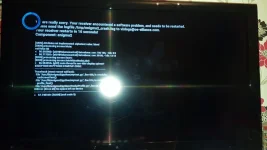
20151222_171020.webp
 
The log says that there is no space left on the device.

Which image are you flashing to it?
Whcih plugins are you adding?

Better to flash the latest image as older images are not being developed.
 
Hi thanks for the reply.
I'm trying to use one I downloaded from the openvix site (latest one)
And not.sure about the plugins?
Sorry if that's not much help but I'm not very good at this sort of thing!!��
 
Also how can there be no space left on the device?? I have a 500GB hard drive and there is only a couple of films on it???
 
Image is stored on flash memory, not HDD.

Can you try and reinstall Openvix 3.2, build version 030.
 
OK so do I delete everything off of my USB stick??
And what USB socket do I use for the reflash front or back??
 
Format usb stick download and extract to the usb use front usb under the flap
 
OK so downloaded openvix 3.2 as you said, unzipped it and transfered it to my memory stick.
Plugged the stick in and switched on the box.
And I'm still getting good the same error message coming up??
 
Think around 52mb after unzipped sorry thats before its unzipped im sure someone will come along and let you know im not on pc right now.
 
Last edited by a moderator:
Maybe you have done this! Click on openvix-3.2.030 release and open. You will see update file. Transfer update file to USB stick and then load to your receiver.
 
Maybe you have tried this! After unzip, click on openvix-3.2.030 and open. You will then see the update file. Tansfer updat file to to USB stick and load into you
 
I have formated the stick and I have downloaded, unzipped and sent the file to the USB stick.
Plugged it in the front of the receiver and switched it on.
It says starting up then after a minute or two I get the same message as in my first post!! I'm sure it's something simple but I can't figure it out!!!��������
 

OpenViX Feeds Status

Back
Top