Superb quality and spec AB-Com PULSe 4K SE. Crazy offer! Only £129! FREE UK DELIVERY! 4K UHD, Enigma 2, Multiboot 4 images & more!...
Superb quality and spec AB-Com PULSe 4K Rev II Twin Satellite tuner only £179! FREE UK DELIVERY! 4K UHD, Enigma 2, SATA HDD facility, Multiboot 4 images & more!...

[VU+ Solo2] Is there a way to group recordings into directories?

whatsat

New member
Joined
Sep 6, 2013
Messages
81
Reaction score
0
Points
0
Hi,

Is there a way to group your similar recordings into different/individual directories automatically like sly does?
i.e. if I record multiple "The Big Bang Theory" can they automatically group into a "The Big Bang Theory" directory?

This is all on an internal HDD if that makes a difference?

Thanks
 
Hi,
create a directory for BBT, make this directory to a bookmark and then you can select this bookmark as destination for timer or auto timer.

ciao
 
Just to further clarify what trial has posted:

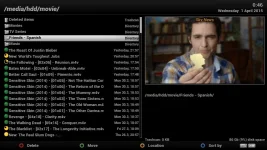
When in your default media directory (showing the contents of 'hdd/media/movie' unless you have changed the recording location) press 'Menu', this gives you various directory choices, including 'create directory'. Select that and press OK or green button. This will bring up the virtual keyboard. Blue button toggles upper/lower case and symbols. Once you have created your directory name i.e. BIG BANG THEORY, select the OK box at the bottom of the virtual keyboard to save and exit.
BTW, you can 'nest' directories within directories; that is create folders within folders - just remember to be IN a directory that you want to create sub-directories in before pressing the Menu button.
When setting up your timers, press the green button as usual, arrow down the Timer Setup screen to 'Location' and press OK. You will then be in the Select Location screen with previously used locations shown at the bottom as bookmarks. Your Big Bang Theory directory should be visible in the upper window - press the 'Channel Up' button to toggle to that window, then navigate to your BBT folder - press the GREEN button.
You will then be back at your timer setup - check you have everything set correctly, especially 'Repeat type' and 'Repeats' settings, then GREEN button to save and exit!
Hope this helps!
 
Thanks for the replies guys.

Is this the only way to do it? It seems that there is still a manual aspect to this (which is fine for me but not others in
my household) and it is not automatically done like on a sly box.

Perhaps a future improvement in the next image???
 
You can do for autotimer

Having saw this thread yesterday, I did same thing for OH so removed existing timers and amended autotimer so for now onwards Corrie will be put into it's own directory.

Will find out tonight if it's worked.
 
Try using tags, radio button by default when in movie list.
 
tags seem to be a searching item rather than an organising item
 
Guys I have done the same in creating a Directory and all, but am still finding recordings outside of the directory. What could be wrong?

And as whatsat said, could this be a future improvement for Vix Images to automatically create a Series Link folder like Sly?
 
tags seem to be a searching item rather than an organising item
Yes, it is a search function.
Guys I have done the same in creating a Directory and all, but am still finding recordings outside of the directory. What could be wrong?
You're not setting them all properly to record to the created directory?
And as whatsat said, could this be a future improvement for Vix Images to automatically create a Series Link folder like Sly?
Probably better & easier to work on an improved tags function, rather than create folders for each new recording.
 
Pretty sure SKY don't create new 'folders' for recordings, just have a better sort by tag function.
Sky invest millions for obvious reasons, so easier to work for them.
Same feature/function any E2 box requires a lot more time.
 
And as whatsat said, could this be a future improvement for Vix Images to automatically create a Series Link folder like Sly?
That wouldn't be an improvement for me, as I put several series into one directory.
But then I do have recordings going into different directories, so it does work. You must be doing something wrong somewhere. I'd recommend sorting that out.

btw, when you say "creating a Directory", did you also make it a Location/Bookmark and set the auto-timer to use it?
 
That wouldn't be an improvement for me, as I put several series into one directory.
But then I do have recordings going into different directories, so it does work. You must be doing something wrong somewhere. I'd recommend sorting that out.

btw, when you say "creating a Directory", did you also make it a Location/Bookmark and set the auto-timer to use it?
Tags with a more obvious button press & better fiename recognition is the way to go.
No need to FTP & create directorys.
 
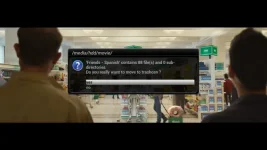
I noticed you can't remove directory by just highlighting it and clicking on delete (red button) or via menu. It doesn't do nothing.

I removed it via telnet.
 
I noticed you can't remove directory by just highlighting it and clicking on delete (red button) or via menu.
I'd noticed that too, but forgotten about it (it's not a frequent task).
When I get around to sorting bookmarks I may have a quick look to see whether empty ones could be made to disappear...unless someone else does so first.
 
Not sure what needs sorting?
Still works fine here.
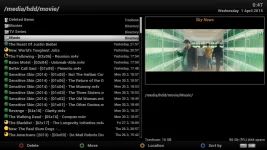
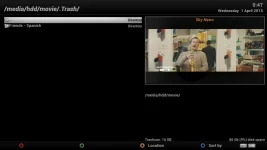
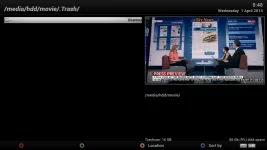
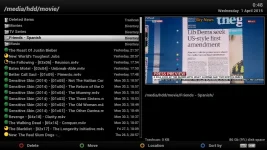
Except that none of those images shows any Locations/Bookmarks - you're not looking at the right thing.

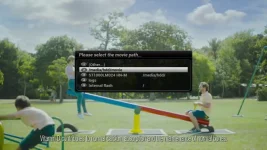
If you press the yellow button on image 1 (the one marked "Location") a menu pops up. It contains the Bookmarks/Locations (synonymous) that you have created. They are listed in the order you created them - which becomes very confusing when you have several and are stepping through them when setting up a new recording and trying to set the location you wish to use. Only one gets shown at a time, and you have no idea which one is coming next, nor whether it would be quicker to go up rather than down the list (which is circular).
I do this all of the time, and do have code to do the sorting - I'm just not sure whether it covers every place that a Location can be set. So for the mpoment I manually sort the list in the settings file when I add a new one.
 
Except that none of those images shows any Locations/Bookmarks - you're not looking at the right thing.

If you press the yellow button on image 1 (the one marked "Location") a menu pops up. It contains the Bookmarks/Locations (synonymous) that you have created. They are listed in the order you created them - which becomes very confusing when you have several and are stepping through them when setting up a new recording and trying to set the location you wish to use. Only one gets shown at a time, and you have no idea which one is coming next, nor whether it would be quicker to go up rather than down the list (which is circular).
I do this all of the time, and do have code to do the sorting - I'm just not sure whether it covers every place that a Location can be set. So for the mpoment I manually sort the list in the settings file when I add a new one.

Recording list -> menu button -> Settings -> button red, button green, button yellow, button blue, can all be changed for short & long button press.
Try the 'Sort by' option ratther than 'sort' for an easy to use pop up menu.
 
Nothing happened like that when I tried it from recordings list. I highlighted it, pressed red button (labelled as delete).

I had set folder as a bookmark so could that be reason why it didn't allow me to delete it?

I did try via menu options and the dedicated delete/red button.

The delete/red button does delete actual recordings.
 
Recording list -> menu button -> Settings -> button red, button green, button yellow, button blue, can all be changed for short & long button press.
Try the 'Sort by' option rather than 'sort' for an easy to use pop up menu.
Well, given that I was the person who wrote the code to add the last two sort options, I do know about that.

BUT THAT HAS NOTHING TO DO WITH SORTING LOCATIONS!!!!
 

OpenViX Feeds Status

Back
Top