M
mifo
Guest
Hardware: VU+ Duo2 with
Tuners A & B: built in dual DVB-S2
Tuner C: built in DVB-T (disabled)
Tuners D & E: two PCTV 290e (DVB-T2)
When trying to enable the 290e sticks the following steps are necessary:
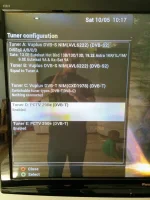
Initially the system shows the two sticks as enabled DVB-T:
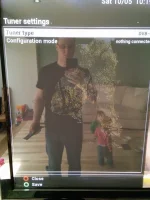
When going in to set up Tuner D however, the Tuner Type menu option is not shown:
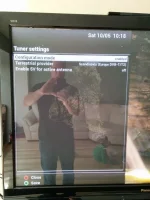
To make it work you need to disable the tuner (D).
Then save
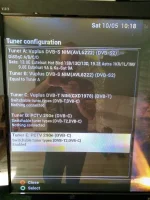
Then go in to Tuner E - which will cause a crash
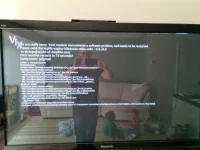
After the system boots back up - go into Tuner E again and you will see a full set of config options for the first time, initially set to DVB-C
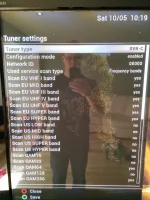
Which you can switch over to DVB-T2 without error - and you get a full, correct options screen for DVB-T2:
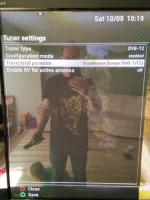
Then go back in to Tuner D which shows a cut down menu again but this time allows you to select the tuner type (initially set to DVB-C)
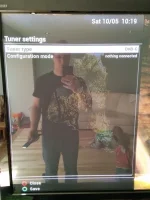
and set it DVB-T2 (go LEFT not right, clicking right sometimes causes a crash)
After which you are done in this section and it's time to scan ...
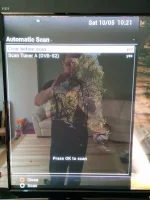
The external tuners are not shown under Autoscan, but a manual scan is possible:
I'm posting this but aware that I unfortunately won't have much chance to do additional testing as the TV is usually either in use (wife) or out of bounds (due to kids being awake)
Tuners A & B: built in dual DVB-S2
Tuner C: built in DVB-T (disabled)
Tuners D & E: two PCTV 290e (DVB-T2)
When trying to enable the 290e sticks the following steps are necessary:
Initially the system shows the two sticks as enabled DVB-T:
When going in to set up Tuner D however, the Tuner Type menu option is not shown:
To make it work you need to disable the tuner (D).
Then save
Then go in to Tuner E - which will cause a crash
After the system boots back up - go into Tuner E again and you will see a full set of config options for the first time, initially set to DVB-C
Which you can switch over to DVB-T2 without error - and you get a full, correct options screen for DVB-T2:
Then go back in to Tuner D which shows a cut down menu again but this time allows you to select the tuner type (initially set to DVB-C)
and set it DVB-T2 (go LEFT not right, clicking right sometimes causes a crash)
After which you are done in this section and it's time to scan ...
The external tuners are not shown under Autoscan, but a manual scan is possible:
I'm posting this but aware that I unfortunately won't have much chance to do additional testing as the TV is usually either in use (wife) or out of bounds (due to kids being awake)