Superb quality and spec AB-Com PULSe 4K SE. Crazy offer! Only £99! FREE UK DELIVERY! 4K UHD, Enigma 2, Multiboot 4 images & more!...
Superb quality and spec AB-Com PULSe 4K Rev II Twin Satellite tuner only £149! FREE UK DELIVERY! 4K UHD, Enigma 2, SATA HDD facility, Multiboot 4 images & more!...

Magic-(E)HD (Lite) skins

Interesting.
Since I'm having similar issue with dvb stick and I use Magic skin I would like to investigate what your saying.
So for you dvb is working with default skin? Please be' more extensive on that.
And let us know if dvb- t Service is working someway.
Btw what USB dvb are u using?
 
Hello, first thanks to all for your replys :thumbsup: , good news I have now sorted this problem by re-sending my bouquet after applying the skin and then doing a full restart.

For future reference the stick is a Nova-T bought from the sponsers and worked perfectly before the skin change. After applying the skin, I restarted enigma and did a full restart, no joy. I then reloaded the original skin but the tuner still showed 'Tune Failed', to get the tuner working again I restored my backup settings. I done this several times but with the same results, and as the duo did not crash there are no logs. I also never encountered any troubles using the 'xmbc' skin.

I then reflashed, applied backup settings, downloaded and installed 'Magid-HD-Night' skin and lastly resent my bouquet using DBEdit. This worked and everything is now working great. I haven't a clue why this worked but it did :confused:, thanks again everyone (Marartis, if you need anymore let me know).

 
What i would like to know is if the search for dvbt Service is working.
Since u have restored from a settings file you have not reported about 0 channels found msg
 
What i would like to know is if the search for dvbt Service is working Now.
Since u have restored from a settings file you have not reported about 0 channels found msg and i woul like to investigate the issue
 
Hello MarsArtis, I will try and help:

Vix 2.4 latest build, Nova-T stick working perfect (tuner C), scanned and found all channels and no problems.

Installed 'Magic-HD-Night', satellite tuners (tuner A & tuner B) working fine. However all channels on tuner C showing 'Tune Failed'. Done a scan on Tuner C and 0 services found.

Done a settings restore and all channels on tuner C now working, so did not bother doing a scan (whats the point). However back on original skin.

Wanted 'Magic-HD-Night' so:

Done a fresh flash / Restored settings (tuner C working)/ Installed 'Magic-HD-Night' skin (tuner C now not working) / Sent my bouquet using dbedit - tuner C now working properly, all channels working (again no point in scanning, all channels fine)

Need any more let me know.
 
Update: I am 99% sure this was caused by 'restart enigma' (happens after skin install), not by the 'Magic-HD-Night' skin.

The 'Tune Failed' happens whenever I 'restart enigma' (even without installing a new skin), to get it back working I have to do a settings restore. However this does not happen when i do a simple 'restart'. I have tried this several times with the same results. Hope this helps.
 
Yess indeed I do confirm as stick50jr told me that the issue with dvbt sticks is related to enugma2 restart.
So to make the dvbt tuner work again a reboot is needed.
It appears to be' a wellknown issue on vix
 
Hi Rob
I'm using your Magic-HD-Night on all my three DUOs.
Looking at the debuglog of one that is giving me few errors as reported in this other thread OVix-3-0-b-539-various-errors
I noticed some errors about skin:
Code:
warning, skin is missing element key_yellow in <class 'Screens.InfoBarGenerics.SecondInfoBar'>
warning, skin is missing element key_blue in <class 'Screens.InfoBarGenerics.SecondInfoBar'>
warning, skin is missing element epg_description in <class 'Screens.InfoBarGenerics.SecondInfoBar'>
warning, skin is missing element key_green in <class 'Screens.InfoBarGenerics.SecondInfoBar'>
warning, skin is missing element key_red in <class 'Screens.InfoBarGenerics.SecondInfoBar'>
warning, skin is missing element channel in <class 'Screens.InfoBarGenerics.SecondInfoBar'>
[ePNG] couldn't open /usr/share/enigma2/ico_dvb_s-fs8.png
[ePNG] couldn't open /usr/share/enigma2/ico_dvb_c-fs8.png
[ePNG] couldn't open /usr/share/enigma2/ico_dvb_t-fs8.png
[ePNG] couldn't open /usr/share/enigma2/ico_service_group-fs8.png
warning, skin is missing element From in <class 'Screens.Dish.Dish'>
warning, skin is missing element Goto in <class 'Screens.Dish.Dish'>
warning, skin is missing element posGoto in <class 'Screens.Dish.Dish'>
warning, skin is missing element posFrom in <class 'Screens.Dish.Dish'>
warning, skin is missing element turnTime in <class 'Screens.Dish.Dish'>
warning, skin is missing element statusicon in <class 'Screens.PVRState.TimeshiftState'>
warning, skin is missing element speed in <class 'Screens.PVRState.TimeshiftState'>
RemovePopup, id = ZapError
warning, skin is missing element key_blue in <class 'Screens.InfoBar.InfoBar'>
warning, skin is missing element key_red in <class 'Screens.InfoBar.InfoBar'>
warning, skin is missing element key_green in <class 'Screens.InfoBar.InfoBar'>
warning, skin is missing element key_yellow in <class 'Screens.InfoBar.InfoBar'>
attacched is the complete debuglog.
 

Attachments

Hi Rob

Hopefully this is the right place for this question.

We have settled on your Magic HD skin and it seems to do pretty much everything we want. The only thing that has been mentioned by all family members is that when fast forward/rewinding through recorded material, there is no on-screen indication of the speed that has been selected ie X2, X4, X8 etc.

Knowing your attention to detail, I imagine you left this info out of the skin to keep it less cluttered.

I know this stuff takes an age to do properly, but I wondered if you could give me a quick pointer on where I should be looking if I wanted to have a go at adding the info myself? I am assuming you don't object to someone editing your skins?

This is of course, very low priority and a nicety rather than anything else.

Cheers in advance.
 
.......when fast forward/rewinding through recorded material, there is no on-screen indication of the speed that has been selected ie X2, X4, X8 etc.
Yes, there is: see the attached screenshot (top left: 32x).
 

Attachments

  • 32X.webp
    32X.webp
    17.6 KB · Views: 46
Yes, there is: see the attached screenshot (top left: 32x).

Hi Rob and thanks for your reply.

That is weird because you will see from my screen grab that I don't get the ffwd/rwd speed or the little arrows next to it, or the time in the top RH corner. Skin was downloaded from the feeds a couple of days ago when I had to reflash.

Any ideas?
 

Attachments

  • About Schmidt-612013-2018.webp
    About Schmidt-612013-2018.webp
    30.2 KB · Views: 37
There are some settings you need to change. I can't remember what they are and I'm not at my box but maybe someone else will chime in. something like

setup>system>user interface>settings>show pvr status in movieplayer info bar set to no
 
Last edited:
Tkr and Rob

Thanks for pointing me in the right direction - worked a treat.

Cheers
 
The errors in logs about skins..are more common

By the way: Magic HD-Night is from my hand:D

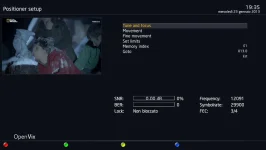
The skin is missing context text for coloured bruttons in many menus.
For instance the sat positioner one. Even crossEPG is laking some descriptions.
Is this a choiche or what?
 
The skin is missing context text for coloured bruttons in many menus.
For instance the sat positioner one. Even crossEPG is laking some descriptions.
Is this a choiche or what?

Hi..just had a look and found one button with text missing in CrossEPG

In PositionerSetup all buttons and text are there so I dont understand what is missing.

Code:
<screen name="PositionerSetup" title="Positioner setup" position="0,0" size="1280,720" flags="wfNoBorder">
	<panel name="BasicTemplate"/>
	<ePixmap pixmap="Magic-HD-Common/buttons/red2.png" position="15,682" size="26,26" alphatest="on" />
	<ePixmap pixmap="Magic-HD-Common/buttons/green2.png" position="305,682" size="26,26" alphatest="on" />
	<ePixmap pixmap="Magic-HD-Common/buttons/yellow2.png" position="580,682" size="26,26" alphatest="on" />
	<ePixmap pixmap="Magic-HD-Common/buttons/blue2.png" position="840,682" size="26,26" alphatest="on" />
	<widget name="red" position="50,682" size="220,26" backgroundColor="background" transparent="1" font="Regular;24" halign="left" />
	<widget name="green" position="340,682" size="220,26" backgroundColor="background" transparent="1" font="Regular;24" halign="left" />
	<widget name="yellow" position="614,682" size="220,26" backgroundColor="background" transparent="1" font="Regular;24" halign="left" />
	<widget name="blue" position="875,682" size="220,26" backgroundColor="background" transparent="1" font="Regular;24" halign="left" />
	<widget name="list" position="590,110" size="600,255" backgroundColor="background" transparent="1" />

Update: PositionerSetup solved...name has been changed into key_red and so on


For other screens I need more info!!

It would help if you could make a screenshot and point out the exact screens.

I only can help when I know what others screen you miss context text, because in "Many menus" is hard to find.
 
Last edited:
The skin is missing context text for coloured bruttons in many menus.
For instance the sat positioner one. Even crossEPG is laking some descriptions.
Is this a choiche or what?


it would probably be best if you started a separate thread for issues or requests pertaining to the Magic HD-Night skin so not to get things confused with this one, seeing as there maintained by different people.
 
here's how the Positioner Setup screen appears.
All the coloured buttons are missing text description for each subsetting:
 

Attachments

  • sat-positio1.webp
    sat-positio1.webp
    66.3 KB · Views: 14

OpenViX Feeds Status

Back
Top