Superb quality and spec AB-Com PULSe 4K SE. Crazy offer! Only £129! FREE UK DELIVERY! 4K UHD, Enigma 2, Multiboot 4 images & more!...
Superb quality and spec AB-Com PULSe 4K Rev II Twin Satellite tuner only £179! FREE UK DELIVERY! 4K UHD, Enigma 2, SATA HDD facility, Multiboot 4 images & more!...

[GiGaBlue QUAD+ PLUS] Merging bouquets from AB2E and ABM (Sat and Cable)

outrage_uk

Member
Joined
Jun 21, 2014
Messages
112
Reaction score
0
Points
16
Ive just added a cable tuner, which works well. Ive used ABM to add virgin channels along side AB2E which do the sky channels.

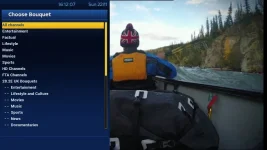
Ive always been happy with AB2E mainly because of the channel numbering (101, 102, 401, 402, etc) - its just a habit typing these in. Since adding cable channels, this is all random - typing channel numbers in is obviously matching cable channels.

Is there anyway to merge the bouquets with AB2E having priority, or simply swap certain channels created under AB2E to load cable channels instead?

Failing that, is there a way to manually assign changes to channels created under AB2E and force the cable tuner? For example 407 is set to load 1_0_1_51A_7E5_2_11A0000_0_0_0 on tuner A or B, where I would like it on 1_0_19_1006_29_F020_FFFF0000_0_0_0 on tuner C.
Guide.webp
 
Last edited:
You can use ABM to scan both and then use a forum posted xml to custom sort. Basically, you get the HD channels from cable and the SD channels from satellite. You will need to do a couple of edits to the file as some channels have changed number and MUTV HD is now available on Satellite.
 
What about printed sky channel numbering? Can that be done with ABM?
 
Thanks, i'll give it a go, still not sure how Virgin and Sky will work together - ie when i press 101, will that load a sky channel (tuner A or B) or 101 from virgin (tuner c)? Do them sky/virgin xml files load the same numbers as original?
 
EDIT: Ive been playing around and your ABM custom files add the channel numbers fine, thanks :)

But when I add both Virgin UK and Sky UK to the ABM providers, it (obviously) adds both to the bouquets list - Virgin first, then Sky after. So when I type a channel number, it's loading that from Virgin - I assume because it is first in the bouquets list.

Basically I don't want the Virgin channels in the bouquet list (or if they have to be... them to be at the bottom), I want the Sky channels, but want to swap the unavailable HD channels on Sky to load them from Virgin. Is this possible, and if so how?

Also on AB2E, you had a custom_swap file which let you swap certain channels 102 = 142, 104 = 227, etc. Can you do this on ABM?
 
Thank you for pointing me in the right direction :) that is exactly what im trying to do.

Just one last thing, ive added your code from the "sat_282_sky_uk_CustomMix.xml" to the top of jasper1974's in order to give me printed channel numbers:

Code:
<hacks>
<![CDATA[

for service in sorted(services[section_identifier]["video"].keys()):
	if service in range(1,1000):
		if "interactive_name" in services[section_identifier]["video"][service]:
			services[section_identifier]["video"][service]["interactive_name"] = str(services[section_identifier]["video"][service]["number"]) + " - " + services[section_identifier]["video"][service]["interactive_name"]
		else:
			services[section_identifier]["video"][service]["interactive_name"] = str(services[section_identifier]["video"][service]["number"]) + " - " + services[section_identifier]["video"][service]["service_name"]
			
]]>

	</hacks>

It shows channel numbers for Sky channels, but not for the swapped Virgin HD channels.

EPG.webp

Is there anyway to force Sky (custom) channel numbers to the Virgin HD channels that have been swapped over?
 
Last edited:
Is this the correct setting?

EPG_Settings.webp

It does show channel numbering, but they don't relate to Sky numbers:

EPG_CN.webp

I should add that pressing numbers works fine - the sky numbers are mapped to the correct channels, even with the virgin/sky mix - it's just showing them in the EPG thats the issue.
 
In ABM, "generate main bouquet" must not be yes. This will create the large bouquet containing all channels.

The following will work:
Yes (only HD)
Yes (only FTA HD)
no
Yes (custom): If the custom bouquet has less than 100 channels. This would be a non-ABM bouquet
 
Last edited:
Getting there :)

The main EPG now shows 'Sky' channel numbers as I want, and typing the number goes to the correct channel:

EPG_1.webp

Numbers are missing from the info bar though:

Info_Bar.webp

More importantly, my custom Sky to Sky channel swaps in "sat_282_sky_uk_CustomMix.xml" that were working before are now been ignored for some reason?

Code:
		<!-- Swap SD with HD -->
		<insert provider="sat_282_Sky_uk" source="142" target="102"></insert> <!-- BBC 2 -->
		<insert provider="sat_282_Sky_uk" source="227" target="104"></insert> <!-- Channel 4 -->
		<insert provider="sat_282_Sky_uk" source="225" target="118"></insert> <!-- ITV 2 -->
		<insert provider="sat_282_Sky_uk" source="263" target="119"></insert> <!-- ITV 3 -->
		<insert provider="sat_282_Sky_uk" source="268" target="120"></insert> <!-- ITV 4 -->
		<insert provider="sat_282_Sky_uk" source="269" target="123"></insert> <!-- ITV Encore -->
		<insert provider="sat_282_Sky_uk" source="427" target="413"></insert> <!-- BT Sport 1 -->
		<insert provider="sat_282_Sky_uk" source="457" target="417"></insert> <!-- BT Sport 2 -->
		<insert provider="sat_282_Sky_uk" source="433" target="414"></insert> <!-- BT Sport Europe -->
		<insert provider="sat_282_Sky_uk" source="458" target="426"></insert> <!-- BT Sport ESPN -->
		<insert provider="sat_282_Sky_uk" source="276" target="192"></insert> <!-- AMC -->
		<insert provider="sat_282_Sky_uk" source="462" target="428"></insert> <!-- Premier Sports -->

Virgin to Sky are still working:

Code:
		<!-- Replace Sky HD channels with working ones from Virgin -->
                <insert provider="cable_uk_virgin" source="150" target="105"></insert> <!-- Channel 5 -->
		<insert provider="cable_uk_virgin" source="109" target="106"></insert> <!-- Sky One HD -->
		<insert provider="cable_uk_virgin" source="111" target="107"></insert> <!-- Sky living HD -->
		<insert provider="cable_uk_virgin" source="145" target="136"></insert> <!-- E4 HD -->
		<insert provider="cable_uk_virgin" source="165" target="114"></insert> <!-- Syfy HD -->
		<insert provider="cable_uk_virgin" source="168" target="125"></insert> <!-- TLC HD -->
		<insert provider="cable_uk_virgin" source="179" target="179"></insert> <!-- ITV Be HD -->
		<insert provider="cable_uk_virgin" source="181" target="112"></insert> <!-- Comedy Central HD -->
		<insert provider="cable_uk_virgin" source="183" target="126"></insert> <!-- MTV HD -->
		<insert provider="cable_uk_virgin" source="191" target="109"></insert> <!-- Watch HD -->
		<insert provider="cable_uk_virgin" source="194" target="111"></insert> <!-- Dave HD -->
		<insert provider="cable_uk_virgin" source="199" target="124"></insert> <!-- Fox HD -->
		<insert provider="cable_uk_virgin" source="200" target="132"></insert> <!-- Alibi HD -->
		<insert provider="cable_uk_virgin" source="203" target="138"></insert> <!-- More 4 HD -->
		<insert provider="cable_uk_virgin" source="206" target="121"></insert> <!-- Sky Arts HD -->
		<insert provider="cable_uk_virgin" source="209" target="156"></insert> <!-- Lifetime HD -->
		<insert provider="cable_uk_virgin" source="249" target="532"></insert> <!-- Eden HD -->
		<insert provider="cable_uk_virgin" source="251" target="520"></insert> <!-- Discovery HD -->
		<insert provider="cable_uk_virgin" source="257" target="523"></insert> <!-- Animal Planet HD -->
		<insert provider="cable_uk_virgin" source="265" target="528"></insert> <!-- Nat Geo Wild HD -->
		<insert provider="cable_uk_virgin" source="268" target="526"></insert> <!-- Nat Geo HD -->
		<insert provider="cable_uk_virgin" source="280" target="133"></insert> <!-- Good Food HD -->
		<insert provider="cable_uk_virgin" source="311" target="358"></insert> <!-- MTV Live HD -->
		<insert provider="cable_uk_virgin" source="416" target="317"></insert> <!-- TCM HD -->
		<insert provider="cable_uk_virgin" source="429" target="315"></insert> <!-- Film4 HD -->
		<insert provider="cable_uk_virgin" source="431" target="301"></insert> <!-- Sky Premiere HD -->
		<insert provider="cable_uk_virgin" source="433" target="310"></insert> <!-- Sky Showcase HD -->
		<insert provider="cable_uk_virgin" source="434" target="304"></insert> <!-- Sky Greats HD -->
		<insert provider="cable_uk_virgin" source="435" target="305"></insert> <!-- Sky Disney HD -->
		<insert provider="cable_uk_virgin" source="436" target="306"></insert> <!-- Sky Family HD -->
		<insert provider="cable_uk_virgin" source="437" target="307"></insert> <!-- Sky Action HD -->
		<insert provider="cable_uk_virgin" source="438" target="308"></insert> <!-- Sky Comedy HD -->
		<insert provider="cable_uk_virgin" source="439" target="309"></insert> <!-- Sky Thriller HD -->
		<insert provider="cable_uk_virgin" source="440" target="303"></insert> <!-- Sky Christmas HD -->
		<insert provider="cable_uk_virgin" source="441" target="311"></insert> <!-- Sky Scifi HD -->
		<insert provider="cable_uk_virgin" source="442" target="312"></insert> <!-- Sky Select HD -->
		<insert provider="cable_uk_virgin" source="501" target="401"></insert> <!-- Sky Sports news hq HD -->
		<insert provider="cable_uk_virgin" source="502" target="402"></insert> <!-- Sky Sports 1 HD -->
		<insert provider="cable_uk_virgin" source="503" target="403"></insert> <!-- Sky Sports 2 HD -->
		<insert provider="cable_uk_virgin" source="504" target="404"></insert> <!-- Sky Sports 3 HD -->
		<insert provider="cable_uk_virgin" source="505" target="405"></insert> <!-- Sky Sports 4 HD -->
		<insert provider="cable_uk_virgin" source="506" target="406"></insert> <!-- Sky Sports 5 HD -->
		<insert provider="cable_uk_virgin" source="507" target="407"></insert> <!-- Sky Sports F1 HD -->
		<insert provider="cable_uk_virgin" source="521" target="410"></insert> <!-- Eurosport 1 HD -->
		<insert provider="cable_uk_virgin" source="522" target="411"></insert> <!-- Eurosport 2 HD -->
		<insert provider="cable_uk_virgin" source="603" target="501"></insert> <!-- Sky News HD -->
		<insert provider="cable_uk_virgin" source="714" target="604"></insert> <!-- Nickelodeon HD -->
		<insert provider="cable_uk_virgin" source="732" target="601"></insert> <!-- Cartoon Network HD -->
	</inserts>

Once that is sorted, i'll be a happy chap :confused:
 
To show channel numbers on info bar go to menu, setup, system, user interface, settings and change "show channel numbers in info bar" from no to yes, then green button to save and exit back out to the main tv. If it doesn't work straight away, just restart gui.


Sent from my iPhone using Tapatalk
 
:) Thank you, that's that sorted...

The only thing left now I want to be able to do is get the custom channel swaps to work. Its strange how Virgin to Sky is working fine but Sky to Sky not :confused:

Have i got provider="sat_282_Sky_uk" wrong?
 
I managed to sort the custom channel swapping the way i wanted. For anyone wondering, and no doubt to remind me in the future...

Within AutoBouquets Maker, CustomLCN.xml files are used to swap channels within the same provider (Satellite to Satellite, Cable to Cable), and CustomMix.xml files are used to swap channels between providers (Satellite to Cable, Cable to Satellite).

This makes for a nice hybrid channel list between providers if your using DVB-S and DVB-C at the same time :)

/usr/lib/enigma2/python/Plugins/SystemPlugins/AutoBouquetsMaker/custom

View attachment sat_282_sky_uk_CustomMix.zip

View attachment sd_sat_282_sky_uk_CustomLCN.zip

Reference : http://www.world-of-satellite.com/showthread.php?45828-CustomLCN-CustomMix-Favourites-List-Hacks
 

OpenViX Feeds Status

Back
Top