
Superb quality and spec AB-Com PULSe 4K SE. Crazy offer! Only £99! FREE UK DELIVERY! 4K UHD, Enigma 2, Multiboot 4 images & more!...
Superb quality and spec AB-Com PULSe 4K Rev II Twin Satellite tuner only £149! FREE UK DELIVERY! 4K UHD, Enigma 2, SATA HDD facility, Multiboot 4 images & more!...
You are using an out of date browser. It may not display this or other websites correctly.
You should upgrade or use an alternative browser.
You should upgrade or use an alternative browser.
MetrixHD_MOD (Now includes a full 1080 HD version too)
- Thread starter scwheeler
- Start date

S
smreid
Guest
Thanks Scwheeler, if I can help with anything or testing let me know.
Thanks for the offer smreid.
What I've done is make the background less transparent as it used to be, which has the knock effect of making the EPG borders darker.
I have updated the GIT repo which will take effect on the next update of VIX.
What I've done is make the background less transparent as it used to be, which has the knock effect of making the EPG borders darker.
I have updated the GIT repo which will take effect on the next update of VIX.
S
smreid
Guest
Thanks mate, I noticed on the GIT that you changed the /usr/lib/enigma2/python/Plugins/Extensions/MyMetrix/skintemplates/MetrixHD Default.xml file and was wondering I changed mine and rebooted would it work? Actually just tried it and still have issues. The lines between programmes still do not show but do randomly show as I move through the EPG, they then randomly disappear. Any ideas what may be causing this?
Thanks again
Steve
Thanks again
Steve
S
smreid
Guest
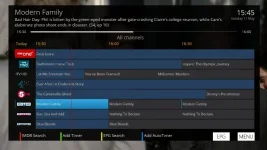
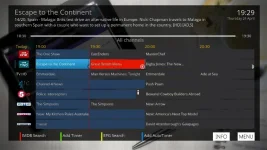
I have re-saved the skin and it now looks very similar to your first screenshot (see below).
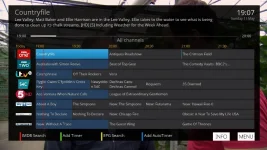
I was hoping that it would look like the below once fixed.
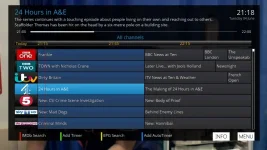
Is it possible for me to make it look like this?
Thanks
I was hoping that it would look like the below once fixed.
Is it possible for me to make it look like this?
Thanks
Two to try, as not sure if one of these is as pictured. Extract the zip and overwrite /share/enigma2/MetrixHD/epg folder
View attachment epg.zip
View attachment epg.zip
However if not you can use photoshop etc to change the colours in this folder and get it how you like. If you come up with anything good then please share it on here .
View attachment epg.zip
View attachment epg.zip
However if not you can use photoshop etc to change the colours in this folder and get it how you like. If you come up with anything good then please share it on here .
S
smreid
Guest
Thanks, will have a play and let you know


D
Driftwood1212
Guest
Hello,
First of all, I think this skin is the best I have seen. I first discovered it in the openatv image, and now I want to make it work on the openvix image. Only I am encountering some problems:
I have an xtrend et5000 and after installing the skin from the plugin section, and loading it, my receiver crashes and enters a boot loop, in which it crashes each time.
Can someone please tell me how I can download the crash log so I can post it here in the forum.
Thanks in advance.
First of all, I think this skin is the best I have seen. I first discovered it in the openatv image, and now I want to make it work on the openvix image. Only I am encountering some problems:
I have an xtrend et5000 and after installing the skin from the plugin section, and loading it, my receiver crashes and enters a boot loop, in which it crashes each time.
Can someone please tell me how I can download the crash log so I can post it here in the forum.
Thanks in advance.
D
Driftwood1212
Guest
Thank you Judge.
D
Driftwood1212
Guest
So here is what I did to reproduce the error:
I reinstalled the last vix image, and downloaded the metrixhd skin from the 'install plugin' section, then I went to setup > system >user interface >skin setup then I picked default,
then the metrix hd configuration screen popped up, I selected 'easy setup'. Then MetrixHD was being generated. Once it was over, the user interface restarted, but nothing changed.
After that I went to setup > system >user interface >skin setup and metrixhd was now selectable. So I picked it up and the user interface restarted again.
Now that metrixhd was loaded, I started switching to random channel, and my receiver 'ET5000' started crashing after each load up.
I attached the latest crash logs.
Please let me know how to solve the issue.
I reinstalled the last vix image, and downloaded the metrixhd skin from the 'install plugin' section, then I went to setup > system >user interface >skin setup then I picked default,
then the metrix hd configuration screen popped up, I selected 'easy setup'. Then MetrixHD was being generated. Once it was over, the user interface restarted, but nothing changed.
After that I went to setup > system >user interface >skin setup and metrixhd was now selectable. So I picked it up and the user interface restarted again.
Now that metrixhd was loaded, I started switching to random channel, and my receiver 'ET5000' started crashing after each load up.
I attached the latest crash logs.
Please let me know how to solve the issue.
Attachments
Hi Driftwood, I believe it may be a ET5000 only issue which I can't replicate so is tricky for me to fix.
Looking at the crash log, I would hazard a guess it's a issue with "RollerCharLCD.py" that is causing the crash. I've removed this from my skin file and have attached below. Unzip and then copy and paste to /share/enigma2/metrixHD/ and let me know what happens.
View attachment skin.xml.zip
Looking at the crash log, I would hazard a guess it's a issue with "RollerCharLCD.py" that is causing the crash. I've removed this from my skin file and have attached below. Unzip and then copy and paste to /share/enigma2/metrixHD/ and let me know what happens.
View attachment skin.xml.zip
D
Driftwood1212
Guest
You are the best scwheeler, it worked  my receiver does not crash anymore.
One thing I need to ask is the update icon that shows up on the upper right screen each time I change a channel. Can you tell me what it is for, and is there a way to deactivate it.
Thank you in advance for your support.
my receiver does not crash anymore.One thing I need to ask is the update icon that shows up on the upper right screen each time I change a channel. Can you tell me what it is for, and is there a way to deactivate it.
Thank you in advance for your support.
Glad it worked! The update icon is letting you know that an update is available for VIX and will disappear when when you are up to date (menu>setup>software update) . There is no other way to get rid of it.
D
Driftwood1212
Guest
Perfect. Thanks again for your support. I appreciate it ))
))
Larry-G
V.I.P ,
- Joined
- May 19, 2010
- Messages
- 32,540
- Reaction score
- 405
- Points
- 0
- Age
- 48
Glad it worked! The update icon is letting you know that an update is available for VIX and will disappear when when you are up to date (menu>setup>software update) . There is no other way to get rid of it.
you can turn the update icon off but that would result in you not being notified when a new update becomes available.
D
Driftwood1212
Guest
scwheeler,
Is there a way to change the vix loading animation to something else ? right now when the STB is loading I get the VIX animation, and I would like to go for something else that suits the metrixhd skin, do you have any suggestions ?
Is there a way to change the vix loading animation to something else ? right now when the STB is loading I get the VIX animation, and I would like to go for something else that suits the metrixhd skin, do you have any suggestions ?
Sure. The easiest way is to download different boot logos from the feeds.
I use the one I made (attached below) if you want to use it extract and over right the default ones in /share

View attachment Archive.zip
I made this with iDreamx software for mac but there is similar for windows.
I use the one I made (attached below) if you want to use it extract and over right the default ones in /share
View attachment Archive.zip
I made this with iDreamx software for mac but there is similar for windows.
Similar threads
- Replies
- 39
- Views
- 36K

