Superb quality and spec AB-Com PULSe 4K SE. Crazy offer! Only £99! FREE UK DELIVERY! 4K UHD, Enigma 2, Multiboot 4 images & more!...
Superb quality and spec AB-Com PULSe 4K Rev II Twin Satellite tuner only £149! FREE UK DELIVERY! 4K UHD, Enigma 2, SATA HDD facility, Multiboot 4 images & more!...

MetrixHD_MOD (Now includes a full 1080 HD version too)

I have 1 Tb HDD Sowa and are currently using no more than 200gb

Look at the size and space of internal memory, HDD nothing to do with.
FlashExpandr extend their internal memory size by moving the /usr to the specified device (USB)
 
I have removed 3 skins and still not working earlier, i will try above and post back later if still no joy.
 
Finally did it guys, however now have another issue.. I have installed all the settings that i require and then hit the save option. 3 times of trying and the box crashes everytime whilst trying to save, if it had managed to save where is the save location? None of the settings have been implemented when the box restarts.. If someone c could help i would appreciate it.
 
Pleased you've got the skin working Igleave.

Once saved it saves the file skin.xml to the MetrixHD directory. Having said that, I have never had it crash whil

Perhaps try just change one setting and see if that works. If so perhaps you will be able to work out the offending add-on. While most should work some may call renderers/converters not compatible with Vix so for the moment I can only suggest using the one's by me.

Obvious question so apologies but have you also ensured MetrixHD is set as skin in setup menu (I think this happens automatically but can't remember).

If this doesn't work I would be tempted to do a full backup and then reflash Vix from USB, restore your setup, and then install MetrixHd.

Hope some of this helps.
 
Finally did it guys, however now have another issue.. I have installed all the settings that i require and then hit the save option. 3 times of trying and the box crashes everytime whilst trying to save, if it had managed to save where is the save location? None of the settings have been implemented when the box restarts.. If someone c could help i would appreciate it.

upload the corresponding crashlogs here so that the skins author may be able to see why it causes the crash.
 
2 lgleave22
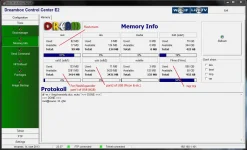
Chances are once again out of memory. Skin is assembled from parts by means of plugin MyMetrix (generates skin.xml).
Him to work you need enough space in the flash memory. Check at the free memory in the flash,
you need to keep a free order of 10% for the normal operation of the image.

dcc_mem.webp
 
Last edited by a moderator:
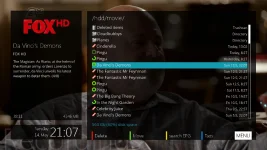
Revised Movie Selection screen with Picon :

Code:
http://live.mymetrix.de/?page=view-skinpart&skinpart_id=118&titleext=MovieSelection%20with%20Picon

screenshot-4.webp
 
A quick question before I install v2 of this fabolous skin. Atm I have scwheeler's mod 1.2 skin setup. Do I need to delete all the components files and metrix hd mod folder first then install the v2 ipk? Please can I be pointed in the right direction as to what to do to upgrade my Metrix HD Mod 1.2 setup to latest. Thanks.
 
gsingh - It should be okay not to delete it, in fact I'm sure I had MetrixHD_MOD running after V2. This one installs as MetrixHD not MextrixHD_MOD so should be separate.

Let us know how you get on.
 
Just installed ipk, no Metrix Hd in skin option only existing Metrix HD Mod is still there. However in the plugin section, I have two new metrix plugins. Should the new skin have installed with the ipk or just the 2 plugins?
 
Just the 2 plugins - the skin is built when you select save skin in the mymetrix plugin in. After this you can restart and select it :)
 
I want to thank Andy for recoding the way scaled picons are displayed.

With the most recent build (665); picons in the Quickepg (left/right info bar) will no longer have a transparent square around them. Much Much nicer:

screenshot-9.webp instead of screenshot-1.webp

This is why I work on this skin for Vix :D
 
I want to thank Andy for recoding the way scaled picons are displayed.

With the most recent build (665); picons in the Quickepg (left/right info bar) will no longer have a transparent square around them. Much Much nicer:

View attachment 25889 instead of View attachment 25890

This is why I work on this skin for Vix :D

yup andy is a top notch developer, he's always adding to and improving the image for the better, often adding features he does not even use but are requested by users. you could not ask for a better developer in my opinion and he is the main reason ViX is as popular as it is with our users.
 
2 lgleave22
Chances are once again out of memory. Skin is assembled from parts by means of plugin MyMetrix (generates skin.xml).
Him to work you need enough space in the flash memory. Check at the free memory in the flash,
you need to keep a free order of 10% for the normal operation of the image.

View attachment 25886

Flash 102.4
Free 36.7

I have deleted all skins to make room for new plugin

Scwheeler i can see the new plugin but there is nothing showing in my skins menu, should there be the MetrixHD skin showing?

How do i add the crashlogs to this thread Phoenix?
 
Saved settings in the plugin and can now see the skin, when i choose the skin it is restarting gui but when it reboots back up is not using the new skin, any ideas what i am doing wrong? :confused:
 
Have you installed any add-ons or left it default? I had this behaviour once when developing a new screen that was incompatible - it would try and load, fail and so boot with the default skin.
 
Have you installed any add-ons or left it default? I had this behaviour once when developing a new screen that was incompatible - it would try and load, fail and so boot with the default skin.


I have now got the skin up and running, I think it was because i had added other elements to the skin that werent default Metrix. I have deleted most of the add ons to get it working, when i get home later i will start to add more default settings to get it to function how i want. The box was crashing when i was saving the settings hence the reason it wasnt showing in my skins section. I went back and removed most of the the non Metrix options and it finally saved.

Did notice earleir though that the new skin isnt showing my picons anymore, do you know how to fix this problem?

Thanks for all the input given above, appreciated
 
Last edited:
A big problem with the other elements is that they use a non-standard code to display any progress bars (i.e. health widget) which causes a crash. I am redoing some of these screen and Vix healthwidget should be realised by the end of the day.

Where do you store your picons? USB? Can you check that they are in the right folder and correct setting in the setup menu. Try another restart.
 
Saved settings in the plugin and can now see the skin, when i choose the skin it is restarting gui but when it reboots back up is not using the new skin, any ideas what i am doing wrong? :confused:

After setting a skin with the plugin MyMetrix necessarily have to completely restart the receiver to compile the new converter!
So, as the skin is made under a different image that many of its parts are not supported in ViX.
 

OpenViX Feeds Status

Back
Top