Superb quality and spec AB-Com PULSe 4K SE. Crazy offer! Only £99! FREE UK DELIVERY! 4K UHD, Enigma 2, Multiboot 4 images & more!...
Superb quality and spec AB-Com PULSe 4K Rev II Twin Satellite tuner only £149! FREE UK DELIVERY! 4K UHD, Enigma 2, SATA HDD facility, Multiboot 4 images & more!...

MetrixHD_MOD (Now includes a full 1080 HD version too)

Gary - pleased you sorted the picon issue, for reference I recommend Ocram's SHD transparent picons that are in the feeds. These are higher resolution so look less pixelated.

pajillas - My setup:
page1.webp

page2.webp

Rimas - good screens, always looking for contributors.
 
How long should it take for the plugin to write the skin file. Ive been trying to install this for the plugin on a vu solo and it just locks up the box?

Thanks

I starte from scratch, reflashed the box, installed and setup the skin first before setting up anything else like channels-plugins and it worked first time:D
 
rimas - can I have your epg button (info.png) thanks.
 
Ive downloaded the picons from the feed and saved them to mu usb hdd. I cant get the picons to show?. There saved as media/hdd/picon should it be media/usb/picon as its a 2gb usb pen? Ive tried to change the hdd to usb my ftp program but cant. Any ideas on this.

Thanks, Gav
 
Got it working, was wondering if I can get the information of now and next to show when I press up and down like the Vix skin. Currently it shows information of the current programme and the name of the next.
 
Also, would it be possible to remove the massive light grey channel name?
 
Never mind, sorted the above issue but it would be great to have the now and next info for the channel list menu and also would it be possible to get the preview on zap back in a tiny box as currently the channel list comes in the way of the preview.

Nice skin, keep up the good work!
 
Gav - I can only speak for my setup, but my picons are located in media/usb/picon. Using your FTP program are you able to copy the picon folder rather than move it into that location?

Rahat - Thanks! On the channel list screen the next programme is displayed in the left hand box at the bottom. There are no plans to change this at the moment but I will bear it in mind. I will look into if it is possible to add preview window on channel list screen over weekend.
 
Gav - I can only speak for my setup, but my picons are located in media/usb/picon. Using your FTP program are you able to copy the picon folder rather than move it into that location?

Ive been playing about with the picon issue the past few hours and still can get it. Also couldnt get the epg to download. If i swith skins tho both problems are solved and the picons & epg work fine. I dont think my solo likes the new skin tbh:(
 
MetrixHD_MOD

Silly question. If I restore from backup will it restore my

Tuner config
Channel lists
Softcam settings
And the changes I made in settings?

Will I have to install my softcam again?

I take the additional plugins I downloaded will not be backed up?

Thanks
 
Jugulator - Yes! But to be sure as a safety net, backup settings and also backup image - worst case if restoring settings doesn't work for you, you can restore your image which is 100% the same as it is today :) (BTW - i have never had to restore an image - it's just a disclaimer!!)

Gav - I'm sure it is a setting and not due to skin - albeit this skin works is works slightly different with picons, I think the epg is a separate issue. The default skin uses a different renderer for picon which may use different directories. Please try downloading the picons directly from here: http://ocram.github.io/picons/downloads.html . Pick the SHD transparent-white-noborder.

Save them in media/usb/picon and try that.

If not Gary solved it by duplicating them in these folders:

/media/usb/XPicons/picon/ (recommended)
/media/hdd/XPicons/picon/
/usr/share/enigma2/XPicons/picon/
 
Also, would it be possible to remove the massive light grey channel name?

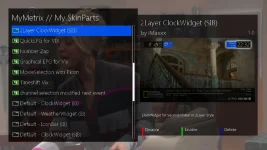
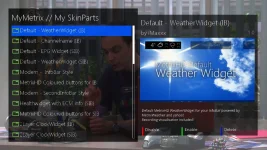
The beauty of the skin (other than the design) is its modular structure.
Do not need any element - disable it in the settings.
In your case, you need to disable 'Default - ChannelName (IB)' in the settings of skin.
 
MetrixHD_MOD

Jugulator - Yes! But to be sure as a safety net, backup settings and also backup image - worst case if restoring settings doesn't work for you, you can restore your image which is 100% the same as it is today :) (BTW - i have never had to restore an image - it's just a disclaimer!!)
/

So when you say take a quick backup, reflash and then install skin from plugins, you mean only settings backup? I guess if its the image backup, it would be exactly the same as it is now which will Include the metrix skin which I have now.
 
So when you say take a quick backup, reflash and then install skin from plugins, you mean only settings backup? I guess if its the image backup, it would be exactly the same as it is now which will Include the metrix skin which I have now.

That's spot on.
 
This skin is nice. A real good design.
It has to undergo some tuning since I see some fonts parts (expecially rounded ones) too tiny and disappear. this happens with all the number 2 displayed in the channel name of EPG list.

Second, since installing the skin I hade 2 crashes. Expecially when in the skin setup plugin.
here the crashlogs:
 

Attachments

This skin is nice. A real good design.
It has to undergo some tuning since I see some fonts parts (expecially rounded ones) too tiny and disappear. this happens with all the number 2 displayed in the channel name of EPG list.

Second, since installing the skin I hade 2 crashes. Expecially when in the skin setup plugin.
here the crashlogs:

I agree. Font is too thin. Part of number 2 and 8 are too thin to be seen. An option to change font would be cool.
 

OpenViX Feeds Status

Back
Top