Superb quality and spec AB-Com PULSe 4K SE. Crazy offer! Only £99! FREE UK DELIVERY! 4K UHD, Enigma 2, Multiboot 4 images & more!...
Superb quality and spec AB-Com PULSe 4K Rev II Twin Satellite tuner only £149! FREE UK DELIVERY! 4K UHD, Enigma 2, SATA HDD facility, Multiboot 4 images & more!...

MetrixHD_MOD (Now includes a full 1080 HD version too)

Hi Lothar - did you change the default channel list skinpart to one of the store?

Also I see you have a Duo (same as me) have you set up a swap file as can see lots of can't allocate memory errors in that crash log?
 
Weird. I've had an update for the picons. I'm assuming the skin is an integral part of this upgrade hence it not coming via update?
G
 
Hi Lothar - did you change the default channel list skinpart to one of the store?

Also I see you have a Duo (same as me) have you set up a swap file as can see lots of can't allocate memory errors in that crash log?

I have give it up and restore a older Image. Now all OK.
 
I know Gary, I've had several picon update in between - guess they work on a different system.

Actually it would be great if Andy could allow things like picons to autoupdate like bouquets/crossepg say every evening. I'm quite comfortable that they won't crash to box and so doesn't need my permission to action.

I sure new Vix will be worth the wait though.
 
Satellite switcher works beautifully by the way - well done
 
I have a question about the weather widget. Does it use the ip address of the box to identify the forecast area?
Great skin by the way. I love the graphics.
Cheers Dennis
 
Nope. You need to set your location in the plugin settings.


Sent from my iPhone using Tapatalk
 
I have installed the 'shd.transparent-white-nopadding_2014-01-19--16-21-17' picons via the Feeds and these apear in root/picons/
as links to root/picons/tv/ ... the channel files

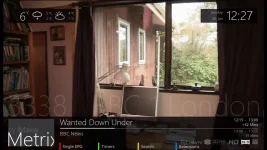
Now they apear correctly in the EPG but not on the Infobar as below.
photo 1.webpphoto 2.webp

How can MatrixHD be configured to use the picons directly from the same location as are used in the EPG ?

Thx
 
Hi DRH - has this improved. Are the reboots and problems caused when you add skin parts from the openstore? Many(most now) are made by users for vti and other images (in fact metrixHD was made for VTI hence the reason I started the MOD).

Have you been able to enter the digits now, as not sure why this won't work?

Hi Scwheeler,

I managed to get the skin working in the end, but as it involved quite a few attempts, removing and starting again.
I hadn't realised at first that installing additional bits were breaking it. I find the store and settings in general quite confusing and there's a distinctive lack of information even from the website.

As its been a few weeks now since I got it working, I can't even remember the order of things, so I'm loathed to touch anything incase I break it again :-)

In the end, the only way I could localise the weather was to directly edit the e2 settings file manually from telnet, the field input screens don't work at all via the UI.
 
I don't have the picons turned on in the EPG screen because for some reason I haven't worked out why, they look awful and blocky.

The picons look great in the channel list screen (where is a large picon) and they also look fine on the info bar, but on the EPG screen, they look so bad, I have to just have service name instead.
 
I have installed the 'shd.transparent-white-nopadding_2014-01-19--16-21-17' picons via the Feeds and these apear in root/picons/
as links to root/picons/tv/ ... the channel files

Now they apear correctly in the EPG but not on the Infobar as below.
View attachment 32205View attachment 32206

How can MatrixHD be configured to use the picons directly from the same location as are used in the EPG ?

Thx

Hi Bwelton - It should work fine wherever they are located as skins aren't location specific. Are you on the latest VIX & latest MetrixHD updates as there was an issue with picons on an older version when I changed the picon renderer?
 
I don't have the picons turned on in the EPG screen because for some reason I haven't worked out why, they look awful and blocky.

The picons look great in the channel list screen (where is a large picon) and they also look fine on the info bar, but on the EPG screen, they look so bad, I have to just have service name instead.

Thanks for the update drh. Glad you got it working - and it can be pot luck on the openstore as the skin parts are user submitted. If you do install skin parts that aren't mine, then I always suggest doing 1 at a time so if there is a problem you know which one it is.

The picons on the epg do get scaled and it is blocky. However this can be improved slightly by which picons you use (I use Ocram's SHD transparent) and also the number of rows in the EPG (I use 7). It will still be blocky due to scaling used in the box but may be a little better.
 
Need some help....

My VU+ Duo crashed and i had to restore it the MyMatrix plugin installed automatically but i cant remember or figure out how to activate the skin... Im missing it...lol

Anyone got some pointers??
 
Go into the Metrix addon and select Save My Skin. Reboot. Viola!


Sent from my iPhone using Tapatalk
 
Also ensure you've selected it in Menu-Settings-Skins in Vix


Sent from my iPhone using Tapatalk
 
Just a quick question about how much flash memory this skin uses.
I have a Vu+duo and have to make choices about which plugins to use.
I really like the skin but dont want to overload the box.
i use ondemand and casheflush plugins with epg and picons on the usb and hdd respectively.
im on Vix 808.
Does the skin use a significant amount of memory?
Cheers Dennis
 
Yes. Without a Swapfile your Duo will reboot if you start a record. this Skin can only Use with a 256MB Swapfile on USB.
 
I have a 65MB swap and it runs totally fine on my Duo.


Sent from my iPad using Tapatalk
 

OpenViX Feeds Status

Back
Top