Superb quality and spec AB-Com PULSe 4K SE. Crazy offer! Only £99! FREE UK DELIVERY! 4K UHD, Enigma 2, Multiboot 4 images & more!...
Superb quality and spec AB-Com PULSe 4K Rev II Twin Satellite tuner only £149! FREE UK DELIVERY! 4K UHD, Enigma 2, SATA HDD facility, Multiboot 4 images & more!...

NAS mount failure

digitl

Forum Supporter
Donated Member
Joined
Sep 6, 2023
Messages
160
Reaction score
1
Points
18
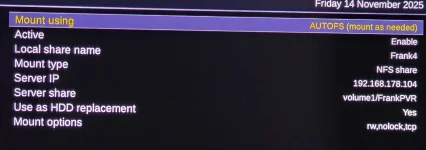
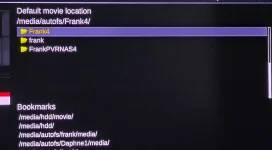
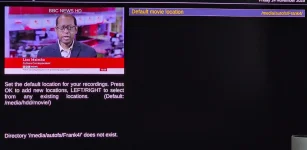
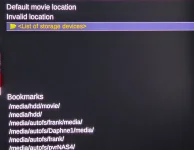
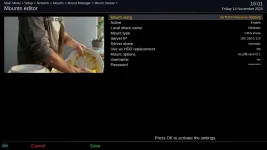
I have worked carefully through setting up a mount on my Ugreen DXP800+ NAS but, despite the share showing as mounted, it comes up as an 'invalid location' when I try to set it as the default location for recordings.

Where, please, is my error?

I have uploaded images to illustrate how the share is set up.
 

Attachments

  • 20251114_100418.webp
    20251114_100418.webp
    25.5 KB · Views: 5
  • 20251114_100523.webp
    20251114_100523.webp
    58.5 KB · Views: 5
  • 20251114_100727.webp
    20251114_100727.webp
    66.6 KB · Views: 5
  • 20251114_100930.webp
    20251114_100930.webp
    65.6 KB · Views: 5
  • 20251114_100815.webp
    20251114_100815.webp
    101.4 KB · Views: 5
No user/password?? or can you specify access IP's for NFS like my Synology??
 
I previously entered the username and password in 'User management' and I can see them there. Is that sufficient? Would the share show as mounted with it having being entered as I did?

Yes, NFS is available and set up. I've changed the user from guest to administrator but that's not fixed the problem.
 
Setup a new user and password on the nas and try to connection to that.
 
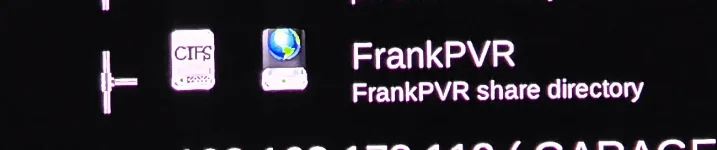
@digital - your first screengrab shows CIFS. That is an old/outdated name for SMB (Server Message Block) protocol. So, is the share on your NAS set as NFS or SMB? NFS doesn't use passwords - you specify allowed IP client addresses on the NAS. If the share is actually SMB rather than NFS, then you should set a user and password and specify these and the NAS IP address on the Duo.
Here is one of my NAS shares (using SMB) on my Vu Uno. For several years now I have used the NAS IP address and set a user and password on it. Microsoft have tightened up security on the SMB protocol since Windows 7 days, gradually limiting the ability for clients to browse to find shares and also restricting guest type access. You can configure Windows to handle shares without passwords and to permit name browsing, but you are at the mercy of monthly updates from Microsoft undoing your config. So, I just accept that and I explicitly set IP addresses and set user ids and passwords on any remote share. Note , you do not need SAMBA installed on your client machine (Vu Duo). The built-in smbclient works just fine to access remote shares. Note the use of IP address, user and password in the SMB (CIFS) config on my VU Uno. Also note the use of vers=2.1 in the mount options.
I'm referring to MS Windows as they are the original developers of SMB. Whatever OS is on your NAS is probably following current security standards for the protocol.
 

Attachments

  • NAS_share.webp
    NAS_share.webp
    38 KB · Views: 8
I previously entered the username and password in 'User management' and I can see them there. Is that sufficient? Would the share show as mounted with it having being entered as I did?

Yes, NFS is available and set up. I've changed the user from guest to administrator but that's not fixed the problem.
How is NFS defined in UGreen? On Synology you can give permission based on IP so credentials are not needed. This is what I use on all my E2 boxes.

Ralf
 
Thanks, all, fixed with your help and advice. New share, new user and Joe_90's image.
 

OpenViX Feeds Status

Back
Top