Superb quality and spec AB-Com PULSe 4K SE. Crazy offer! Only £99! FREE UK DELIVERY! 4K UHD, Enigma 2, Multiboot 4 images & more!...
Superb quality and spec AB-Com PULSe 4K Rev II Twin Satellite tuner only £149! FREE UK DELIVERY! 4K UHD, Enigma 2, SATA HDD facility, Multiboot 4 images & more!...

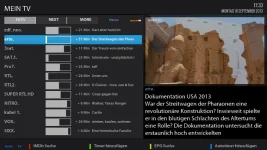
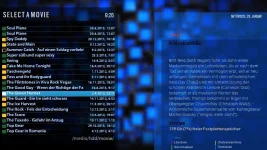
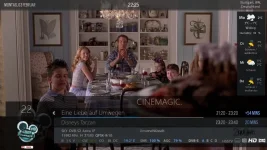
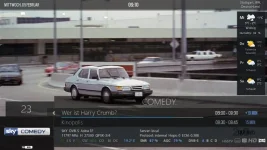
Nou_HD Skin

Keep me guessing why don't you ha ha ha.. Got the playback of recordings, only 29 more to find lol..
 
Update: a new version 1.0.

The skin looks not different, but is totaly changed. Please delete the old skin bevor installing the new version. Happy New Year to all!

Is this why you have changed the version number back to 1.0?, the last version was 5
 
Nashu, thanks for the update how do we activate this screen:

EPG Selection Multi.webp

Thanks
 
Hello grazeyone,
This was the old EPG SelectionMulti Screen. It doesn't exist anymore. Greetings.
 
Thats still in the ViX image although i cant remember the name. press and hold the EPG button then try the different options until you get the one you want
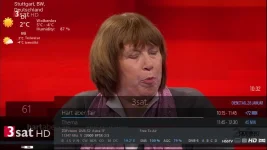
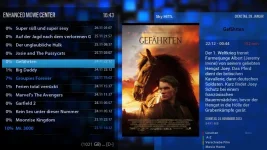
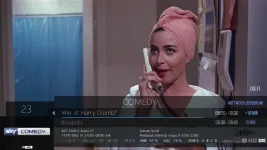
Thanks mate I can access it when watching back a recording.

Sent from my Nexus 7 2013 using Tapatalk
 
Update version 2.0.

The screens Eventview, Eventviewsimple and InfobarEventview now with runningtext.
Picon added to the Eventview and Eventview simple screens.

In the screens with Runningtext: now is stopping the text after two/three times running.
A short description in EPG or channellist does not more running now.

New screens added: : epgsearch, epgrefresh: 5 screens für IPTV-List- Updater. FastScan, NETcasterScreenBrowser, NETcasterScreenHelp, netcaststopmess, netcastsetup; Wake on Lan Config, PiconsUpdater.

In Cronmanager screen- listtransparency was corrected.

Bug in MediaInfoSetup screen fixed.

RecInfobar u. ResolutionLabel screens changed.


In GraphicalEPG/GraphicalEPGPIG the timeline_now position changed.

Changed graphic in folder „images“: ico_crypt.png.

Changed graphics in folder “menu”: arrow-dn.png, arrow-lt.png, arrow-rt,png, arrow-up.png, epg_day_jump.png, epg_bouquet_change.png.

Changed graphics in folder common_icons: Mediaplayerbar_gray.png und Mediaplayerbar_purple.png.

Please overwrite the old screen. Greetings.
 

Attachments

Update vs.2.3.

In runningtext of all main screens like (EPGs, CoolTv EPGs, Channel Selections etc.) start time and runningstep changed.

Enhanced Movie Selection and Movie Selection changed.

Few other little changes.

WEATHER Widgets in Infobar and Secondinfobar included. In infobar for 2 days (today and tomorrow); in secondinfobar for 5 days.

For the weather you need from feed the Weather Plugin (extensions) and the weathercomponenthandler (system plugins). After download you have to set up your prefered city in the Weather Plugin. After that please restart the box.

Please overwrite the old skin. Grettings.
 

Attachments

  • Infobar Nou_HD.webp
    Infobar Nou_HD.webp
    31.1 KB · Views: 30
  • EnhancedMovieCenter.webp
    EnhancedMovieCenter.webp
    55.2 KB · Views: 25
  • Movie Selection.webp
    Movie Selection.webp
    60.7 KB · Views: 22
  • Nou_HD vs.2.3.zip
    Nou_HD vs.2.3.zip
    6.2 MB · Views: 5
Last edited:
And here the last update 2.4.

Weather widgets better positioned. Greetings.
 

Attachments

@Busterroo

After unpack, open each folder and after that, the files (follow the directory) via FTP to the Box.

The directory is: for Nou_HD folder: usr/share/enigma2 and for the other files: usr/lib/enigma2/python/Components/Renderer.
Greetings.
 
Last edited:
Update version 2.6.

Weather widgets are now on the right side in infobar and secondinfobar.
The weather icons changed- they are now smaller.
Infobar u. secondinfobar optimized; the graphics are also changed.
icon_dolby.png smaller.
Runningtext steptime and startdelay in the screens: eventview, eventview simple and EpgInfobarView changed. Greetings.
 

Attachments

Hi Nashu, thank you once again for the updates. Please can you tell me where to go to setup the weather local to myself.
 
Hello Igleave,

In Weather Plugin.

You need from feed the weather plugin (extensions) and weathercomponenthandler (system plugins); after that restart GUI. Greetings.
 
Last edited:
Update vs.2.7.

Here a version with the posibility to change between Nou_HD_Weather or Nou_HD (without weather). After installing you have to go to menu/system/skins and there to choose the version which you wish. Please remove the old version, before installing vs.2.7. Greetings.
 

Attachments

  • Nou_HD vs.2.7.zip
    Nou_HD vs.2.7.zip
    6.5 MB · Views: 4
  • Infobar_Weather.webp
    Infobar_Weather.webp
    38.1 KB · Views: 18
  • Infobar.webp
    Infobar.webp
    32.2 KB · Views: 18
Last edited:

OpenViX Feeds Status

Back
Top