
Superb quality and spec AB-Com PULSe 4K SE. Crazy offer! Only £99! FREE UK DELIVERY! 4K UHD, Enigma 2, Multiboot 4 images & more!...
Superb quality and spec AB-Com PULSe 4K Rev II Twin Satellite tuner only £149! FREE UK DELIVERY! 4K UHD, Enigma 2, SATA HDD facility, Multiboot 4 images & more!...
You are using an out of date browser. It may not display this or other websites correctly.
You should upgrade or use an alternative browser.
You should upgrade or use an alternative browser.


thecaretaker
Forum Supporter

- Joined
- Apr 22, 2012
- Messages
- 327
- Reaction score
- 4
- Points
- 18
- Location
- Southern UK
- Website
- www.thecaretakers.co.uk
Well done Rossi, very nice default skin. Love it.
What size picons would fit the Youvix InfoBar best? My current ones (MMC Black 100x60) look a bit too small.
What size picons would fit the Youvix InfoBar best? My current ones (MMC Black 100x60) look a bit too small.

Andy_Hazza
Moderator
Go for the oscram shd transparent-white-nopadding ones. They can be found in the feeds.
thecaretaker
Forum Supporter
- Joined
- Apr 22, 2012
- Messages
- 327
- Reaction score
- 4
- Points
- 18
- Location
- Southern UK
- Website
- www.thecaretakers.co.uk
OK, I answered my own question, the best size is 155x97. Just resized my existing picons and they now look great. Thanks.
Andy_Hazza
Moderator
oscram shd ones are 220x132
H
hoppy01
Guest
Hi all, might have found a little bug with this skin when you want to start recording. “Add recording (enter recording duration)” no box pops up for you to enter the time you want your recording to go for. Worked fine in “openvixhd-Apollo.071-vuduo2_usb” but is seems to be missing from “openvixhd-Apollo.077-vuduo2_usb”
Thanks
Thanks

Rob van der Does
ViX Beta Tester
No need to resize picons; ViX does that for you.
R
rossi2000
Guest
Hi all, might have found a little bug with this skin when you want to start recording. “Add recording (enter recording duration)” no box pops up for you to enter the time you want your recording to go for. Worked fine in “openvixhd-Apollo.071-vuduo2_usb” but is seems to be missing from “openvixhd-Apollo.077-vuduo2_usb”
Thanks
screenshot plz?

Menne.0201
New member
- Joined
- Apr 21, 2014
- Messages
- 8
- Reaction score
- 0
- Points
- 0
- Age
- 61
oscram shd ones are 220x132
settings are great
H
hoppy01
Guest
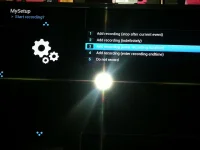
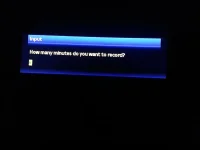
I press the record button and get the “start recording” options (screen01) then I get a totally blank screen. I’m still able to key in a time to start recording be nothing is seen on screen. I uploaded a shot of the missing “input screen” from another skin to show you what is missing (screen03).screenshot plz?
All worked fine up to “openvixhd-Apollo.077-vuduo2_usb”
R
rossi2000
Guest
fixed for next build, thx for reporting.
G
gbok
Guest
Just flashed the vix hd image on my vuduo. No problems. Looks like after the flash there is even an extra couple of megs flash memory available. Cacheflux also working fine. Settings were restored perfectly.
New life for my duo
New life for my duo

duoduo
Forum Supporter
Think I have missed something here, what's apollo hd skin and where do I find it?

Larry-G
V.I.P ,
- Joined
- May 19, 2010
- Messages
- 32,540
- Reaction score
- 405
- Points
- 0
- Age
- 48
Think I have missed something here, what's apollo hd skin and where do I find it?
It's not a skin but a entire image in conjunction with Rossi2000 and OpenViX.
go to www.openvix.co.uk and download the OpenViX HD image for your receiver, you will need to reflash the image and do not use a settings backup between the two as there are changes in the HD image which will be overwritten by any settings backup made and restored from the base OpenViX image.
currently there are Two skins on the feeds, YouViX blue and YouViX red, a green and dark blue variant will follow in build 078 as well as some others that are currently still in development. OpenViX HD is built specifically to take advantage of the 1080 frame buffer and rossi has been working on this for over three months now, currently no other image team has this level of support or any real 1080 full HD skins, only OpenViX HD has.
H
honda-civic
Guest
There is a problem in insert favorites list,this function does not work
Larry-G
V.I.P ,
- Joined
- May 19, 2010
- Messages
- 32,540
- Reaction score
- 405
- Points
- 0
- Age
- 48
It does take a little longer to bootup with the HD image due to changes Rossi made and the new animated boot screen he added. It's nothing to worry about and it's not like your going to be sitting there watching the bootup screen that often unless you really really like it that is LMAO.
Sent from my iPad Air using Tapatalk
Sent from my iPad Air using Tapatalk

Joe_90
Moderator
There is a problem in insert favorites list,this function does not work
I'm having an issue with using the TV/Radio button which is not toggling into the radio bouquets reliably. It seems to be bringing up the TV mode although I did have it working in radio mode earlier today.
goosegog
Forum Supporter
Tried loads of skins and always go straight back to default skin,think i will keep this on a little longer,good work rossi,nice neat looking skin
Cheers[emoji106]
Sent from my iPhone using Tapatalk
Cheers[emoji106]
Sent from my iPhone using Tapatalk

