Superb quality and spec AB-Com PULSe 4K SE. Crazy offer! Only £129! FREE UK DELIVERY! 4K UHD, Enigma 2, Multiboot 4 images & more!...
Superb quality and spec AB-Com PULSe 4K Rev II Twin Satellite tuner only £179! FREE UK DELIVERY! 4K UHD, Enigma 2, SATA HDD facility, Multiboot 4 images & more!...

[VU+ Duo2] OpenVix 4.0 few issues need help solving

Have you installed samba/nfs on both boxes?


Sent from my iPhone using Tapatalk

Yes - although in theory you should only need to install it on the server as thats the one you're mounting, not the client. But regardless its installed on both.
 
EPG has gone back to being garbled junk again.

It was working fine when I first fixed, its set to hard drive not USB stick as recommended above. I deleted the .dat file, went into Cross EPG and redownloaded the Open UK manually - go back to the guide and its still garbled.

What on earths going on now??
 
EPG has gone back to being garbled junk again.

It was working fine when I first fixed, its set to hard drive not USB stick as recommended above. I deleted the .dat file, went into Cross EPG and redownloaded the Open UK manually - go back to the guide and its still garbled.

If you manually deleted it, I hope that you halted enigma2 before doing so. If you don't, the one held in RAM will be re-written.
 
If you manually deleted it, I hope that you halted enigma2 before doing so. If you don't, the one held in RAM will be re-written.

I deleted it in the EPG options menu where the Load/Delete/Save, resides - and I checked after that the EPG was blank - it was. I got CrossEPG to download fresh UK online - and its corrupt.
 
Are you using an internal HDD and/or NFS? I'm sure I read in another thread about problems with NFS!

That first crashlog complained about not enough disk space for timeshift.

The second crashlog complained about timing out reading/writing

Either this means HDD has errors and/or if you're using NFS then problems with NFS.

You would have to narrow down which one is causing it. I would do this by doing a fresh usb install (without restore of settings) and formatting of internal HDD. Don't install samba or NFS and try not to install any plugins, at least at first. Just what you need.

Then overtime add any plugins one at a time with sufficient time between installs to help determine when it plays up again.
 
Yeah well there are logs for multiple bugs that keep growing not getting fixed. I just tried updating to 4.1 - now the box is stuck in continual crashses. Id post the logs but its only going to get even more confusing

To be honest this is pushing me towards wanting to just pay the price for Sky Q right now, it'd be worth it for the stability and GUI alone compared to how this junk is currently performing.
 
To be honest this is pushing me towards wanting to just pay the price for Sky Q right now, it'd be worth it for the stability and GUI alone compared to how this junk is currently performing.
If you want Sky Q, pay for it.
Other than that, sounds like user error?
 
If you want Sky Q, pay for it.
Other than that, sounds like user error?

Haha of course all these crash logs sound like user error... yeah mate, of course they do. Its definitely user error that the EPG data is continally getting corrupt, its definitely user error that the Zero box can't rewind timeshift, its definitely user error that the Duo2 box regularly wont power on, or will get in a HDMI-CEC loop of just turning the TV off, its definitely user error that the network volume never stays mounted on the Zero box like it should once setup, its definitely user error that the box always crashed when you press the EPG, I could go on, but I can see how you came to that conclusion...Its definitely my fault and not shoddy programming (this coming from a dev, that is my day job by the way).

Predominately I'd just like the EPG to stop getting corrupted and the Zero to be able to rewind - two pretty simple features in a basic setup box you'd pick up from Asda to be fair, i'm not asking for the world here - they did cost £450 plus the hard drive from World-of-Satellite and my only support are a handful of users on a forum.
 
So now i'm back to a freshly restored box with 4.1, no more boot loop.

Ive deleted all previous .dat files, ive formatted the USB stick and ive set it epg location, starting fresh.

Ive just gone for UK channels, so i've run it on Sky UK OpenTV only - and its only filled in EPG data for about 20% of the channels... :mad:

I mean what more can I do - this could be simpler to setup, its exactly the same steps as before the restore, which filled every channel with data (but then started getting corrupted days later) and now its only filling a few of the channels... (which could be none actually, maybe its loading it from the EIT)
 
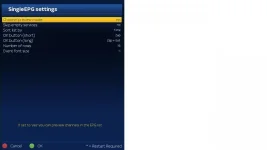
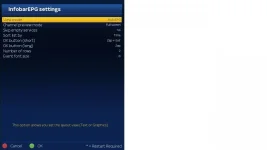
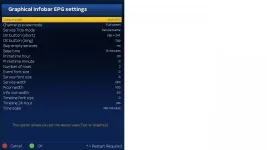
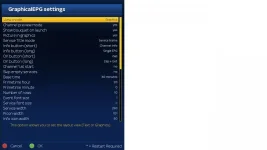
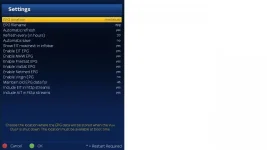
What are the settings for EPG. Post screenshots of all the settings you have used.

You seem to have made your mind up that the image is faulty. Perhaps reverting to the last image you were using without altering any other variable will help you identify problem.
 
I know it is very frustarting for you, but if you continue posting with a chip on your shoulder, nobody will want to assist you.

Can you try a differnt USB stick?
EDIT: Or use the HDD.
 
Last edited:
What are the settings for EPG. Post screenshots of all the settings you have used.

You seem to have made your mind up that the image is faulty. Perhaps reverting to the last image you were using without altering any other variable will help you identify problem.

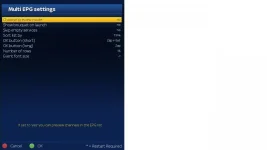
Well, the problem started on 3.2, and has now carried on into 4.0 and 4.1, so...

Anyway here are some screengrabs, i've included settings from the various EPG menus though I don't think they're applicable. (and if I was in charge of software dev this is one of the first areas id simplify 5 different sections for different menus with no idea for the average user which is which is an awful user experience)

Ive no idea if refresh or automatic save can affect crossEPG, its again not intuitive what these functions actually do. At the moment, all I want it to do is grab the Sky TV from OpenTV every day and not corrupt - foreign channels can get tackled at a later date right now. EPG-Importer does work better, but I prefer the OpenTV data than the Rytek sources as its accurate to what you get when you actually tune to the channel (and its a bit better IMO)

1_0_19_1B1D_802_2_11A0000_0_0_0-2.webp1_0_19_1B1D_802_2_11A0000_0_0_0-3.webp1_0_19_1B1D_802_2_11A0000_0_0_0-4.webp1_0_19_1B1D_802_2_11A0000_0_0_0-5.webp1_0_19_1B1D_802_2_11A0000_0_0_0-6.webp1_0_19_1B1D_802_2_11A0000_0_0_0-7.webp1_0_19_1B1D_802_2_11A0000_0_0_0-8.webp1_0_19_1B1D_802_2_11A0000_0_0_0-9.webp1_0_19_1B1D_802_2_11A0000_0_0_0-10.webp
 
I know it is very frustarting for you, but if you continue posting with a chip on your shoulder, nobody will want to assist you.

Can you try a differnt USB stick?
EDIT: Or use the HDD.

The corruption seems to be happening more often on the HDD - it did work for a fair few months just fine on this USB stick (though its lately ended up corrupting on both so I don't think its media dependant)

Chip removed for now, but it is very frustrating when you've paid so much and have having to spend literally hours and hours of your life troubleshooting and setting up, suddenly Sky seems quite cheap when you consider you do work for £80 an hour rate and you've spent about 20 hours trying to get your Linux box to do the basics. If it ran as it should it would be a lot better solution that Sky Q with the ability to get the foreign channels, but it's feeling like just having the Zero with the big dish would suffice for the odd time I want to watch a game not on Sky. I just wanted to banish that old multi-box setup though.
 
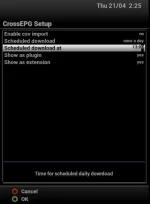
OMG! Why are you downloading EPG data every hour? Once a day at a time suitable for you (does not have to be 04:30) is good enough.
Are both receivers writing EPG to the same storage device?

Have a look at section 4.1 of the Vix manual. You shouldn't be setting the refresh option, no need for it.
Have a look at this video. Set it exactly as shown. http://www.world-of-satellite.com/s...-EPG-with-Crossepg-for-Astra-28-2-Video-Guide
Please use the HDD as your storage device for now.
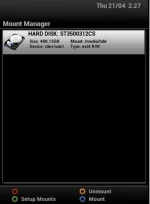
 
OMG! Why are you downloading EPG data every hour? Once a day at a time suitable for you (does not have to be 04:30) is good enough.
Are both receivers writing EPG to the same storage device?

Have a look at section 4.1 of the Vix manual. You shouldn't be setting the refresh option, no need for it.
Have a look at this video. Set it exactly as shown. http://www.world-of-satellite.com/s...-EPG-with-Crossepg-for-Astra-28-2-Video-Guide
Please use the HDD as your storage device for now.

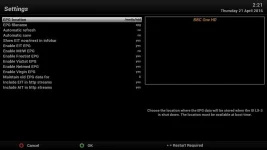
The download in standby was a test to see if would fix anything, obviously it didn't - but good catch, will put it back to early hours after the ABM list build.

No the second box has no tuner so it can't run CrossEPG, I did try to get it to access the same epg.dat file a read only but obviously with the various mounts not sticking this would really feasble, so the only reliable option for the second box is to do the epg-importer unfortunately. Id like it to access the crossEPG created file on the first box but at the minute even the crossEPG file being created isn't applying to the channels.

As for the video, thats exactly how I do it - will try again by swapping to the hd again tomorrow because after the final step with the USB stick tonight, the CrossEPG data didn't apply to the channels like in the video.

This issue with CrossEPG doing its job, but then not showing when you browse channels has only happen tonight since I started totally from scratch with 4.1 - before then, whilst the data got corrupt after a few days, it did just work exactly as the video (and for all foreign channels) just download and instantly apply in EPG.
 
In my view, best not to add too many variables in the mix. Just deal with one receiver at this time. Do the mounts later. Rob shares EPG data between receivers, so he may be able to assist later.

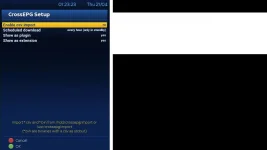
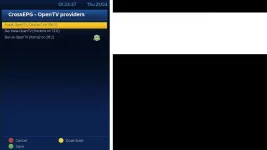
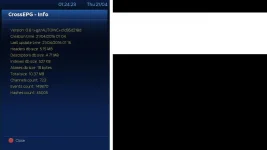
With all due respect, your settings do not match what is in the video guide. We'll have to add text/commentary to it later. Do it exactly as shown in the video please. If it helps I attach my screenshots. Perhaps you can upload the exact same ones?

01 Mounts
01 Storage devices.webp

02 EPG settings
02 EPG settings.webp

03 Cross EPG settings
03 Cross EPG settings.webp

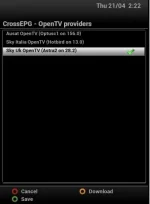
04 CrossEPG OpenTV providers
04 Cross OpenTV providers.webp

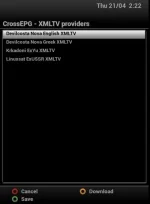
05 Cross EPG XMTLV providers
05 Cross XMLTV providers.webp

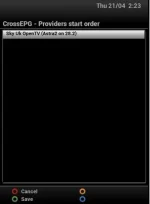
06 Cross EPG providers order
06 Cross providers order.webp
 
there's no reasoning with some, even if they refuse to read a manual.
 

OpenViX Feeds Status

Back
Top