
So on the server box, add /etc/epgimport/epgexport.sources.xml. Delete the epg and disable OpenTV and freesat so it is not imported again. Use EpgImporter on the server box to import from itself. Check if the entries are correct.


OK. Will try at some point next week. I need to wait till there is a bit of downtime as the boxes are used by the family. I'll report findings back.So on the server box, add /etc/epgimport/epgexport.sources.xml. Delete the epg and disable OpenTV and freesat so it is not imported again. Use EpgImporter on the server box to import from itself. Check if the entries are correct.
Hi @Huevos , Did the test and guess what. The programs are being imported an hour late on the server box too. I kept an eye on 1 program and it was there at 10pm, then I cleared it, did an epg importer and it was then there an hour later than it should have been. Does this mean that the epg-importer plugin is doing something odd? My time settings are pretty normal. The time is correct on the server as far as I can see:OK. Will try at some point next week. I need to wait till there is a bit of downtime as the boxes are used by the family. I'll report findings back.
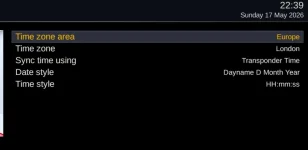
I have the server box do an epg refresh every few hours (as it's always on standby and I want it to pick up any late program changes). In addition it is set to save the epg data to epg.dat every hour.What does "look at the epg on the server box" mean? If it means EPG.DAT that could be very stale as it is only written at reboot or it forced.
So... more research. Conclusion: Rytec data already has a compensation for BST (so all programs are in the rytec data at starting an hour earlier than they actually start). When you export the EPG locally (to import somewhere else) it takes the time in the EPG and does not adjust it to compensate for BST. The EPG-Importer software does not handle this and this is why the rytec data is "tweaked" at source. The EPG Exporter does not do this tweak so EPG-Importer gets the times wrong.Hi @Huevos , Did the test and guess what. The programs are being imported an hour late on the server box too. I kept an eye on 1 program and it was there at 10pm, then I cleared it, did an epg importer and it was then there an hour later than it should have been. Does this mean that the epg-importer plugin is doing something odd? My time settings are pretty normal. The time is correct on the server as far as I can see:
View attachment 68806
I can only think that the EPG-Importer plugin is not taking acount of British Summertime or someting odd like that.
Very strange!!
I have since cleared it all down and run EPGRefresh on the Server box (tuning to a few Satellite channels and a few Tererestrial channels and the EPG is now back to normal with the programs at the correct times.
For now, I have set my slave box back to look directly at the EPG on the server box (via the NFS share) and the EPG on the slave box is now also correct.
Back to my original question of why this is not a good idea? It seems to work well and the programs have the correct times in the schedule too. Happy to go down the Export/import route if this issue with the incorrect time can be bottomed out.
Thanks
Paul
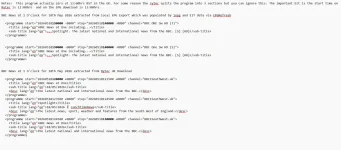
Sure. Will give it a go tonight after everyone has gone to bedCan you try an updated version of the epgexport plugin?
Send to the epgexport plugin folder and then restart. Afterwards recreate the xml files using the epgexport plugin.


On Linux (Unix) systems all clocks run on UTC.Rytec data is obviously adjusted in the knowlege that enigma2 does not handle BST or any other summertime offset upon importation of EPG data and has to be fed the wrong data to compensate.
Hi. I copied the new py and rebooted but getting a constant enigma2 crash. Crash file attached:Sure. Will give it a go tonight after everyone has gone to bed
reverted to old pyc for now (luckily I renamed it pyc.old before updating) and it boots again okay.Hi. I copied the new py and rebooted but getting a constant enigma2 crash. Crash file attached:
OK.That crash is nothing to do with my change. I will have to investigate.
Hi, Machine booted fine this time. Went through export with yelow key and it creashed a few moments later. Thanks, PaulI fixed the crash. Not related to my code. Try the offset now.
So it ran this time and produced the export file. I can see that the exporter items have +01000Ok, try again.

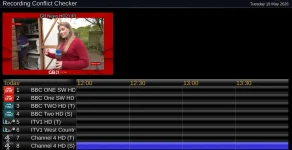
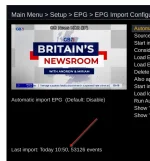

What I'll do is leave it using the Export / import now as that is setup and working after all of your efforts but.... if it glitches its good to know that I can swap back over to my old method also.In your case maybe reading EPG.DAT directly across the network works fine.
Also possible if reading across the network is use the path, rather than http path, in epgexport.sources.xml.


