Superb quality and spec AB-Com PULSe 4K SE. Crazy offer! Only £99! FREE UK DELIVERY! 4K UHD, Enigma 2, Multiboot 4 images & more!...
Superb quality and spec AB-Com PULSe 4K Rev II Twin Satellite tuner only £149! FREE UK DELIVERY! 4K UHD, Enigma 2, SATA HDD facility, Multiboot 4 images & more!...

[SF8008] Openvix & DAB+ feeds?

Code:
#NAME D1 Scotland (28.2E, UK)
#SERVICE 4097:0:2:0:0:0:0:0:0:0:http://localhost:5237/ts2na/1:0:C:295A:90B:3B:11A0000:0:0:0/1065/12/0xc2a1:Classic FM
#DESCRIPTION Classic FM
#SERVICE 4097:0:2:0:0:0:0:0:0:0:http://localhost:5237/ts2na/1:0:C:295A:90B:3B:11A0000:0:0:0/1065/12/0xc4fb:Smooth Relax
#DESCRIPTION Smooth Relax
#SERVICE 4097:0:2:0:0:0:0:0:0:0:http://localhost:5237/ts2na/1:0:C:295A:90B:3B:11A0000:0:0:0/1065/12/0xc4ed:Heart Xmas
#DESCRIPTION Heart Xmas
#SERVICE 4097:0:2:0:0:0:0:0:0:0:http://localhost:5237/ts2na/1:0:C:295A:90B:3B:11A0000:0:0:0/1065/12/0xc0c0:talkSPORT
#DESCRIPTION talkSPORT
#SERVICE 4097:0:2:0:0:0:0:0:0:0:http://localhost:5237/ts2na/1:0:C:295A:90B:3B:11A0000:0:0:0/1065/12/0xc0c2:LBC
#DESCRIPTION LBC
#SERVICE 4097:0:2:0:0:0:0:0:0:0:http://localhost:5237/ts2na/1:0:C:295A:90B:3B:11A0000:0:0:0/1065/12/0xc1c0:Absolute Radio
#DESCRIPTION Absolute Radio
#SERVICE 4097:0:2:0:0:0:0:0:0:0:http://localhost:5237/ts2na/1:0:C:295A:90B:3B:11A0000:0:0:0/1065/12/0xc5c0:KISS
#DESCRIPTION KISS
#SERVICE 4097:0:2:0:0:0:0:0:0:0:http://localhost:5237/ts2na/1:0:C:295A:90B:3B:11A0000:0:0:0/1065/12/0xc0c6:Magic
#DESCRIPTION Magic
#SERVICE 4097:0:2:0:0:0:0:0:0:0:http://localhost:5237/ts2na/1:0:C:295A:90B:3B:11A0000:0:0:0/1065/12/0xcfe6:KISSTORY
#DESCRIPTION KISSTORY
#SERVICE 4097:0:2:0:0:0:0:0:0:0:http://localhost:5237/ts2na/1:0:C:295A:90B:3B:11A0000:0:0:0/1065/12/0xcfd1:Heart UK
#DESCRIPTION Heart UK
#SERVICE 4097:0:2:0:0:0:0:0:0:0:http://localhost:5237/ts2na/1:0:C:295A:90B:3B:11A0000:0:0:0/1065/12/0xc6c0:Smooth UK
#DESCRIPTION Smooth UK
#SERVICE 4097:0:2:0:0:0:0:0:0:0:http://localhost:5237/ts2na/1:0:C:295A:90B:3B:11A0000:0:0:0/1065/12/0xcee8:Gold Radio UK
#DESCRIPTION Gold Radio UK
#SERVICE 4097:0:2:0:0:0:0:0:0:0:http://localhost:5237/ts2na/1:0:C:295A:90B:3B:11A0000:0:0:0/1065/12/0xcfe8:Heart Dance
#DESCRIPTION Heart Dance
#SERVICE 4097:0:2:0:0:0:0:0:0:0:http://localhost:5237/ts2na/1:0:C:295A:90B:3B:11A0000:0:0:0/1065/12/0xc1dc:Heart 80s
#DESCRIPTION Heart 80s
#SERVICE 4097:0:2:0:0:0:0:0:0:0:http://localhost:5237/ts2na/1:0:C:295A:90B:3B:11A0000:0:0:0/1065/12/0xcbe9:Heart 90s
#DESCRIPTION Heart 90s
#SERVICE 4097:0:2:0:0:0:0:0:0:0:http://localhost:5237/ts2na/1:0:C:295A:90B:3B:11A0000:0:0:0/1065/12/0xc37b:Capital XTRA
#DESCRIPTION Capital XTRA
#SERVICE 4097:0:2:0:0:0:0:0:0:0:http://localhost:5237/ts2na/1:0:C:295A:90B:3B:11A0000:0:0:0/1065/12/0xcae9:Heart 70s
#DESCRIPTION Heart 70s
#SERVICE 4097:0:2:0:0:0:0:0:0:0:http://localhost:5237/ts2na/1:0:C:295A:90B:3B:11A0000:0:0:0/1065/12/0xc4cd:Radio X
#DESCRIPTION Radio X
#SERVICE 4097:0:2:0:0:0:0:0:0:0:http://localhost:5237/ts2na/1:0:C:295A:90B:3B:11A0000:0:0:0/1065/12/0xc8ea:LBC News
#DESCRIPTION LBC News
#SERVICE 4097:0:2:0:0:0:0:0:0:0:http://localhost:5237/ts2na/1:0:C:295A:90B:3B:11A0000:0:0:0/1065/12/0xc5da:Capital UK
#DESCRIPTION Capital UK
#SERVICE 4097:0:2:0:0:0:0:0:0:0:http://localhost:5237/ts2na/1:0:C:295A:90B:3B:11A0000:0:0:0/1065/12/0xc9eb:Smooth Chill
#DESCRIPTION Smooth Chill
#SERVICE 4097:0:2:0:0:0:0:0:0:0:http://localhost:5237/ts2na/1:0:C:295A:90B:3B:11A0000:0:0:0/1065/12/0xc9ed:Capital DANCE
#DESCRIPTION Capital DANCE
#SERVICE 4097:0:2:0:0:0:0:0:0:0:http://localhost:5237/ts2na/1:0:C:295A:90B:3B:11A0000:0:0:0/1065/12/0xc4ca:UCB 1
#DESCRIPTION UCB 1
#SERVICE 4097:0:2:0:0:0:0:0:0:0:http://localhost:5237/ts2na/1:0:C:295A:90B:3B:11A0000:0:0:0/1065/12/0xc4f0:GB News Radio
#DESCRIPTION GB News Radio
#SERVICE 4097:0:2:0:0:0:0:0:0:0:http://localhost:5237/ts2na/1:0:C:295A:90B:3B:11A0000:0:0:0/1065/12/0xcbd8:UCB 2
#DESCRIPTION UCB 2
#SERVICE 4097:0:2:0:0:0:0:0:0:0:http://localhost:5237/ts2na/1:0:C:295A:90B:3B:11A0000:0:0:0/1065/12/0xc9f3:Heart 00s
#DESCRIPTION Heart 00s
 
Code:
#NAME SDL National (28.2E, UK)
#SERVICE 4097:0:2:0:0:0:0:0:0:0:http://localhost:5237/ts2na/1:0:C:295E:90B:3B:11A0000:0:0:0/1063/12/0xc3d8:Virgin Radio
#DESCRIPTION Virgin Radio
#SERVICE 4097:0:2:0:0:0:0:0:0:0:http://localhost:5237/ts2na/1:0:C:295E:90B:3B:11A0000:0:0:0/1063/12/0xc0d8:Times Radio
#DESCRIPTION Times Radio
#SERVICE 4097:0:2:0:0:0:0:0:0:0:http://localhost:5237/ts2na/1:0:C:295E:90B:3B:11A0000:0:0:0/1063/12/0xc9d8:Sunrise Radio UK
#DESCRIPTION Sunrise Radio UK
#SERVICE 4097:0:2:0:0:0:0:0:0:0:http://localhost:5237/ts2na/1:0:C:295E:90B:3B:11A0000:0:0:0/1063/12/0xccd8:PremierChristian
#DESCRIPTION PremierChristian
#SERVICE 4097:0:2:0:0:0:0:0:0:0:http://localhost:5237/ts2na/1:0:C:295E:90B:3B:11A0000:0:0:0/1063/12/0xcdd8:Premier Praise
#DESCRIPTION Premier Praise
#SERVICE 4097:0:2:0:0:0:0:0:0:0:http://localhost:5237/ts2na/1:0:C:295E:90B:3B:11A0000:0:0:0/1063/12/0xcad7:Jazz FM Stereo
#DESCRIPTION Jazz FM Stereo
#SERVICE 4097:0:2:0:0:0:0:0:0:0:http://localhost:5237/ts2na/1:0:C:295E:90B:3B:11A0000:0:0:0/1063/12/0xc5e0:BFBS UK
#DESCRIPTION BFBS UK
#SERVICE 4097:0:2:0:0:0:0:0:0:0:http://localhost:5237/ts2na/1:0:C:295E:90B:3B:11A0000:0:0:0/1063/12/0xc7e6:Virgin Anthems
#DESCRIPTION Virgin Anthems
#SERVICE 4097:0:2:0:0:0:0:0:0:0:http://localhost:5237/ts2na/1:0:C:295E:90B:3B:11A0000:0:0:0/1063/12/0xc8e6:Virgin Chilled
#DESCRIPTION Virgin Chilled
#SERVICE 4097:0:2:0:0:0:0:0:0:0:http://localhost:5237/ts2na/1:0:C:295E:90B:3B:11A0000:0:0:0/1063/12/0xcaeb:Talk
#DESCRIPTION Talk
#SERVICE 4097:0:2:0:0:0:0:0:0:0:http://localhost:5237/ts2na/1:0:C:295E:90B:3B:11A0000:0:0:0/1063/12/0xc1d8:talkSPORT 2
#DESCRIPTION talkSPORT 2
#SERVICE 4097:0:2:0:0:0:0:0:0:0:http://localhost:5237/ts2na/1:0:C:295E:90B:3B:11A0000:0:0:0/1063/12/0xc5ef:Boom Radio UK
#DESCRIPTION Boom Radio UK
#SERVICE 4097:0:2:0:0:0:0:0:0:0:http://localhost:5237/ts2na/1:0:C:295E:90B:3B:11A0000:0:0:0/1063/12/0xcdda:Fix Radio
#DESCRIPTION Fix Radio
#SERVICE 4097:0:2:0:0:0:0:0:0:0:http://localhost:5237/ts2na/1:0:C:295E:90B:3B:11A0000:0:0:0/1063/12/0xcce9:CapXTRA Reloaded
#DESCRIPTION CapXTRA Reloaded
#SERVICE 4097:0:2:0:0:0:0:0:0:0:http://localhost:5237/ts2na/1:0:C:295E:90B:3B:11A0000:0:0:0/1063/12/0xc5f6:Radio X Class Rk
#DESCRIPTION Radio X Class Rk
#SERVICE 4097:0:2:0:0:0:0:0:0:0:http://localhost:5237/ts2na/1:0:C:295E:90B:3B:11A0000:0:0:0/1063/12/0xcaea:Magic Musicals
#DESCRIPTION Magic Musicals
#SERVICE 4097:0:2:0:0:0:0:0:0:0:http://localhost:5237/ts2na/1:0:C:295E:90B:3B:11A0000:0:0:0/1063/12/0xcee6:HITS RADIO CHIL
#DESCRIPTION HITS RADIO CHIL
#SERVICE 4097:0:2:0:0:0:0:0:0:0:http://localhost:5237/ts2na/1:0:C:295E:90B:3B:11A0000:0:0:0/1063/12/0xc6cf:Kerrang
#DESCRIPTION Kerrang
#SERVICE 4097:0:2:0:0:0:0:0:0:0:http://localhost:5237/ts2na/1:0:C:295E:90B:3B:11A0000:0:0:0/1063/12/0xcce7:Absolute Country
#DESCRIPTION Absolute Country
#SERVICE 4097:0:2:0:0:0:0:0:0:0:http://localhost:5237/ts2na/1:0:C:295E:90B:3B:11A0000:0:0:0/1063/12/0xc7c9:Absolute Rock
#DESCRIPTION Absolute Rock
#SERVICE 4097:0:2:0:0:0:0:0:0:0:http://localhost:5237/ts2na/1:0:C:295E:90B:3B:11A0000:0:0:0/1063/12/0xc3d9:Magic Soul
#DESCRIPTION Magic Soul
#SERVICE 4097:0:2:0:0:0:0:0:0:0:http://localhost:5237/ts2na/1:0:C:295E:90B:3B:11A0000:0:0:0/1063/12/0xc8d8:Absolute 80s
#DESCRIPTION Absolute 80s
#SERVICE 4097:0:2:0:0:0:0:0:0:0:http://localhost:5237/ts2na/1:0:C:295E:90B:3B:11A0000:0:0:0/1063/12/0xcac2:Absolute 90s
#DESCRIPTION Absolute 90s
#SERVICE 4097:0:2:0:0:0:0:0:0:0:http://localhost:5237/ts2na/1:0:C:295E:90B:3B:11A0000:0:0:0/1063/12/0xc5d8:Mellow Magic
#DESCRIPTION Mellow Magic
#SERVICE 4097:0:2:0:0:0:0:0:0:0:http://localhost:5237/ts2na/1:0:C:295E:90B:3B:11A0000:0:0:0/1063/12/0xc7d8:Planet Rock
#DESCRIPTION Planet Rock
#SERVICE 4097:0:2:0:0:0:0:0:0:0:http://localhost:5237/ts2na/1:0:C:295E:90B:3B:11A0000:0:0:0/1063/12/0xcde6:Magic Classical
#DESCRIPTION Magic Classical
#SERVICE 4097:0:2:0:0:0:0:0:0:0:http://localhost:5237/ts2na/1:0:C:295E:90B:3B:11A0000:0:0:0/1063/12/0xcafc:Capital Anthems
#DESCRIPTION Capital Anthems
#SERVICE 4097:0:2:0:0:0:0:0:0:0:http://localhost:5237/ts2na/1:0:C:295E:90B:3B:11A0000:0:0:0/1063/12/0xcafb:Smooth 80s
#DESCRIPTION Smooth 80s
#SERVICE 4097:0:2:0:0:0:0:0:0:0:http://localhost:5237/ts2na/1:0:C:295E:90B:3B:11A0000:0:0:0/1063/12/0xcff9:KISSTORY R&B
#DESCRIPTION KISSTORY R&B
#SERVICE 4097:0:2:0:0:0:0:0:0:0:http://localhost:5237/ts2na/1:0:C:295E:90B:3B:11A0000:0:0:0/1063/12/0xcffa:Grt Hits Rad 60s
#DESCRIPTION Grt Hits Rad 60s
 
@joe90, yes the process is similar between an enigma2 decoder and a linux computer.
I have no linux PC and I'm a very very limited linux expert too.
I believe that all files needed in the enigma2 receivers are the same for all brands/models, so no Openvix specific files.
There are 3 main files: eti-tools package (needed to convert TS to ETI-NA and then ETI-NA to ETI-NI, like for the BBC mux for example), tsniv2ni (needed to convert NIV format to NI, like for italian feeds at 9 East), and dabstreamer (the audio player, corresponding to dablin for PC).
I have all these files installed in my Openvix without any viewable error.
If anyone needs them, please tell me how to send.
 
Of course, nowadays it is possible to listen to and watch "things" via the Internet, but this loses the charm of satellite reception and the very need for a satellite box, a mobile phone is enough :(
That's why it's gratifying to see that there are still people who research and find out what is transmitted via satellite, not only DAB but also IP, MPD, MPE, MPX, NIP, which most users of satellite boxes do not even know that some of them can be processed.

The planned termination of Astra 3B on 23E brought the opportunity to try some "exotic" services also on Astra 1L from 19E.
For example, a German DABmux WDR that broadcasts on 11604V DVB-S/QPSK SR-2200 FEC-3/4.
Code:
00C00000:0402:0001
	s 11604000:2200000:1:3:192:2:0
/
Code:
0bb8:00c00000:0402:0001:2:0:0
DAB WDR 11604V
p:DAB,c:001fff,c:150bb8,f:4
Code:
root@sf8008:/tmp# opkg install *.ipk
Installing eti-tools (1.0+git117+73f4a0f) on root.
Installing tsniv2ni (1.0+git9+00c0894) on root.
Installing dabstreamer (0.1+git13+47fb431) on root.
Package eti-tools (1.0+git117+73f4a0f-r0) installed in root is up to date.
Package tsniv2ni (1.0+git9+00c0894-r0) installed in root is up to date.
Configuring eti-tools.
Configuring tsniv2ni.
Configuring dabstreamer.
 Adding system startup for /etc/init.d/dabstreamer.
root@sf8008:/tmp#
Code:
root@sf8008:~# wget http://localhost:8001/1:0:2:BB8:402:1:C00000:0:0:0: -q -O- | fedi2eti 3000 228.10.1.5 10010 | ni2out --list
using pid 3000 ip 228.10.1.5 port 10010
[10/18/24 21:50:51] Initialise next pseq to 18559
[10/18/24 21:50:51] EDI-AF: Packet sequence error

Ensemble: Radio fuer NRW   (0x10ec)
****************************************************************************
 #  Programme Label   Serv.Id.  P/S SubCh Capac.Units   Prot.   Bitrate Mode
****************************************************************************
 1: WDR Event         (0xdf96)  Prm   6   36 (252-287)  eep-3a  48 Kb/s DAB+
 2: WDR 2 BERG.-LAND  (0xdc92)  Prm  22   54 (810-863)  eep-3a  72 Kb/s DAB+
 3: WDR 2 S▒DWESTF    (0xdb92)  Prm  21   54 (756-809)  eep-3a  72 Kb/s DAB+
 4: WDR 2 M▒NSTERL    (0xda92)  Prm  20   54 (702-755)  eep-3a  72 Kb/s DAB+
 5: WDR 2 AACHEN      (0xd492)  Prm  19   54 (648-701)  eep-3a  72 Kb/s DAB+
 6: WDR 2 OWL         (0xd592)  Prm  18   54 (594-647)  eep-3a  72 Kb/s DAB+
 7: WDR 2 RHEIN-RUHR  (0xd792)  Prm  16   54 (486-539)  eep-3a  72 Kb/s DAB+
 8: WDR 2 RUHRGEBIET  (0xd692)  Prm  17   54 (540-593)  eep-3a  72 Kb/s DAB+
 9: WDR Maus          (0xdf95)  Prm   2   48 ( 54-101)  eep-3a  64 Kb/s DAB+
10: WDRcosmo          (0xd496)  Prm   5   48 (204-251)  eep-3a  64 Kb/s DAB+
11: WDR 5             (0xd395)  Prm   4   48 (156-203)  eep-3a  64 Kb/s DAB+
12: 1LIVE diGGi       (0xdf91)  Prm   3   54 (102-155)  eep-3a  72 Kb/s DAB+
13: WDR 4             (0xd394)  Prm  14   54 (360-413)  eep-3a  72 Kb/s DAB+
14: WDR 2 RHEINLAND   (0xd392)  Prm   7   54 (288-341)  eep-3a  72 Kb/s DAB+
15: 1LIVE             (0xd391)  Prm   1   54 (  0- 53)  eep-3a  72 Kb/s DAB+
16: WDR 3             (0xd393)  Prm  15   72 (414-485)  eep-3a  96 Kb/s DAB+
Free CUs on this multiplex =  18
root@sf8008:~#
Code:
root@sf8008:~# wget http://localhost:8001/1:0:2:BB8:402:1:C00000:0:0:0: -q -O- | fedi2eti 3000 228.10.2.5 10010 | ni2out --list
using pid 3000 ip 228.10.2.5 port 10010
[10/18/24 21:54:29] Initialise next pseq to 27641
[10/18/24 21:54:29] EDI-AF: Packet sequence error
Not UDP protocol 2
Since when using 4097 the sound is heavily distorted
Code:
#SERVICE 4097:0:2:0:0:10EC:0:0:0:0:http%3a//localhost%3a5237/fedi2eti/1%3a0%3a2%3aBB8%3a402%3a1%3aC00000%3a0%3a0%3a0/3000/228.10.1.5/10010/0xd395:WDR 5
it is more appropriate to use 5002 from serviceapp
Code:
#SERVICE 5002:0:2:0:0:10EC:0:0:0:0:http%3a//localhost%3a5237/fedi2eti/1%3a0%3a2%3aBB8%3a402%3a1%3aC00000%3a0%3a0%3a0/3000/228.10.1.5/10010/0xd395:WDR 5

Code:
root@sf8008:~# opkg install enigma2-plugin-systemplugins-serviceapp
Installing exteplayer3 (67+gitr126+37b14790+37b1479402) on root.
Downloading http://www.openvix.co.uk/feeds/openvix/release/6.6/sf8008/cortexa15hf-neon-vfpv4/exteplayer3_67+gitr126+37b14790+37b1479402-r0_cortexa15hf-neon-vfpv4.ipk.
Installing uchardet (0.0.8-r1+git383+ab1d2f10+ab1d2f1120) on root.
Downloading http://www.openvix.co.uk/feeds/openvix/release/6.6/sf8008/cortexa15hf-neon-vfpv4/uchardet_0.0.8-r1+git383+ab1d2f10+ab1d2f1120-r0_cortexa15hf-neon-vfpv4.ipk.
Installing enigma2-plugin-systemplugins-serviceapp (0.5+git200+cfee7a50+cfee7a58ea) on root.
Downloading http://www.openvix.co.uk/feeds/openvix/release/6.6/sf8008/cortexa15hf-neon-vfpv4/enigma2-plugin-systemplugins-serviceapp_0.5+git200+cfee7a50+cfee7a58ea-r3_cortexa15hf-neon-vfpv4.ipk.
Configuring exteplayer3.
Configuring uchardet.
Configuring enigma2-plugin-systemplugins-serviceapp.
root@sf8008:~#
If no sound can be heard, check whether the dabstreamer is started at boot
Code:
root      2438  0.0  1.1  28032 10600 ?        Sl   22:58   0:00 python /etc/rc3.d/S50dabstreamer start
and whether a command from eti-tools is executed after selecting a program from userbouquet
Code:
root      2556  0.2  1.0  68500 10100 ?        Ssl  22:59   0:00 exteplayer3 http://localhost:5237/fedi2eti/1:0:2:BB8:402:1:C00000:0:0:0/3000/228.10.1.5/10010/0xd391 -a 0 -n 0
root      2560  0.0  0.2   4756  2536 ?        Ss   22:59   0:00 /bin/sh -c wget http://127.0.0.1:8001/1:0:2:BB8:402:1:C00000:0:0:0 -q -O- | fedi2eti 3000 228.10.1.5 10010 | ni2out
root      2561  0.1  0.1   8248  1484 ?        S    22:59   0:00 wget http://127.0.0.1:8001/1:0:2:BB8:402:1:C00000:0:0:0 -q -O-
root      2562  0.5  0.0   1728   576 ?        S    22:59   0:00 fedi2eti 3000 228.10.1.5 10010
root      2563  0.0  0.0   1752   636 ?        S    22:59   0:00 ni2out --sid 0xd391

Anyone who wants can of course listen to the stream from the receiver elsewhere (e.g. VLC)
 

Attachments

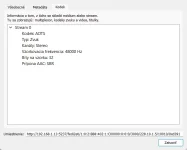
  • capture_001_18102024_231922.webp
    capture_001_18102024_231922.webp
    20.7 KB · Views: 12
Last edited:
Looking forward to an excellent ending on this as trying to find good radio stations on My ET10000 as quality is not good and did not find any plugins.
 
@joe90, yes the process is similar between an enigma2 decoder and a linux computer.
I have no linux PC and I'm a very very limited linux expert too.
I believe that all files needed in the enigma2 receivers are the same for all brands/models, so no Openvix specific files.
There are 3 main files: eti-tools package (needed to convert TS to ETI-NA and then ETI-NA to ETI-NI, like for the BBC mux for example), tsniv2ni (needed to convert NIV format to NI, like for italian feeds at 9 East), and dabstreamer (the audio player, corresponding to dablin for PC).
I have all these files installed in my Openvix without any viewable error.
If anyone needs them, please tell me how to send.

We don't need you to send anything. Just put the URL link to the .ipk files in a "code" wrapper (Go Advanced box ). I'm not 100% sure that the software will work in all receivers, but I'll try for you. I will just say that the audio from all the DAB constellations on 28.2E are working for me on a linux PC when streamed from my receiver. The quality of some of the streams is absolutely terrible (mono 32kb), but others like BBC3 are acceptable. Are you saying that you are not hearing some of the streams audio?
 
Looking forward to an excellent ending on this as trying to find good radio stations on My ET10000 as quality is not good and did not find any plugins.

Don't hold your breath! Really, some of the DAB streams are very poor. The MP2 radio streams generally available on 28.2 are much better. Quantity over quality on the DAB feeds.
 
@EnoSat - what image are you using? The OpenVix image does not have the eti-tools plugin, which is why I built it from source on my desktop. If you can provide a link I'll try it on my AX HD61 or Mutant HD51, or even on my daily driver, my GB Quad Plus.
 
@EnoSat - what image are you using? The OpenVix image does not have the eti-tools plugin, which is why I built it from source on my desktop. If you can provide a link I'll try it on my AX HD61 or Mutant HD51, or even on my daily driver, my GB Quad Plus.
SF8008...
He istalled those ipk's from /tmp folder, not feeds.
Code:
root@sf8008:/tmp# opkg install *.ipk
 
SF8008...
He istalled those ipk's from /tmp folder, not feeds.
Code:
root@sf8008:/tmp# opkg install *.ipk

Yes - I understand! But, he got them from somewhere. I know they are not on the feeds, that's why I built them from source on my linux desktop and got them working from there. If they are available pre-built for enigma I'll try them.
 
Well I'm sure if we know the source we can build them for the feeds.
 
OK, I managed how to send files in attachment here. Sorry but I use screen readers and sometime I have problems with accessibility. Solved now.
Well, here is the package I installed in my Octagon SF8008, Openvix 6.6.008.
Use exactly the same telnet commands reported by @Enosat for installation.
The result are as mentioned above, some stations work, others not.
Nothing at Eutelsat 9 East, do not know why. Thanks.
 

Attachments

Yes it's dabstreamer which will hold most interest as the other eti-tools are mostly just a means to stripping the MPEG "wrapping" and presenting a DAB constellation/bouquet to (I presume) some sort of user interface to select the actual audio programme?

I found that I didn't really have to do anything with lamedb to find/extract the DAB constellations. The service info was pretty much available from the menu, so I just pasted it into the eti tools on my PC and the dablin player did the job of selecting the specific programme and playing the audio.
Code:
curl http://192.168.0.127:8001/1:0:C:2954:90B:3B:11A0000:0:0:0: | ts2na -p 1061 |na2ni | dablin_gtk

I'm presuming @Clemente is working towards an actual bouquet which will list the available DAB streams and invoke dabstreamer to play them?
 
Finally I have the solution thanks to a great guy from another forum.
The problem does seem gstreamer that is able to play only mp2 audio but not aac, and this does explain why I got only the BBC streams.
He suggested to install serviceapp using this command:

Code:
opkg install enigma2-plugin-systemplugins-serviceapp

Also, in the bouquet files, the first field in every station string must be changed from 4097 to 5002.
Doing these operations I have a very good sound from my receiver. It perfectly works in Openvix image. Thanks.
 
@Enosat - I've installed the eti-tools and dabstreamer from @Clemente's file on my AX61HD. So far this works:

Code:
root@ax61:~# wget http://localhost:8001/1:0:C:2954:90B:3B:11A0000:0:0:0: -q -O- | ts2na -p 1061 | na2ni | ni2out --list
WARN:  Forward error correction (FEC) disabled (NOT COMPILED)
INFO:  Using pid: 0x0425 (1061)
INFO:  E1 Sync found at bit: 64, inverted: yes
DEBUG: seek: B:8, b:0
DEBUG: pre-readed output 15 frames (23 bytes left):
DEBUG: MULTIFRAME FILLING: 207
INFO:  ETI Sync found at pos: 2
INFO:  ETI Multiframe sync found at blockId: 9
.
Ensemble:  (0xce15)
****************************************************************************
 #  Programme Label   Serv.Id.  P/S SubCh Capac.Units   Prot.   Bitrate Mode
****************************************************************************
 1: BBC Radio3        (0xc223)  Prm   3  116 (192-307)  uep-3  160 Kb/s DAB
 2: BBC Radio4        (0xc224)  Prm   4   96 (308-403)  uep-3  128 Kb/s DAB
 3: BBC Radio6Music   (0xc22b)  Prm  11   96 (692-787)  uep-3  128 Kb/s DAB
 4: BBC Radio4Extra   (0xc22c)  Prm  12   58 (788-845)  uep-3   80 Kb/s DAB
 5: BBC Radio1Xtra    (0xc22a)  Prm  10   96 (596-691)  uep-3  128 Kb/s DAB
 6: BBC AsianNetwork  (0xc236)  Prm   7   48 (452-499)  uep-3   64 Kb/s DAB
 7: BBC Radio5Live    (0xc225)  Prm   5   48 (404-451)  uep-3   64 Kb/s DAB
 8:                             Sec   8   48 (500-547)  uep-3   64 Kb/s DAB
 9: BBC WorldService  (0xc238)  Prm   9   48 (548-595)  uep-3   64 Kb/s DAB
10: BBC Radio5SX      (0xc228)  Prm   8   48 (500-547)  uep-3   64 Kb/s DAB
11: BBC Radio1        (0xc221)  Prm   1   96 (  0- 95)  uep-3  128 Kb/s DAB
12: BBC Radio2        (0xc222)  Prm   2   96 ( 96-191)  uep-3  128 Kb/s DAB
Free CUs on this multiplex =  18 
root@ax61:~#

So, I can see the detail of the BBC DAB multiplex on 28.2 ok

However, I'm slightly confused on how I can play this using dabstreamer or where dabstreamer fits into the equation?

I tried following your earlier posts where I assume you are using fedi2eti to extract the DAB data and stream it on IP 228.10.1.5:10010 like this:

Code:
root@sf8008:~# wget http://localhost:8001/1:0:2:BB8:402:1:C00000:0:0:0: -q -O- | fedi2eti 3000 228.10.1.5 10010 | ni2out --list

I adapted it to the BBC multiplex which is on PID 1061, so I started it like this:
Code:
root@ax61:~# wget http://localhost:8001/1:0:C:2954:90B:3B:11A0000:0:0:0: -q -O- | fedi2eti 1061 228.10.1.5 10010 | ni2out --list
using pid 1061 ip 228.10.1.5 port 10010

But that's all I can see - there is no list of programmes unless I use ts2na and nani and I can't figure out how to invoke dabstreamer and play the stream. Help!
 
Finally I have the solution thanks to a great guy from another forum.
The problem does seem gstreamer that is able to play only mp2 audio but not aac, and this does explain why I got only the BBC streams.
He suggested to install serviceapp using this command:

Code:
opkg install enigma2-plugin-systemplugins-serviceapp

Also, in the bouquet files, the first field in every station string must be changed from 4097 to 5002.
Doing these operations I have a very good sound from my receiver. It perfectly works in Openvix image. Thanks.

Hi @Clemente. I already have serviceapp installed, so it should not be an issue to play AAC streams for me. But I seem to be stuck at an earlier stage. I may just go back to your earlier posts and manually create a little bouquet.
 
Finally I have the solution thanks to a great guy from another forum.
The problem does seem gstreamer that is able to play only mp2 audio but not aac, and this does explain why I got only the BBC streams.
He suggested to install serviceapp using this command:

Code:
opkg install enigma2-plugin-systemplugins-serviceapp

Also, in the bouquet files, the first field in every station string must be changed from 4097 to 5002.
Doing these operations I have a very good sound from my receiver. It perfectly works in Openvix image. Thanks.

you have it written in this thread - post #24
 
Last edited:
https://github.com/piratfm/eti-tools?tab=readme-ov-file#satellite-dab-feeds
DAB distributions use different formats for distribution (ts2na, tsniv2ni, fedi2eti, bbfedi2eti, ...)

You can find out the IP and port, for example, using dvbsnoop

I have only been testing with the BBC DAB distribution on 28.2 and I don't think there are any IP addresses involved. It's just a data feed for the DAB transmitters to use. I thought that the IP address you had in your example was a multicast address for distributing on your LAN. I think I have been approaching this from the wrong perspective. I'll go back to @Clemente's posts on bouquet files and start from there. I already have some IP bouquets which use exteplayer (5002) and I'll see how they can be adapted to tune the DAB streams. I thought maybe that dabstreamer had a GUI where I could select a programme within a DAB distribution using the screen and remote without having to create bouquets beforehand.
 

OpenViX Feeds Status

Back
Top