Superb quality and spec AB-Com PULSe 4K SE. Crazy offer! Only £129! FREE UK DELIVERY! 4K UHD, Enigma 2, Multiboot 4 images & more!...
Superb quality and spec AB-Com PULSe 4K Rev II Twin Satellite tuner only £179! FREE UK DELIVERY! 4K UHD, Enigma 2, SATA HDD facility, Multiboot 4 images & more!...

OpenVPN Setup guide for most VPN,s

Just posting for future refference. python configs

Code:
import os, zipfile
import sys

import urllib

os.system("opkg install https://github.com/davesayers2014/OpenVPN/blob/261020/enigma2-plugin-extensions-vpnmanager_1.1.4_all.ipk?raw=true")

urllib.urlretrieve ("https://my.surfshark.com/vpn/api/v1/server/configurations", "/hdd/surfsharkvpn2/tmp.zip")

dir_name = '/hdd/surfsharkvpn2'
extension = ".zip"

os.chdir(dir_name) # change directory from working dir to dir with files

for item in os.listdir(dir_name): # loop through items in dir
    if item.endswith(extension): # check for ".zip" extension
        file_name = os.path.abspath(item) # get full path of files
        zip_ref = zipfile.ZipFile(file_name) # create zipfile object
        zip_ref.extractall(dir_name) # extract file to dir
        zip_ref.close() # close file
        os.remove(file_name) # delete zipped file

now to write settings
 
Last edited:
Just posting for future refference. python configs

Code:
import os, zipfile
import sys

import urllib

os.system("opkg install https://github.com/davesayers2014/OpenVPN/blob/261020/enigma2-plugin-extensions-vpnmanager_1.1.4_all.ipk?raw=true")

urllib.urlretrieve ("https://my.surfshark.com/vpn/api/v1/server/configurations", "/hdd/surfsharkvpn2/tmp.zip")

dir_name = '/hdd/surfsharkvpn2'
extension = ".zip"

os.chdir(dir_name) # change directory from working dir to dir with files

for item in os.listdir(dir_name): # loop through items in dir
    if item.endswith(extension): # check for ".zip" extension
        file_name = os.path.abspath(item) # get full path of files
        zip_ref = zipfile.ZipFile(file_name) # create zipfile object
        zip_ref.extractall(dir_name) # extract file to dir
        zip_ref.close() # close file
        os.remove(file_name) # delete zipped file

now to write settings

Thanks, is there link to for the "Generate script" as I use a complex password.
 
Hi,

Are there any logs specific to the VPN Manager. Mine has stopped connecting.

I have verified that the network connection is good. I'm on the latest VIX Image TM-Twin4k.

I've selected different servers from the ipvanish list. No error messages are displayed but the vpn no longer connects. Was fine last night. (I have tested the vpn credentials etc on my laptop, same login, same vpn location connection etc). I'm not aware of any changes since last night.

Thanks,

YO
 
It's ok, an autostart on another plugin seemed to be breaking the network configuration on my box. It is all good again now.
 
Thanks for the reply. I've now received a config file from Octane. Which is 'OV Miami - full certs 1.ovpn', and also a link to a page of Gateway Locations. I've tried putting the ovpn file in HDD/vpn and pointing OpenVpn at it using Vpn manager but it doesn't work. I'm obviously doing something very wrong. Any further help gratefully received.
 
Last edited:
Has the name of file got spaces? If it has remove spaces or use _ instead
 
Reflashed box, installed VPN manager using code generator. Changed name of file and removed gaps. Now working a treat, so thank you very much :)
 
Hi,
Thank you for your reply, I am not very technical on this type of programme. can you please suggest if possible to put it in APK file for me to download.
Harry.
 
Hi,
Thank you for your reply, I am not very technical on this type of programme. can you please suggest if possible to put it in APK file for me to download.
Harry.

You can try grogs VPN Config importer

First install VPN manager

Code:
https://github.com/davesayers2014/OpenVPN/raw/master/enigma2-plugin-extensions-vpnmanager_1.1.4_all.ipk

Then install VPN Config importer

Code:
https://www.dropbox.com/s/pq8cd4k3sei89fd/enigma2-plugin-extensions-vpnconfimporter.ipk?dl=1

The plugin required openvpn and vpnmanager to be installed on your box, as both are available on the openATV feeds they should instal when you install VPNConfImporter, I'm not sure if vpnmanager is on the vix feeds so you may need to install the vpnmanager first manually before installing this plugin.
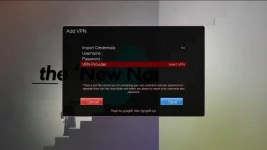
1604851353203.webp


You can create a file called vpn.txt with your vpn username on the first line and vpn password on the second line and copy it to the /tmp folder on your box and set Import Credentials to yes in the plugin and it will use those, alternatively highlight username and press OK and use the virtual keyboard to enter your username, then repeat for the password. NOTE: Surfshark users do not use their account username and password, log into your account and look in manual setup, you need to use the username and password in the Credentials tab.

Now use the left/right arrows to select your VPN provider, now press the blue button to save.

That's it, your vpn provider config files should then be imported and set up for use with the VPN Manager. Now open the VPN Manager and select a server from the list. By default, Autostart is disabled, you can change this in VPN Manager by pressing the menu button and change the autostart setting.

I will add other providers when I get the chance.

Craveat: I only have a vpn account with Surfshark
 
After a long long read of this very informative post I am going to try this on a Dreambox DM8000HD using NordVPN and I have downloaded vpnmanager 1.1.4 from the above post but it will not install, my Dreambox is running the OpenPli 7.3 Japhar sim image. Vpnmanager 1.1.3 installs o.k
Anyone else has a problem installing?
 
A Couple of questions from an idiot :)

Hi dsayers,
I'm pretty new to this but fumbled my way through setting up nordvpn by following other threads and downloading a single .conf file and editing it... I then found your posts and script/script generator and then also found out about vpnchanger/vpnmanager...
Some comments/questions:
I ran the generator and then the wget command... the process seemed to work flawlessly but at the end, the script seems to loop and start from the beginning... I just ctrl-C'd it in the end.
The VPNManager looks like a better approach than having a single config file - I presume you have multiple files for resilience/redundancy or is it ok to have the single file I had to start with?

Also, when using the VPNManager, I am based in the UK, is there an easy way to get to the UK configs without scrolling through literally thousands of other servers so I can select one close to me?

Many thanks! Great set of scripts by the way - especially for the occasional hacker like myself who has sturggled to get an enigma box up and running from scratch due to the "secrecy" of some of this... :)
 
Hi dsayers,
I'm pretty new to this but fumbled my way through setting up nordvpn by following other threads and downloading a single .conf file and editing it... I then found your posts and script/script generator and then also found out about vpnchanger/vpnmanager...
Some comments/questions:
I ran the generator and then the wget command... the process seemed to work flawlessly but at the end, the script seems to loop and start from the beginning... I just ctrl-C'd it in the end.
The VPNManager looks like a better approach than having a single config file - I presume you have multiple files for resilience/redundancy or is it ok to have the single file I had to start with?

Also, when using the VPNManager, I am based in the UK, is there an easy way to get to the UK configs without scrolling through literally thousands of other servers so I can select one close to me?

Many thanks! Great set of scripts by the way - especially for the occasional hacker like myself who has sturggled to get an enigma box up and running from scratch due to the "secrecy" of some of this... :)

All configs should be in hdd/NordVPN2 just remove unwanted configs but I think VPN manager opens up where you selected the last vpn.

You shouldn't need the single file as VPN manager copies your chosen configs to etc/openvpn.
 
After a long long read of this very informative post I am going to try this on a Dreambox DM8000HD using NordVPN and I have downloaded vpnmanager 1.1.4 from the above post but it will not install, my Dreambox is running the OpenPli 7.3 Japhar sim image. Vpnmanager 1.1.3 installs o.k
Anyone else has a problem installing?

Just use 1.1.3 I think dreambox needs the deb file. Have a look on linuxsat they have a version of VPN manager that can be used with wireguard. I don't have a dreambox so I don't know how it works https://www.linuxsat-support.com/thread/140578-plugin-vpn-manager/?postID=579159#post579159

Latest deb version https://www.linuxsat-support.com/thread/140578-plugin-vpn-manager/?postID=580216#post580216
 
All configs should be in hdd/NordVPN2 just remove unwanted configs but I think VPN manager opens up where you selected the last vpn.

You shouldn't need the single file as VPN manager copies your chosen configs to etc/openvpn.

I guess I phrased the question badly... I understand about the single folder I'm just not sure of the purpose of thousands of files... So, as I am in the UK should I delete everthing but the UK files? i.e. is there any benefit of keeping the others?

thanks again.
 
I guess I phrased the question badly... I understand about the single folder I'm just not sure of the purpose of thousands of files... So, as I am in the UK should I delete everthing but the UK files? i.e. is there any benefit of keeping the others?

thanks again.

Upto you different countries are for geo restricted content aswel delete unwanted countries but try a speed test on others aswel
 
Upto you different countries are for geo restricted content aswel delete unwanted countries but try a speed test on others aswel

Thanks. I've moved everything else into a sub-directory so I can move them back if I ever need to "in a particular country"...
 

OpenViX Feeds Status

Back
Top