Superb quality and spec AB-Com PULSe 4K SE. Crazy offer! Only £129! FREE UK DELIVERY! 4K UHD, Enigma 2, Multiboot 4 images & more!...
Superb quality and spec AB-Com PULSe 4K Rev II Twin Satellite tuner only £179! FREE UK DELIVERY! 4K UHD, Enigma 2, SATA HDD facility, Multiboot 4 images & more!...

[VU+ Solo2] Position setup

sataday

Member
Joined
Aug 13, 2014
Messages
294
Reaction score
2
Points
18
Location
Pandora, Alpha Centauri.
Is using "postion setup" just a matter of guess work, or is there a more technical way of doing it? Do the setting differ according to the make of TV, or is there a recommened list of numbers/settings?
What numbers do other users use?
 
Is using "postion setup" just a matter of guess work, or is there a more technical way of doing it? Do the setting differ according to the make of TV, or is there a recommened list of numbers/settings?
What numbers do other users use?
Just first adjust the left side with the left/right adjustment and upper edge with up/down adjustment, then right side with the width and lower edge with the height.
For each setting, find the value where the edges of the black area meet the edges of the screen area that you can see.
My tv is Sony KDL-32D2600 that I bought in 2008, and I haven't found any settings in the tv to disable overscan, so I have adjusted my Ultimo to left/right 14, width 695, up/down 18, height 543. The optimal settings may vary with different televisions.
 
Thanks for your feedback jukkal. My setting are not far off what you have. 14,690,10,555, but I will have another go as per your suggestions.
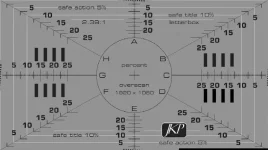
It would be good if a test card was available for this setup.
 
Thanks for your feedback jukkal. My setting are not far off what you have. 14,690,10,555, but I will have another go as per your suggestions.
My setting values were not meant as suggestions, because I suspect that the optimal values may vary from tv to tv. Try what works best in yours, see which values align the edges of the dark area to the edges of your tv screen. But before that, check the settings in your tv to turn overscan off if you can find such setting.
 
My display does not have an option to swith off overscan. If that is possible for you, then that is what you should do.

I caonnot so I do teh following:
I move to the right until I can just see the white edge on the left side of the screen. I then move it back one step. I then resize so that the right hand side of the screen just touches the edge.
I then move it down so that I can just see the white edge on the top edge of the screen. Then move it back one step. I then resize so that teh bottom edhge just touches the edge.
 
I caonnot so I do teh following:...
Which is what I did, too.

If you're like me you with then find a grey "test card" displaying underneath everything, and when you exit the positioning menu it will remain there!
You can remove it by changing channel.
 
@jukkal. I didn't mean I was going to use your settings, I meant I was going to follow the steps you gave.

Which is what I did, too.

If you're like me you with then find a grey "test card" displaying underneath everything, and when you exit the positioning menu it will remain there!
You can remove it by changing channel.

Can you explain more about the "test card" I don't see one.
 
Last edited:
Hi,
did you search the internet for overscan and your TV or did you search the menu of your TV. The option is seldom called overscan. For my Samsungen I find the overscan option as "Bildanpassung" in German in that menu where I select 16:9 or 4:3.

ciao
 
Can you explain more about the "test card" I don't see one.
This one:
TestCard.webp

It show up in the background while making adjustments (so mostly hidden, unless you turn the "user interface visibility" right down - and then you won't see that) and stays there on exiting this config screen.
It only goes away when you change channels.
 
I presume that the test card is generated by your TV when making adjustments. Not when making position steup adjustments on stb.
Nope.
That image is from a snapshot taken using the OpenWebif - which never gets a sniff of what my TV does.
 
I presume that the test card is generated by your TV when making adjustments. Not when making position steup adjustments on stb.

No it's built into the image, if you adjust the OSD during the initial setup also known as the F.I.W (first install wizard), you will see this test card in the background. Not sure if it displays at any other time though as I have overscan disabled on my TV's so don't need to adjust the OSD any more.


Sent from my iPad Air using Tapatalk
 

OpenViX Feeds Status

Back
Top