D
dymebox
Guest
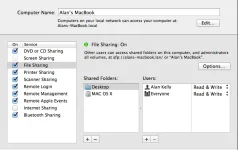
I'm having problems connecting to a shared folder hosted on my Mac.
I can connect to the share from other devices, so i'm certain there is not an issue with the share or the credentials I'm using.
In the Mounts editor, I'm using the following settings:
Mount using: FSTAB
Active: enable
Local Share name: Server
Mount type: CIFS share
Server IP: 192.168.0.19
Server share: /media
use as HDD replacement: no
Mount options: rw
Username: username
Password: password
And then in mount manager it shows a red x.
Any ideas what i'm doing wrong? Are there logs I can check for a clue?
Thanks in advance.
I can connect to the share from other devices, so i'm certain there is not an issue with the share or the credentials I'm using.
In the Mounts editor, I'm using the following settings:
Mount using: FSTAB
Active: enable
Local Share name: Server
Mount type: CIFS share
Server IP: 192.168.0.19
Server share: /media
use as HDD replacement: no
Mount options: rw
Username: username
Password: password
And then in mount manager it shows a red x.
Any ideas what i'm doing wrong? Are there logs I can check for a clue?
Thanks in advance.