
Superb quality and spec AB-Com PULSe 4K SE. Crazy offer! Only £99! FREE UK DELIVERY! 4K UHD, Enigma 2, Multiboot 4 images & more!...
Superb quality and spec AB-Com PULSe 4K Rev II Twin Satellite tuner only £149! FREE UK DELIVERY! 4K UHD, Enigma 2, SATA HDD facility, Multiboot 4 images & more!...
You are using an out of date browser. It may not display this or other websites correctly.
You should upgrade or use an alternative browser.
You should upgrade or use an alternative browser.


1. What exactly do you meanby 1.??? You have Mountmanager installed that controls how the disk is recognised.I believe what OpenVix really miss is:
1. External/Internal Drives control Panel [obvious to me]
2. Recording Manager
By the way, tried to install Grogs, it says done, but never installed!
Does not matter, as I see that most wish to get rid of it ...
Will try tags, but this 'lack' of Recordings Control is just a huge lack, I believe.
To me it makes all the good OpenVix is taken 'away'.
Even with OpenWebIf, you have limitations - that could be where we could have HDD and Recordings Control Panels.
Just a guess!
At this point the internal HDD becomes a bother [being internal], as it might be better to have it external, so you can connect to your computer and manually add/organise folders and recordings, but that I also guess might create problems of wake-on-off ... possibly?
2. Again - explain what you think a recording manager does - I am really at a loss as to what you are missing.
3. I have no issues either installing or running with Grogs - works for me.
Mundosat
Forum Supporter

1. What exactly do you meanby 1.??? You have Mountmanager installed that controls how the disk is recognised.
2. Again - explain what you think a recording manager does - I am really at a loss as to what you are missing.
3. I have no issues either installing or running with Grogs - works for me.
I do not have any difficulties in viewing anything with OpenWebIf like 'anyone' else - I am merely adding some thoughts.
1. Drives 'managing' is not just mounting/recognising, a Control Panel would let you actually 'Manage' the drive to: Create/Delete/Rename/Copy/Paste/Move folders 'and' files properly, but of course this is just my thoughts.
I saw a Plugin called File Manager, but it is just basic and it is not yet in full screen mode.
2. Recording Manager: similar to the way Grogs works, but 'managed' by the user, including 'setting' automatisms etc.
3. Grogs: I simply installed it, using OpenVix [it did says done] - I did not [and cannot] do anything different when installing.
I am NOT an idiot too. It did not install or so it seems, as I do not see it in Plugins or anywhere else.
Can anyone reply with images/prnt/scr, of Grogss when installed - starting from the point where it is listed before you run it?
Please be kind, I do not understand why I get 'crowded' as soon as I 'personally' find a couple of things that 'in my view' need improving.
Discussing is 'progressing', arguing is 'regressing'.
We are all friends here trying to use a system the best way we can and the way we wish.

Willo3092
ViX Beta Tester
This is Grog's Movie Organisor running on ViX 5.3.035.
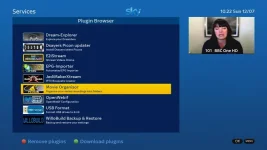
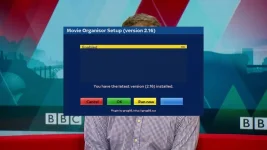
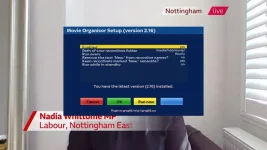
Mundosat
Forum Supporter
Thanks
In the meantime I went again to look after last night - did a reboot and Grogs is there!
I also installed Terminal [if/when is needed] on OpenWebIf and it 'finished' installing ONLY after this re-boot.
I just switched Grogs ON, will look at it later on tonight, as I have a new TV cabinet to install after removing a mountain of old cables and devices - only left there to stop cat getting into 'wiring'!
I guess there are some Extensions that need re-booting when they either get stuck - i.e. do not finish installing, etc.
Re-boot seems to always work.
Last night when installed Grog, the whole System was not responding to remote control - even the Front LCD was stuck.
Re-booting fixed it.
Well, a reboot helped!
In the meantime I went again to look after last night - did a reboot and Grogs is there!
I also installed Terminal [if/when is needed] on OpenWebIf and it 'finished' installing ONLY after this re-boot.
I just switched Grogs ON, will look at it later on tonight, as I have a new TV cabinet to install after removing a mountain of old cables and devices - only left there to stop cat getting into 'wiring'!
I guess there are some Extensions that need re-booting when they either get stuck - i.e. do not finish installing, etc.
Re-boot seems to always work.
Last night when installed Grog, the whole System was not responding to remote control - even the Front LCD was stuck.
Re-booting fixed it.
Well, a reboot helped!
Willo3092
ViX Beta Tester
A GUI restart is good practice after installing any plugin really.
Mundosat
Forum Supporter
Yes, I agree.
Did a few recording of 2-3 series and Grog did not put them in folders.
I even used the yellow button to make it sort them now.
Then I created a folder manually, moved files.
Then opened folder, they were not there!
Used file manager and files were there and I moved them back to movie folder.
Deleted all recordings and uninstalled grog, waiting for afew recordings, i. A few days I should see if it works.
Dud reboots and also updated grog before chosing yes, to enabke it.
It is enabled as it also shows green icon.
Lets see what happens.
I tried long press yellow within recordings, nothing happened.
Overall all works but sorting.
Did a few recording of 2-3 series and Grog did not put them in folders.
I even used the yellow button to make it sort them now.
Then I created a folder manually, moved files.
Then opened folder, they were not there!
Used file manager and files were there and I moved them back to movie folder.
Deleted all recordings and uninstalled grog, waiting for afew recordings, i. A few days I should see if it works.
Dud reboots and also updated grog before chosing yes, to enabke it.
It is enabled as it also shows green icon.
Lets see what happens.
I tried long press yellow within recordings, nothing happened.
Overall all works but sorting.
Mundosat
Forum Supporter
After deleting all recording and re-installing grog [GUI reboots an all!], I found it did put 'some' recordings in 3 folders, BUT ...
it did create folders based on data/time/etc. and mixed everything up, because it is DATE/Time related - of course, why?
Some are not even in a folder and should be.
I did some manual Folder changes and found there are certain operation things work or not in regarding Create/Rename/Folders etc. and 'especially' MOVE [green] button!
I learned NOT to use it, as 'every' time I do a recording disappear within the created folder, I am guessing there is a folder/file permission' problem in Grog - maybe only related to Gigablue?
I used the MENU button 'instead', to do creation and moving and almost all the time files WERE there where I moved them.
It almost works!
It is just as mentioned at the beginning!
Strange
Also why is there an option to ***/media and ***/media/ on the Organisor Plugin Setup? and what is the difference?
Note the forward slash
I noticed 'some' differences as some recorded programmes disappeared [after GUY reboots] and I also checked the Recording Timers list - each one of them and they ALL use ***/media/!
I am only trying to make Grog work as it would suffice me, then if all fail, I will try the TAG thing, but does TAG only works when GROG is ENABLED - i.e. part of it?
Sorry for being ignorant on this matter... as I am slowly getting 'back' into 'Linux' thinking [it actually is 'different' from Windows in some ways] - I used to play with Linux installations on PCs many years ago.
This is the most important thing on a recorder, auto organising them or it will be a long ,list of nonsense.
I do love the 'liberty' of this receiver - as I am myself, a free-spirit.
PS as mentioned, if I use File Explorer plug-in, I see ALL files, they have NOT disappeared, as I though - Grog does not detects them.
it did create folders based on data/time/etc. and mixed everything up, because it is DATE/Time related - of course, why?
Some are not even in a folder and should be.
I did some manual Folder changes and found there are certain operation things work or not in regarding Create/Rename/Folders etc. and 'especially' MOVE [green] button!
I learned NOT to use it, as 'every' time I do a recording disappear within the created folder, I am guessing there is a folder/file permission' problem in Grog - maybe only related to Gigablue?
I used the MENU button 'instead', to do creation and moving and almost all the time files WERE there where I moved them.
It almost works!
It is just as mentioned at the beginning!
Strange
Also why is there an option to ***/media and ***/media/ on the Organisor Plugin Setup? and what is the difference?
Note the forward slash
I noticed 'some' differences as some recorded programmes disappeared [after GUY reboots] and I also checked the Recording Timers list - each one of them and they ALL use ***/media/!
I am only trying to make Grog work as it would suffice me, then if all fail, I will try the TAG thing, but does TAG only works when GROG is ENABLED - i.e. part of it?
Sorry for being ignorant on this matter... as I am slowly getting 'back' into 'Linux' thinking [it actually is 'different' from Windows in some ways] - I used to play with Linux installations on PCs many years ago.
This is the most important thing on a recorder, auto organising them or it will be a long ,list of nonsense.
I do love the 'liberty' of this receiver - as I am myself, a free-spirit.
PS as mentioned, if I use File Explorer plug-in, I see ALL files, they have NOT disappeared, as I though - Grog does not detects them.
Last edited:

ccs
ViX Beta Tester
- Joined
- Sep 6, 2014
- Messages
- 5,836
- Reaction score
- 5
- Points
- 0
Tags have nothing to do with Grog, they're a simple option in standard ViX.
As I've tons of series recordings still to watch, Tags does everything I want. I've a few permanent folders for "soaps", the rest of the recordings just end up in movie list.
Shame you didn't try that first.
As I've tons of series recordings still to watch, Tags does everything I want. I've a few permanent folders for "soaps", the rest of the recordings just end up in movie list.
Shame you didn't try that first.
Mundosat
Forum Supporter
Thank for the info.
I believed if Grog worked would suffice my needs = Humax really.
I am guessing it is not that good on this Gigablue receiver then.
I am still using Humax for 'safe' recordings, while still testing - taking ages now!

I believed if Grog worked would suffice my needs = Humax really.
I am guessing it is not that good on this Gigablue receiver then.
I am still using Humax for 'safe' recordings, while still testing - taking ages now!
Mundosat
Forum Supporter
I think you are correct, probably the best of solutions and 'we' manage it.
I am also exploring a bit more OpenWebIf [when I can] to learn my way around and now I am connected using Filezilla [I normally use since ever] too and downloading Movie folder etc. - just checking out things and to re-list all recordings ONLY on Movie folder and put it back 'after' I disabled Grog or uninstalled.
Is a Password really needed? [i.e. security ... router ...] - I am a Security Nut!
I am also exploring a bit more OpenWebIf [when I can] to learn my way around and now I am connected using Filezilla [I normally use since ever] too and downloading Movie folder etc. - just checking out things and to re-list all recordings ONLY on Movie folder and put it back 'after' I disabled Grog or uninstalled.
Is a Password really needed? [i.e. security ... router ...] - I am a Security Nut!
Last edited:

Andy_Hazza
Moderator
When we move over to 5.4 ViX you will need to set a password when using FTP, it will be mandatory
Sent from my iPhone using Tapatalk
Sent from my iPhone using Tapatalk
Mundosat
Forum Supporter
I used Filezilla to put all recordings back into the Movie folder - deleted created folders, then rebooted.
Then I uninstalled Grog and rebooted again [just to be safe!].
........
Another 'strange thing' I thought was Grog's fault is, when/if I create a Folder [series name] and move recordings in there, 'sometimes' the folder is empty and I cannot find the file anywhere!
Never understood why - even after GUI or complete reboot.
I went to FTP and they ARE there [obviously], put them back to Movie folder.
Any idea what is happening? The 'God of Messing up' is against me!!
Then if I FTP the same episodes within the created folder [created via remote] and then open Movie folder again - they are NOT there as well!
I put them back into Movie folder and they are visible without GUI reboot!
I like order... , me!!
Problem reading folders? A bug?
Then I uninstalled Grog and rebooted again [just to be safe!].
........
Another 'strange thing' I thought was Grog's fault is, when/if I create a Folder [series name] and move recordings in there, 'sometimes' the folder is empty and I cannot find the file anywhere!
Never understood why - even after GUI or complete reboot.
I went to FTP and they ARE there [obviously], put them back to Movie folder.
Any idea what is happening? The 'God of Messing up' is against me!!
Then if I FTP the same episodes within the created folder [created via remote] and then open Movie folder again - they are NOT there as well!
I put them back into Movie folder and they are visible without GUI reboot!
I like order... , me!!
Problem reading folders? A bug?
ccs
ViX Beta Tester
- Joined
- Sep 6, 2014
- Messages
- 5,836
- Reaction score
- 5
- Points
- 0
When you create a folder, you need to create a bookmark using the GUI to point to it - I'll let you find out how.
It's probably one of the most difficult things to work out, so when you have, everything else will be a doddle.
It's probably one of the most difficult things to work out, so when you have, everything else will be a doddle.
Last edited:
Mundosat
Forum Supporter
I think I remember that .. yes ... I did not think I needed to do it for these folder creation.
OK, that will work then.
Yes, also I understood the Yellow Long Press thing now.
Thanks for your continuous help.
OK, that will work then.
Yes, also I understood the Yellow Long Press thing now.
Thanks for your continuous help.
Mundosat
Forum Supporter
Page 51 of OpenVix manual - explains it.
But I just added a Bookmark within the recording list.
Easy too when you know how - already forgot!
hahahahah
I am wondering if a folder created within Filezilla can be I can BOOKMARKED within Filezilla, if you get what I mean.
Far easier.
But I just added a Bookmark within the recording list.
Easy too when you know how - already forgot!
hahahahah
I am wondering if a folder created within Filezilla can be I can BOOKMARKED within Filezilla, if you get what I mean.
Far easier.

abu baniaz
Moderator
Easier to issue "init 4" command, in file called "settings" located in /etc/enigma2, you will find a list of recordable locations. Edit, save, transfer back, then issue "init 3" to restart enigma2
ccs
ViX Beta Tester
- Joined
- Sep 6, 2014
- Messages
- 5,836
- Reaction score
- 5
- Points
- 0
Never thought of that, I'd have eventually suggested a forum search which comes up with the answer.Page 51 of OpenVix manual - explains it.
Mundosat
Forum Supporter
Thanks, but at present I am avoiding talking directly to Enigma 2 unless necesary... it is now doing what I need ... and I have just backed it up and also Imaged it.
Anyway, now I believe I almost have all I need - I have just on thing left to solve, but it might be to do with EPG data.
i.e. once in a while ONE series on Auto-Timer setting takes 5 episodes - one of which is all I need - other episodes are older and from different series.
Apart from that, all seems fine now I generally know ho Enigma 2 mind works.
NOTE:
Since I already had quite a few recordings, I used Filezilla to create folders, move files in 1-2 minutes via PC.
Then went to Receiver and added Bookmarks on all Directories I just created.
That too was pretty fast, once you know how to do it.
I mean literally 10s each folder - once inside the bookmark page.
I also rebooted.
Done!
Anyway, now I believe I almost have all I need - I have just on thing left to solve, but it might be to do with EPG data.
i.e. once in a while ONE series on Auto-Timer setting takes 5 episodes - one of which is all I need - other episodes are older and from different series.
Apart from that, all seems fine now I generally know ho Enigma 2 mind works.
NOTE:
Since I already had quite a few recordings, I used Filezilla to create folders, move files in 1-2 minutes via PC.
Then went to Receiver and added Bookmarks on all Directories I just created.
That too was pretty fast, once you know how to do it.
I mean literally 10s each folder - once inside the bookmark page.
I also rebooted.
Done!
Last edited:
Similar threads
- Replies
- 4
- Views
- 264
- Replies
- 1
- Views
- 95
- Replies
- 15
- Views
- 721
- Replies
- 48
- Views
- 2K

- Replies
- 0
- Views
- 453