
Superb quality and spec AB-Com PULSe 4K SE. Crazy offer! Only £99! FREE UK DELIVERY! 4K UHD, Enigma 2, Multiboot 4 images & more!...
Superb quality and spec AB-Com PULSe 4K Rev II Twin Satellite tuner only £149! FREE UK DELIVERY! 4K UHD, Enigma 2, SATA HDD facility, Multiboot 4 images & more!...
You are using an out of date browser. It may not display this or other websites correctly.
You should upgrade or use an alternative browser.
You should upgrade or use an alternative browser.

O
Ojustaboo
Guest
Two days it's been fine. Will let you know if the problem returns.
many many thanks for all your help in this
many many thanks for all your help in this
O
Ojustaboo
Guest
There aren't any in /tmp ?
O
Ojustaboo
Guest
Ah, sorry, I should have checked better, it's causing Enigma2 to restart, that's why there's no logs.
Crashlogs from two attempts I just did and 6am this morning attached
Crashlogs from two attempts I just did and 6am this morning attached
Attachments

Peterj
ViX Beta Tester
O
Ojustaboo
Guest
O
Ojustaboo
Guest
Today it's back to BBCLondon but when I woke up, the LCD just had a line through it rather than the clock, and I powered off to reset it without thinking, hence lost those /tmp files
However after a manual scan it still says BBCLondon, /tmp files attached
After autoscan
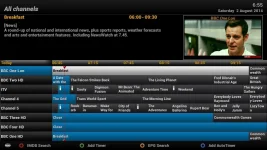
After manual scan
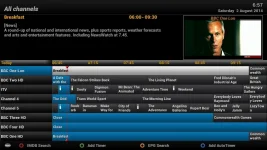
EDIT: Just ran another manual scan and this time its worked (/tmp files attached)
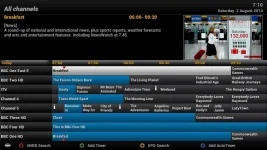
However after a manual scan it still says BBCLondon, /tmp files attached
After autoscan
After manual scan
EDIT: Just ran another manual scan and this time its worked (/tmp files attached)
Attachments
Last edited:
Peterj
ViX Beta Tester
O
Ojustaboo
Guest
I presume you mean remove all the autobouquet.sat_freesat... files in /etc/enigma2 ?
Peterj
ViX Beta Tester
It can be done in normal screen favorites.
Navigation up,
blue button favorites,
highlight the bouquets you want to delete,
menu button,
choose delete bouquets.
Only all channels is necessary.
Navigation up,
blue button favorites,
highlight the bouquets you want to delete,
menu button,
choose delete bouquets.
Only all channels is necessary.
O
Ojustaboo
Guest
O
Ojustaboo
Guest
oh, the above scan correctly had BBCEast

abu baniaz
Moderator
@Ojustaboo
Is everything working fine now? Reason for asking is that if yes, the changes that @PeterJ has made can be made permanent.
Thanks.
Is everything working fine now? Reason for asking is that if yes, the changes that @PeterJ has made can be made permanent.
Thanks.
O
Ojustaboo
Guest
So far yes it's been 100% fine thanks.
Hopefully it's permanently fixed, in the past sometimes it would work for a week or two before reverting.
ps, the changes place a few files in /tmp, not sure if you want to make that permanent or not.
many thanks for al the help
Hopefully it's permanently fixed, in the past sometimes it would work for a week or two before reverting.
ps, the changes place a few files in /tmp, not sure if you want to make that permanent or not.
many thanks for al the help
Peterj
ViX Beta Tester
Here are the 2 files without creating the debug logfiles.
Also fixed a small issue I found.
Let's try it for 2 weeks.
Copy bouquetswriter.py which must be chmod 755 to /usr/lib/enigma2/python/Plugins/SystemPlugins/AutoBouquetsMaker/scanner
rename the bouquetswriter.pyo (So you can put it back later).
Restart enigma2. (the py will be compiled to a pyo)
Also fixed a small issue I found.
Let's try it for 2 weeks.
Copy bouquetswriter.py which must be chmod 755 to /usr/lib/enigma2/python/Plugins/SystemPlugins/AutoBouquetsMaker/scanner
rename the bouquetswriter.pyo (So you can put it back later).
Restart enigma2. (the py will be compiled to a pyo)
Attachments
Last edited by a moderator:
O
Ojustaboo
Guest

Peterj
ViX Beta Tester
Do you want me to go ahead and install the files from yesterday?
Many thanks
yes, please.
O
Ojustaboo
Guest
So far it's working, but I've noticed one small issue.
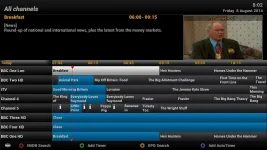
If you look at any of my above pics regardless of whether BBCLondon or BBCEast, the bottom channel on the first page is always BBCHD.
This works great as I watch BBCHD all the time when it's not things like the news.
Since the latest file, that's changed to BBC Alba
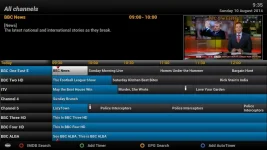
and BBCHD is now right at the end in amongst all the various other regions
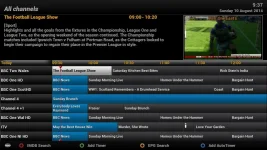
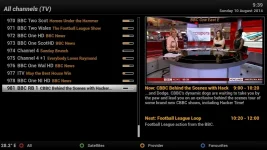
If you look at any of my above pics regardless of whether BBCLondon or BBCEast, the bottom channel on the first page is always BBCHD.
This works great as I watch BBCHD all the time when it's not things like the news.
Since the latest file, that's changed to BBC Alba
and BBCHD is now right at the end in amongst all the various other regions
Similar threads
C
[ABM-DVB-S/S2]
Struggling with AutoBouquet
- carpytone
- AutoBouquetMaker Support Discusson
- Replies
- 29
- Views
- 12K

