
Superb quality and spec AB-Com PULSe 4K SE. Crazy offer! Only £99! FREE UK DELIVERY! 4K UHD, Enigma 2, Multiboot 4 images & more!...
Superb quality and spec AB-Com PULSe 4K Rev II Twin Satellite tuner only £149! FREE UK DELIVERY! 4K UHD, Enigma 2, SATA HDD facility, Multiboot 4 images & more!...
You are using an out of date browser. It may not display this or other websites correctly.
You should upgrade or use an alternative browser.
You should upgrade or use an alternative browser.
[SF8008] samba again not working
- Thread starter bellejt
- Start date


ccs
ViX Beta Tester
- Joined
- Sep 6, 2014
- Messages
- 5,836
- Reaction score
- 5
- Points
- 0
Flashing 6.1.003 still works ok for me after removing "disable netbios = No".
I looks like there was something else "wrong" with /etc/samba on your sf8008.
Was samba actually working on that box when you took a settings backup ?
If it was then 6.1 is picking up something 6.0 didn't. Debug logs might show something.
I looks like there was something else "wrong" with /etc/samba on your sf8008.
Was samba actually working on that box when you took a settings backup ?
If it was then 6.1 is picking up something 6.0 didn't. Debug logs might show something.
ccs
ViX Beta Tester
- Joined
- Sep 6, 2014
- Messages
- 5,836
- Reaction score
- 5
- Points
- 0
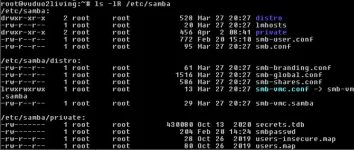
Thanks, it shows that you changed smb-user.conf a few weeks ago. Did you do the same on the sf8008 ?
All other files look ok.
Have you tried installing via putty?
Code:opkg update
Code:opkg install packagegroup-base-smbfs-server
This worked for me, ended up doing a fresh install, and not using the backup wizard on first boot.
Installing Samba via interface didn't work, it looked to work, but on reboot it keeps asking for Samba to be installed. Installing via putty using these commands worked.
Don't forget to set the root password, Samba doesn't seem to like password-less login.
Then restore settings afterwards

I had the same problem and this worked for me - info from this thread and also another post here
1. Stop and uninstall SAMBA using remote control on the ViX install
2. Reinstall from feeds using putty per above info in this thread....
When logged using Putty type:
opkg update
Then type:
opkg install packagegroup-base-smbfs-server
3. Stop Samba as it starts with opkg install
4. Next the contents of smbpasswd file here: /etc/samba/private/smbpasswd needed to be reset. You can use this attached exhibit to replace the one in the private folder View attachment smbpasswd.txt
The first two lines must be reset to defaults to (or just use attached exhibit and delete ".txt" suffix)
root:0:XXXXXXXXXXXXXXXXXXXXXXXXXXXXXXXX:NOPASSWORD XXXXXXXXXXXXXXXXXXXXXX:
kids:500:XXXXXXXXXXXXXXXXXXXXXXXXXXXXXXXX:NOPASSWO RDXXXXXXXXXXXXXXXXXXXXXX:
5. Restart Samba on the ViX install
6. Next reset the Samba Password using Putty again
Type:
smbpasswd -a root
You will be prompted to enter and repeat the new password per below in the Putty window
New SMB password:
Retype new SMB password:
7. Finally Stop and restart Samba using remote on the ViX installation. You should now be able to access the Samba share from you computer explorer
I followed this procedure twice and it worked both times. It was a process of discovery reading the posts from everyone in the threads
1. Stop and uninstall SAMBA using remote control on the ViX install
2. Reinstall from feeds using putty per above info in this thread....
When logged using Putty type:
opkg update
Then type:
opkg install packagegroup-base-smbfs-server
3. Stop Samba as it starts with opkg install
4. Next the contents of smbpasswd file here: /etc/samba/private/smbpasswd needed to be reset. You can use this attached exhibit to replace the one in the private folder View attachment smbpasswd.txt
The first two lines must be reset to defaults to (or just use attached exhibit and delete ".txt" suffix)
root:0:XXXXXXXXXXXXXXXXXXXXXXXXXXXXXXXX:NOPASSWORD XXXXXXXXXXXXXXXXXXXXXX:
kids:500:XXXXXXXXXXXXXXXXXXXXXXXXXXXXXXXX:NOPASSWO RDXXXXXXXXXXXXXXXXXXXXXX:
5. Restart Samba on the ViX install
6. Next reset the Samba Password using Putty again
Type:
smbpasswd -a root
You will be prompted to enter and repeat the new password per below in the Putty window
New SMB password:
Retype new SMB password:
7. Finally Stop and restart Samba using remote on the ViX installation. You should now be able to access the Samba share from you computer explorer
I followed this procedure twice and it worked both times. It was a process of discovery reading the posts from everyone in the threads
ArloGuthrie
Member
- Joined
- Aug 16, 2023
- Messages
- 67
- Reaction score
- 0
- Points
- 6
What OS are you using to view shares? Windows?
If so is SMB installed and enabled in Programs and Features?
In services make sure both Function Discovery services are set automatic-delayed start and start them. A cold reboot will be needed.
My osmio4k shows in Network with root and the hdd directories r/w
If so is SMB installed and enabled in Programs and Features?
In services make sure both Function Discovery services are set automatic-delayed start and start them. A cold reboot will be needed.
My osmio4k shows in Network with root and the hdd directories r/w
What OS are you using to view shares? Windows?
If so is SMB installed and enabled in Programs and Features?
In services make sure both Function Discovery services are set automatic-delayed start and start them. A cold reboot will be needed.
My osmio4k shows in Network with root and the hdd directories r/w
With the greatest of respect you may not have the issues: it seems clean installs are fine, but updates and restore not so (perhaps depending on how long you have an image installed and version upgrades - mine is from 3 years ago with all minor/major upgrades, and clearly others have this problem). You have gone down the Windows features pathway - nothing what so ever to do with Samba that ViX Samba service provides for compatibility with Windows native Netbios browsing with Explorer or any Windows native network browsing. Thank for input and interest
ArloGuthrie
Member
- Joined
- Aug 16, 2023
- Messages
- 67
- Reaction score
- 0
- Points
- 6
With the greatest of respect you may not have the issues: it seems clean installs are fine, but updates and restore not so (perhaps depending on how long you have an image installed and version upgrades - mine is from 3 years ago with all minor/major upgrades, and clearly others have this problem). You have gone down the Windows features pathway - nothing what so ever to do with Samba that ViX Samba service provides for compatibility with Windows native Netbios browsing with Explorer or any Windows native network browsing. Thank for input and interest
I guess I did not understand exactly what you are using Samba for. Would you possibly be able to state the usage? Examples would be file transfers/sharing. Remote streaming of content?
I use Samba and Nfs to find my boxes hopefully on a network scan and know its ip address and those boxes might have internal or external Hdd with recordings i want to play on another box and tv.
Remote streaming of content on your network to view in another room.
Sometimes i cant mount Samba to view but using NFS i can as a backup.
Remote streaming of content on your network to view in another room.
Sometimes i cant mount Samba to view but using NFS i can as a backup.

bellejt
Forum Supporter

- Joined
- Dec 24, 2013
- Messages
- 2,253
- Reaction score
- 53
- Points
- 48
- Age
- 65
Be a little humble in your responses - I posted to help.
As far a I am concerned there is a "Status Quo" of "hit or miss" for Samba access from MS Windows, and the "fix" that I outlined worked without reinstall of ViX or the Samba extension, or reverting to backup or the OE master files side loaded. The "fix" was tested. I had hoped it might be useful.
If you found the post helpful then great, if you didn't that's also fine. Those of you who feel you have some knowledge and have to comment without a solution or something that works subject to "conditional" circumstances that's also fine, BUT post the caveats or conditions.
My circumstances were 3 - 4 generations of ViX upgraded and restored and Samba access has failed many times over that period. The solution I provided to restore Samba network plugin / extension function worked - check with the engineers, but I guess it resets the authority and encryption key, enabling Samba browsing again from remote NetBios clients after the input of the new password which is generated,
I was trying to help.
As far a I am concerned there is a "Status Quo" of "hit or miss" for Samba access from MS Windows, and the "fix" that I outlined worked without reinstall of ViX or the Samba extension, or reverting to backup or the OE master files side loaded. The "fix" was tested. I had hoped it might be useful.
If you found the post helpful then great, if you didn't that's also fine. Those of you who feel you have some knowledge and have to comment without a solution or something that works subject to "conditional" circumstances that's also fine, BUT post the caveats or conditions.
My circumstances were 3 - 4 generations of ViX upgraded and restored and Samba access has failed many times over that period. The solution I provided to restore Samba network plugin / extension function worked - check with the engineers, but I guess it resets the authority and encryption key, enabling Samba browsing again from remote NetBios clients after the input of the new password which is generated,
I was trying to help.
I guess I did not understand exactly what you are using Samba for. Would you possibly be able to state the usage? Examples would be file transfers/sharing. Remote streaming of content?
Ease of access to HDD folders (ViX image and delta backups, movie media folder) and Enigma settings for certain media plugins. Filezilla is my go to when Samba fails, but I find it convenient to use Windows explorer to do stuff. Thanks
Similar threads
- Replies
- 0
- Views
- 631
- Replies
- 1
- Views
- 90

- Replies
- 10
- Views
- 493

- Replies
- 41
- Views
- 2K
