Superb quality and spec AB-Com PULSe 4K SE. Crazy offer! Only £129! FREE UK DELIVERY! 4K UHD, Enigma 2, Multiboot 4 images & more!...
Superb quality and spec AB-Com PULSe 4K Rev II Twin Satellite tuner only £179! FREE UK DELIVERY! 4K UHD, Enigma 2, SATA HDD facility, Multiboot 4 images & more!...

[VU+ Duo2] Share harddrive on duo2 with client vu zero....best way

gedclarke

Forum Supporter ,
Joined
Feb 16, 2012
Messages
167
Reaction score
19
Points
0
Age
54
Location
Liverpool UK
Hello can anyone please point me in the right direction to share hard drive from vu duo2 with my client box (vu zero). Both boxes are connected via ethernet & vu duo 2 is password protected. Great if you can help & no worries if not, thanks for any help in advance....cheers Ged
 
just mount the disk from duo2 from the zero.
 
Sorry but I have no experience in mounting network drives...any guides or bit more info please..
 
go to your network settings
menu
setup
system
network
networkbrowser
It will scan your network and show you any shared folders
I have no password on my pc but the browser likes something so I just leave default username and password.
It will save the mount for you.
 
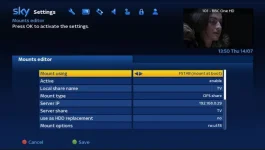
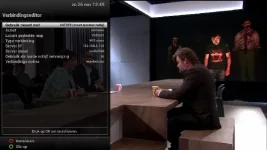
Meun/setup/network/mounts/network browser.
Wait for it to scan your network. (Samba needs to be installed and running on duo) Netwok browser should find your duo2. Press ok on the duo2. It will ask you for username(root) and password if you have one. If no password delete the word password on the screen. Press ok.
You should then see the duo hard drive in the duo tree. Press on it to activate it.
Once that’s all done escape out of all menus. Press the record/list button on remote. Press yellow for location and you should see you duo drive. Good luck.
 
Meun/setup/network/mounts/network browser.
Wait for it to scan your network. (Samba needs to be installed and running on duo) Netwok browser should find your duo2. Press ok on the duo2. It will ask you for username(root) and password if you have one. If no password delete the word password on the screen. Press ok.
You should then see the duo hard drive in the duo tree. Press on it to activate it.
Once that’s all done escape out of all menus. Press the record/list button on remote. Press yellow for location and you should see you duo drive. Good luck.

Done that and I can now see drives in tree, however they all show an red x next to them instead of green tick....any ideas?
 
Press ok on the hard drive to activate it. It should turn green.
 
Does it state on the hard drive icon CIFS?
 
It needs to be changed to a cifs share. Press ok on the hard drive and change share to cifs.
 
It needs to be changed to a cifs share. Press ok on the hard drive and change share to cifs.

changed to cifs in settings on client box but still shows as NFS after i press ok, any ideas? Thanks for all your repliies by the way:thumbsup:
 
You might have to delete the mount in mount manger and start again making sure its mounted as a CIFS share.
 
it can be mounted as NFS share also.Just mount and exit menu.Then try to choose the HDD in recorded menu.My drives here are mounted as NFS but never show a green icon.All is working fine .Just instaal before samba and NFS share on the master box.
 
thanks everyone for your contributions, i am going to have a fresh look at it tomorrow......going round in circles. If anyone knows any useful guides please let me know :thumbsup:
 
My first post details everything I and others do to get this running. Are you sure samba is enabled and running on the boxes.
Have you got nfs enabled in network utilities?
 
menu / setup / network / utilities / samba

enable and you are done
 
simply activating samba will not give you a shared drive.He needs to set up a mount.Either NFS or Cifs.
 

OpenViX Feeds Status

Back
Top