Superb quality and spec AB-Com PULSe 4K SE. Crazy offer! Only £129! FREE UK DELIVERY! 4K UHD, Enigma 2, Multiboot 4 images & more!...
Superb quality and spec AB-Com PULSe 4K Rev II Twin Satellite tuner only £179! FREE UK DELIVERY! 4K UHD, Enigma 2, SATA HDD facility, Multiboot 4 images & more!...

[OS-mini] Softcam mgcamd1.38 install error message

Ashley69

Forum Supporter
Donated Member
Joined
Feb 14, 2015
Messages
1,099
Reaction score
1
Points
0
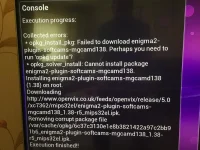
IMG_0049.webp

Trying to install mgcamd 1.38 from plugins. Please see attached error message. Unsure what it means. Have run opkg update.
Box. Eddison Os Mini
Image 5.0.024 Fresh flash done. No other plugins installed.

Thanks
 
Last edited:
might you have got a faulty download,i would try a new download file and try again to see if it works correctly,service states in the green.
 
Looks like it’s a fault with the mgcamd 1.38 plugin. I’ve just tried downloading mgcamd 1.35 and oscam latest and both are fine.
 
Same here...and 1.38 is also missing from the sponsors download section...please fix :-)
 
Just tried on mbmicro, installs fine. Might be a corruption during the build process for osmini.

Code:
Welcome to OpenViX for mbmicro
openvix 5.0 mbmicro

mbmicro login: root
Last login: Mon Aug  7 01:57:46 BST 2017 on pts/0
root@mbmicro:~# opkg install enigma2-plugin-softcams-mgcamd138
Installing enigma2-plugin-softcams-mgcamd138 (1.38) on root.
Configuring enigma2-plugin-softcams-mgcamd138.
root@mbmicro:~#

For time being,
Download attached binary
Extract/unzip/inflate,
Transfer the unzipped binary to /usr/softcams/
chmod 755

transfer your configs

Start as normal
 

Attachments

I have same problem... wont download mgcam1.38 from plugins... what should i do

Sent from my SM-G925F using Tapatalk
 
I downloaded and installed the mgcamd file above but not sure what chmod755 means and what other configs i need to transfer and to where... any help will be much appreciated thanks

Sent from my SM-G925F using Tapatalk
 
chmod 755 means change the file attribute to that value, if u were using dreambox control centre to ftp,right click & you'll see attributes in drop down, you would also need to transfer mg.cfg file & newcamd.list to usr>keys
 
Until next build can be download from OpenViX downloads http://www.openvix.co.uk/index.php/downloads/softcams/

Two ways to install:

Method one.
1) FTP to /tmp
2) Blue button > ViX > Install local extension.
3) Select and IPK and press green to install.

Method two.
1) Format a USB stick fat32.
2) Add the IPK to root of USB stick.
3) Connect to USB port.
4) You should get a pop up asking to 'install local extension'.
 
Until next build can be download from OpenViX downloads http://www.openvix.co.uk/index.php/downloads/softcams/

Two ways to install:

Method one.
1) FTP to /tmp
2) Blue button > ViX > Install local extension.
3) Select and IPK and press green to install.

Method two.
1) Format a USB stick fat32.
2) Add the IPK to root of USB stick.
3) Connect to USB port.
4) You should get a pop up asking to 'install local extension'.
Worked a treat... thanks really appreciated [emoji3]

Sent from my SM-G925F using Tapatalk
 

OpenViX Feeds Status

Back
Top