Ashley69
Forum Supporter

- Joined
- Feb 14, 2015
- Messages
- 1,099
- Reaction score
- 1
- Points
- 0
Welcome to OpenViX for mbmicro
openvix 5.0 mbmicro
mbmicro login: root
Last login: Mon Aug 7 01:57:46 BST 2017 on pts/0
root@mbmicro:~# opkg install enigma2-plugin-softcams-mgcamd138
Installing enigma2-plugin-softcams-mgcamd138 (1.38) on root.
Configuring enigma2-plugin-softcams-mgcamd138.
root@mbmicro:~#
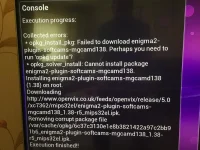
I have same problem... wont download mgcam1.38 from plugins... what should i do
Sent from my SM-G925F using Tapatalk
Worked a treat... thanks really appreciated [emoji3]Until next build can be download from OpenViX downloads http://www.openvix.co.uk/index.php/downloads/softcams/
Two ways to install:
Method one.
1) FTP to /tmp
2) Blue button > ViX > Install local extension.
3) Select and IPK and press green to install.
Method two.
1) Format a USB stick fat32.
2) Add the IPK to root of USB stick.
3) Connect to USB port.
4) You should get a pop up asking to 'install local extension'.