Superb quality and spec AB-Com PULSe 4K SE. Crazy offer! Only £99! FREE UK DELIVERY! 4K UHD, Enigma 2, Multiboot 4 images & more!...
Superb quality and spec AB-Com PULSe 4K Rev II Twin Satellite tuner only £149! FREE UK DELIVERY! 4K UHD, Enigma 2, SATA HDD facility, Multiboot 4 images & more!...

[GiGaBlue UHD UE 4K] Storage disks and bookmarking

GeoffatMM

Forum Supporter
Donated Member
Joined
Nov 3, 2021
Messages
166
Reaction score
2
Points
18
Location
Cognac, France
Hi, I have searched but cannot find an answer so I am turning to the forum for help.

I have installed a hard drive in my Gigablue UHD UE 4K and it works fine. However I have an existing collection of recordings on a network drive that I would like to access both to view and to record to.

Under Network Mounts I have added the drive and it appears in the mount viewer. I have mounted both the main drive and also one of the subdirectories (movies). Both have a green tick.

When I try to mount them again (to see if that is the problem) there are no options other than close which sort of implies it does not recognise the mounts I ache added OR it recognises that they are properly mounted.

They are both open (guest) shares so no username or password are needed but when I try to enter them to check if that is the problem, the screen does not respond and again, the only option is red to Close the window. In fact the screen freezes and I have to hard restart the receiver with the on/off switch.

When I go to the recording section to try to add them as a bookmark in the default movie location I can navigate to the file system but it only shows the internal drive, not the network drives. If I try on the Timer or Instant Recording options, the network drives are shown but when I try to select them, it says it is an Invalid Location. I can however add the as bookmarks. Again it lets me navigate the internal disk as a valid storage area.

With the bookmarks added, they now appear under the default movie location. This is not as explained in the OpenVix help guide version 1.1!

When I try to select one of the bookmarks for a recording it says there may not be enough space on the disk, do I want to continue. When I say yes, the box crashes and restarts. On restart, the bookmarks have disappeared.

Is this me not doing it properly or is this a software glitch?

Are there any logs I should prepare to aid understanding what is happening?

Geoff
 
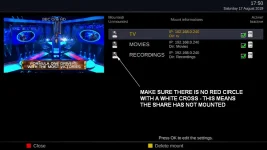
The green tick doesn't mean the share is mounted, check the icon for a red circle and white cross.

ShareNotMounted.webp


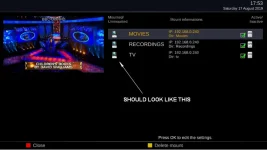
ShareMounted.webp

I find it easier to add my own automounts.xml to /etc/enigma2/ reboot and then go into Mount Manager and set it up.

After rebooting it looks like the first image - just click on one of the shares and press green to save and overwrite the existing mount.
This always seems to mount all of the shares properly.

Example automounts.xml:

View attachment automounts.xml

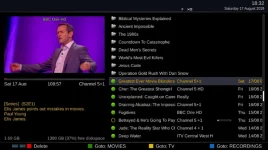
I then allocate the coloured buttons in the movie list to my shared drives.

movie player.webp
 
Last edited:
Hmmm, done something wrong I think. The network is up and I can see the box over ftp and via Kodi and I can run the network test OK. However, as soon as I try to browse the network the box freezes and I have to turn it off and restart it. When I try to look at services such as SMB or NFS (or to update the software) it flashes up a page but then cancels it and gives an error message of: Sorry feeds are down for maintenance, etc.


Sent from my iPhone using Tapatalk
 
The feeds are down for maintenance (new image being built)
 
Looking now they are green ?? so maybe working now.

Feeds down will agree maintenance .

When you search network how long did you leave it scanning i wonder.

Does Nas need Samba or Nfs setup as its been a while since setting one up.

Everything hard wired i assume.
 
The feeds are down for maintenance (new image being built)

I looked on both sites but could not see a notice to say that was happening. Is there a page I should go to for the server status? I will have another go with an update tonight.
 
Looking now they are green ?? so maybe working now.

Feeds down will agree maintenance .

When you search network how long did you leave it scanning i wonder.

Does Nas need Samba or Nfs setup as its been a while since setting one up.

Everything hard wired i assume.

I left it for half an hour which should have been long enough! It froze so I had to restart it again.

I assumed samba would be running for connections via Kodi to work but I may be wrong.

My network (in an old stone house with 600mm walls) is a wifi mesh system with power line connections so technically, the TV and the drive on my office computer are hard wired. However it is not as stable as a traditionally hard wired network.

G
 
The Forum link, top left of this page, gives the OpenViX Feeds Status, half way down the first page, on the right.
 
Last edited:
So last night I updated the image to the newly released 6.0.006 and it did have some effect.

Network browsing worked fine and I was able to bookmark my drive to the recordings settings. However, although it let me bookmark it, there was still a warning that the drive was invalid and when I tried to use it by adjusting the location for a recording there was again an initial warning that there did not appear to be any space on the disk (there is plenty) and then it crashed (it did not freeze) with a message to post the crash report on the forum.

I cannot see a post explaining how to do this as I assume it is not wanted in the thread but on some form of pastebin link? Could someone let me know please. The issue is reproducible so there should be at least two crash reports available.

Everything else appears to be working fine and there does not appear to be any latent hangover in the system as a result of the crashes.

Geoff
 
I found a prior post from Abu that asked the logs to be posted so I am attaching both here.

I can view the logs on the TV but could not find a way to download or send them so I have recovered them via ftp.

As an aside, FileZilla says the server (receiver) is not using TLS so connections are insecure. Probably not an issue when done internally but is there a way to set TLS to work on the box?

View attachment Enigma2_crash_2022-01-05_02-05-57.log
View attachment Enigma2_crash_2022-01-05_02-00-13.log
 
Not a person that knows how to read a crash but it starts with a skin issue and skins are known to give issues and might advise to try another and reboot box.

Anytime i see the Filezilla popup i just disregard it and continue.
 
Code:
<  1566.5246> 02:05:57.7564 Traceback (most recent call last):
<  1566.5247> 02:05:57.7565   File "/usr/lib/enigma2/python/StartEnigma.py", line 252, in processDelay
<  1566.5254> 02:05:57.7572     callback(*retval)
<  1566.5255> 02:05:57.7573   File "/usr/lib/enigma2/python/Screens/TimerEntry.py", line 294, in <lambda>
<  1566.5260> 02:05:57.7579     session.openWithCallback(lambda answer: checkForConflicts(session, refreshCallback, answer[1]) if answer[0] else None, TimerEntry, timer)
<  1566.5261> 02:05:57.7579   File "/usr/lib/enigma2/python/Screens/TimerEntry.py", line 309, in checkForConflicts
<  1566.5266> 02:05:57.7584     simulTimerList = getTimerConflicts(session, timer)
<  1566.5266> 02:05:57.7584   File "/usr/lib/enigma2/python/Screens/TimerEntry.py", line 322, in getTimerConflicts
<  1566.5271> 02:05:57.7590     simulTimerList = session.nav.RecordTimer.record(timer, dosave=False)
<  1566.5272> 02:05:57.7590   File "/usr/lib/enigma2/python/RecordTimer.py", line 1265, in record
<  1566.5287> 02:05:57.7605     self.addTimerEntry(entry)
<  1566.5288> 02:05:57.7606   File "/usr/lib/enigma2/python/timer.py", line 225, in addTimerEntry
<  1566.5292> 02:05:57.7611     self.calcNextActivation(dosave)
<  1566.5293> 02:05:57.7611   File "/usr/lib/enigma2/python/timer.py", line 264, in calcNextActivation
<  1566.5297> 02:05:57.7615     self.processActivation(dosave)
<  1566.5298> 02:05:57.7616   File "/usr/lib/enigma2/python/timer.py", line 359, in processActivation
<  1566.5303> 02:05:57.7621     self.doActivate(entry, False)
<  1566.5303> 02:05:57.7621   File "/usr/lib/enigma2/python/RecordTimer.py", line 996, in doActivate
<  1566.5315> 02:05:57.7633     if w.activate():
<  1566.5315> 02:05:57.7633   File "/usr/lib/enigma2/python/RecordTimer.py", line 487, in activate
<  1566.5322> 02:05:57.7640     if not self.justplay and not self.freespace():
<  1566.5322> 02:05:57.7640   File "/usr/lib/enigma2/python/RecordTimer.py", line 303, in freespace
<  1566.5327> 02:05:57.7645     s = os.statvfs(dirname)
<  1566.5328> 02:05:57.7646 FileNotFoundError: [Errno 2] No such file or directory: '/media/autofs/GJJIMAC'
<  1566.5328> 02:05:57.7646 [ePyObject] (CallObject(<bound method Session.processDelay of <__main__.Session object at 0xb077ad18>>,()) failed)
 
Thanks but it is the default skin so rather than change I think we need to discover the issue in case others experience it.

I will, like you say, ignore the ftp message in future.
 
Thanks ccs so why is it not finding the file or trying to mount it?

In any case, if it cannot find the file, it should not crash so what is causing the crash?
 
If this is over NFS the box user must match the user of the device being accessed irrespective of being a guest.
 
Hi Huevos,

Are you saying that I need to delete and remount the drive but this time with a username and password?


Sent from my iPhone using Tapatalk
 

OpenViX Feeds Status

Back
Top