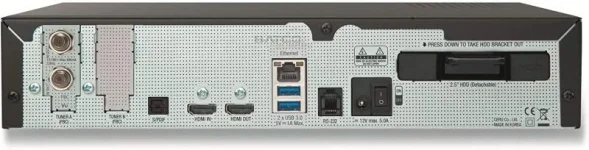
Hello, I bought a new Vu+ Duo4KSE, uploaded OpenVix 5.4.008, but I have a very strange issue with tuner configuration, never seen in many Vu+ boxes I tested.
My receiver came with two tuners installed: 1 Twin DVB-S2X Multistream satellite tuner and a double DVB-T2 terrestrial one.
Entering in Menu > Setup > Tuner & Scan > Tuner Setup I see all tuners in such reversed order. Both terrestrial tuners are at the top of the list (Tuner A and B), then I read six FBC tuners (from C to H) and finally two tuners that I can configure (Tuner I and J). It never happened to me. I always found satellite tuners at first with two configurable tuners at the top, then FBC, then terrestrial.
If I attempt to configure one satellite tuner it seems to work, I have signal from the dish, scanning seems performing well, but when I try to recall any found channel it says "Service unavailable. Check tuner configuration!". This happens with ALL satellite channels, terrestrial channels work well instead.
I tried to upload a setting list that I always use in my Vu+ boxes (I have more than one), this list always worked well but this time nothing changed. Now I do not know how to clean the box from this list I just uploaded.
So, where is the problem? Why I see my tuners in this strange reversed order and how can I fix this?
Thank you for your help.
My receiver came with two tuners installed: 1 Twin DVB-S2X Multistream satellite tuner and a double DVB-T2 terrestrial one.
Entering in Menu > Setup > Tuner & Scan > Tuner Setup I see all tuners in such reversed order. Both terrestrial tuners are at the top of the list (Tuner A and B), then I read six FBC tuners (from C to H) and finally two tuners that I can configure (Tuner I and J). It never happened to me. I always found satellite tuners at first with two configurable tuners at the top, then FBC, then terrestrial.
If I attempt to configure one satellite tuner it seems to work, I have signal from the dish, scanning seems performing well, but when I try to recall any found channel it says "Service unavailable. Check tuner configuration!". This happens with ALL satellite channels, terrestrial channels work well instead.
I tried to upload a setting list that I always use in my Vu+ boxes (I have more than one), this list always worked well but this time nothing changed. Now I do not know how to clean the box from this list I just uploaded.
So, where is the problem? Why I see my tuners in this strange reversed order and how can I fix this?
Thank you for your help.